


Web-Art Login Shield with reCAPTCHA
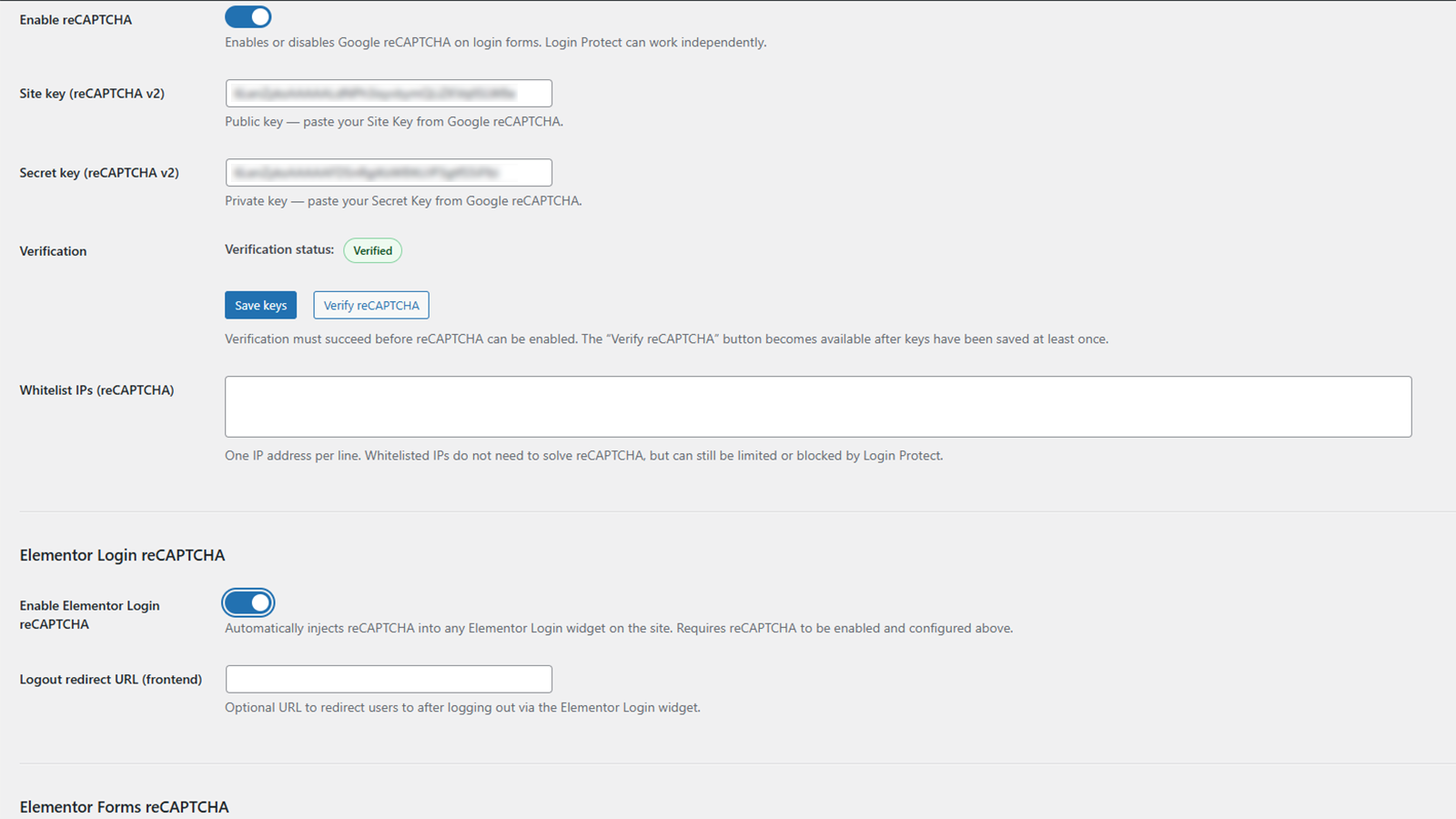
reCAPTCHA settings panel
Web-Art Login Shield with reCAPTCHA is a focused security plugin that protects WordPress authentication, Elementor Login widgets and Elementor Forms against automated attacks.
It strengthens wp-login.php, Elementor Login and Elementor Forms by integrating Google reCAPTCHA v2 verification and optional IP-based rate limiting, without replacing or modifying WordPress core authentication logic.
The plugin is intentionally lightweight and transparent:
– no ads
– no telemetry or analytics sent to the author
– no third-party dashboards provided by the plugin
– no all-in-one security suite overhead
All login protection modules (reCAPTCHA, Login Protect, Advanced login URL) are opt-in and disabled by default.
Additionally, the plugin can apply a small XML-RPC hardening rule-set (disables a few high-risk XML-RPC methods) to reduce common abuse vectors. This does not disable XML-RPC completely. XML-RPC hardening is applied only when Login Protect is enabled and “Protect XML-RPC logins” is enabled.
Each module (reCAPTCHA, Login Protect, Advanced login URL) can be enabled independently. Elementor reCAPTCHA options require reCAPTCHA to be configured and verified.
Key Features
reCAPTCHA v2 integration
- reCAPTCHA v2 checkbox for wp-login.php (when enabled and IP is not allowlisted)
- server-side token verification for WordPress login and Elementor Forms validation
- reCAPTCHA must be verified before enabling protection
Elementor reCAPTCHA options
- automatic frontend injection for Elementor Login widgets (when enabled)
- optional frontend injection for Elementor Forms (Elementor Pro) (when enabled)
- Custom Alignment: Ability to set Left, Center, or Right alignment for reCAPTCHA in both Elementor Login and Elementor Forms directly from plugin settings.
- Elementor frontend scripts inject reCAPTCHA only when they detect relevant widgets/forms in the DOM (supports dynamically loaded content, popups, AJAX, etc.)
- Google reCAPTCHA scripts are not loaded for allowlisted IPs
Whitelist IPs (reCAPTCHA)
- reCAPTCHA IP allowlist (allowlisted IPs bypass reCAPTCHA checks on wp-login.php, Elementor Login and Elementor Forms; Login Protect may still apply)
- reCAPTCHA allowlist accepts one entry per line (exact IP match only)
- optional note format supported: IP | reason (reason is ignored for matching)
Login Protect (IP-based lockouts)
- failed login attempt counting per IP address
- timed lockouts after a configurable threshold
- blocked IP list (lockouts expire automatically after the configured lockout time)
- recent security event log (stored locally)
- wp-login.php lockout UX: countdown notice and temporary submit blocking during an active lockout
- Login Protect is independent of reCAPTCHA (can be enabled and used without reCAPTCHA enabled)
- three practical protection modes:
- MODE 1 – reCAPTCHA only
- MODE 2 – reCAPTCHA + Login Protect
- MODE 3 – Login Protect only
Trusted IPs (Login Protect)
- separate allowlists for reCAPTCHA and Login Protect (exact IP match only)
- Login Protect allowlist accepts one entry per line (exact IP match only)
- optional note format supported: IP | reason (reason is ignored for matching)
REST API and XML-RPC protection (optional)
- optional protection for authentication attempts via XML-RPC and REST API (applies only when the corresponding checkbox is enabled; Login Protect must be enabled)
XML-RPC hardening (optional)
- optionally disables a small set of high-risk XML-RPC methods commonly abused by attackers:
- pingback.ping
- pingback.extensions.getPingbacks
- system.multicall
- XML-RPC hardening is applied only when Login Protect is enabled and “Protect XML-RPC logins” is enabled
This reduces abuse without disabling XML-RPC entirely.
Advanced login URL (optional)
- single toggle enables Advanced login behavior
- custom login endpoint (rewrites requests to the standard WordPress login handler without altering core authentication logic)
- when Advanced is enabled, wp-login.php and wp-admin are protected for non-authenticated visitors
- protection behavior is configured via two required fields:
- Custom login URL slug (example: “secure-login-1234”)
- Default redirect slug (recommended: “404” to display the active theme’s 404 page)
- both fields are required when Advanced is enabled (saving is blocked if any field is empty)
- if fields are empty when enabling Advanced, the plugin auto-generates a secure random login slug and sets the redirect slug to the recommended default
- protection applies only to non-authenticated users (logged-in users can still access wp-admin and wp-login.php)
- safe fallback handling to avoid logout loops (wp-login.php?action=logout remains accessible)
IP Blocking (Site-wide)
- single toggle enables site-wide IP blocking
- permanently blocks selected IP addresses from accessing the entire site (returns HTTP 403)
- blocklist accepts one entry per line (exact IP match only)
- optional note format supported: IP | reason (reason is ignored for matching)
- recommended use cases: persistent abuse, scraping, hostile bots, repeated attacks not covered by login-only protection
- warning: do not add your own IP address unless you have alternative access (hosting panel / WP-CLI / database access) to remove the entry
Technical Design Principles
-
Fail-closed security model (scoped)
If reCAPTCHA verification cannot be completed and reCAPTCHA protection is enabled for the given login or form, the request is rejected to reduce the risk of automated bypass.
Administrators can always regain access by disabling the feature in plugin settings or by deactivating the plugin via hosting or FTP. -
Non-intrusive defaults
Login protection modules remain disabled until explicitly enabled by an administrator. -
Conflict awareness
If another plugin injects reCAPTCHA into login or form flows, it should be disabled to avoid duplicate widgets or verification conflicts. -
Emergency config kill-switches (wp-config.php)
For recovery scenarios (e.g. accidental lockouts), selected modules can be force-disabled via wp-config.php constants. This does not bypass security rules; it disables the module logic before it runs. Remove the constant to restore normal behavior.
External Services
This plugin integrates with Google reCAPTCHA v2, an external service provided by Google LLC.
reCAPTCHA features are disabled by default. The plugin does not load reCAPTCHA scripts or send verification requests unless an administrator enables reCAPTCHA protection and/or uses the “Verify reCAPTCHA” test in the plugin settings.
Google’s reCAPTCHA JavaScript (https://www.google.com/recaptcha/api.js) may be loaded on:
– wp-login.php (when reCAPTCHA is enabled and the visitor IP is not allowlisted)
– the frontend (when Elementor Login protection is enabled and a non-allowlisted visitor loads the page; injection occurs only if Elementor Login widgets are detected in the DOM)
– the frontend (when Elementor Forms protection is enabled and a non-allowlisted visitor loads the page; injection occurs only for Elementor Forms)
– the plugin settings page only when an administrator runs the “Verify reCAPTCHA” test (if provided in the UI)
When a visitor (or admin during verification) completes the reCAPTCHA challenge:
– a verification token (g-recaptcha-response) is generated in the browser
– during server-side verification on your website, the token and the configured Secret Key are sent to:
https://www.google.com/recaptcha/api/siteverify
– the visitor’s IP address is sent to Google as the remoteip parameter when it is available on the server
The plugin sends the g-recaptcha-response token to Google only when the protected form is submitted (login attempt / form submission) or when an administrator runs the “Verify reCAPTCHA” test.
The plugin does not send usernames, passwords, email addresses, or any form field contents to Google – only the reCAPTCHA token, the configured Secret Key, and the visitor IP address (remoteip) when available.
The plugin does not store or process any data returned by Google beyond the verification result, and it does not send any telemetry, analytics, or usage data to the plugin author.
Note: Google reCAPTCHA may set cookies and collect additional device and usage data in the visitor’s browser, as described in Google’s privacy policy and terms. Site owners are responsible for disclosing this in their site privacy policy and obtaining consent where required by applicable law.
Google privacy policies apply:
– https://policies.google.com/privacy
– https://policies.google.com/terms
Privacy
This plugin does not send telemetry, analytics or usage data to the plugin author or any third party.
Local data stored by the plugin (for security purposes only):
– IP addresses related to login attempts / lockouts (Login Protect)
– timestamps of failed attempts and lockouts
– last username associated with a locked IP (Login Protect)
– recent security event log entries (the plugin stores up to the last 30 events; entries rotate automatically)
– last reCAPTCHA configuration or HTTP error (for admin diagnostics)
– permanent site-wide IP blocklist entries (optional notes stored; notes are not used for matching)
Data retention:
– security event log keeps only the most recent entries (up to 30; automatic rotation)
– Login Protect state is stored locally and is automatically pruned (e.g. stale non-locked entries are removed over time and the list is capped)
– permanent site-wide IP blocklist entries are retained until removed by an administrator
– plugin data can be removed during uninstall if the uninstall cleanup option is enabled
All data is stored locally in the WordPress database and is used solely to enforce security rules and display administrative information.
Legal
reCAPTCHA is a trademark of Google LLC.
Elementor is a trademark of Elementor Ltd.
This plugin is not affiliated with, endorsed by, or sponsored by Google LLC or Elementor Ltd.