
Environment
26 plugins tagged with environment

Display Environment Type
Displays WordPress 5.5's environment type setting in the admin bar and the "At a Glance" dashboard widget.

Contextual Adminbar Color
Use custom admin bar colors and favicons to differentiate your environments (staging/prod)
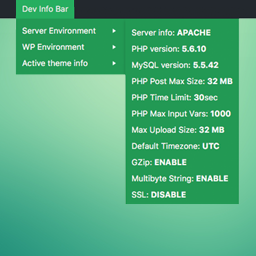
Dev Info Bar
A simple WordPress extension which adds itself to the admin bar, providing system information such as PHP, MySQL version and details of the WordPress …
Environment & Debug Bar
Display your environment and debug info in the toolbar.

PLX Multi-Environments
Manage separate Development, Staging, and Production environments directly from the Wordpress Admin screen.

dotenv
A WordPress plugin to set WordPress options from a .env file.
365i Environment Indicator
Displays a color-coded DEV, STAGING, or LIVE indicator in the admin bar to prevent accidental changes on production sites.
Katze Version Snapshot
View WordPress, PHP, plugin, and theme versions in Markdown or CSV for maintenance checks.
Set the Stage
Quickly switch between environments (live, test, dev) from the admin bar.

Env Bar
Display a colored bar to help distinguish between different environments.
Enviromon
Select and save your current environment.

MÜLLweg! DE
Mit dem MÜLLweg! DE Plugin kann der MÜLLweg! DE Müll-Mängelmelder direkt in die eigene Homepage eingebunden werden.
Online Leaf
Integrates a standby engine to reduce the energy required to view the website when the visitors are inactive, to make your blog a Green Website.

eGreen Web Meter
Transform your website into a carbon neutral space.

Abhinavdev Environment Badge
Displays a customizable badge in the WordPress Admin Bar showing your environment (Local, Staging, Production) to avoid errors on live sites.

Axle Staging Guard
Stop staging sites from emailing real customers, calling live APIs and showing up in Google. Colours the admin bar so nobody edits the wrong copy.

Envwise Environment-Based Control
Automatically controls search engine indexing based on your environment (production vs development/staging).
Development Environment
Whoops error handling, no password logins, template hints, no indexing, flush rewrites, everything a developer needs for their local development envir …

Don't Mess Up Prod
Displays an environment indicator in the admin bar.

WP Environment Label
WP Environment Label - shows label with current server/environment name defined by config or admin-panel.

Nexora Site Toolkit
Your WordPress admin command nest — environment stats, content metrics, security checks, shortcuts, and private notes. No file manager.

EnvBeacon
Display a colored notice in the WordPress admin bar to indicate which environment (Live, Staging, Local) your site is running on.

Profenv – Environment Profiles
Store environment-specific values (GTM container ID, GA4 measurement ID, etc.) per environment and switch them automatically.

StageBar – Staging Environment Indicator
Know at a glance which site you are editing. The admin bar changes colour and shows a LIVE, STAGING, DEV or LOCAL badge.