
Developer Tools
75 plugins tagged with developer-tools

Advanced Post Manager
Turbo charge your posts admin for any custom post type with sortable filters and columns, and auto-registration of metaboxes.

Debug Log Viewer
Effortlessly view, search, filter and manage your WordPress debug.log in the admin dashboard. Real-time monitoring and email alerts
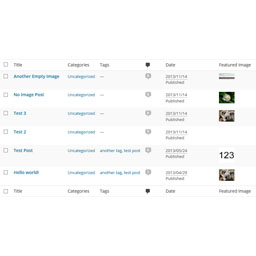
Post List Featured Image
A plugin that adds the "Featured Image" column in admin posts and pages list.

Easy Symlinks
Manage symbolic links from the WordPress admin. Create and delete symlinks without CLI access, ideal for Pantheon environments.

Code Block Copy Button
Add a customizable copy button to code blocks for fast, one-click copying.
PostMeta Viewer – Custom Fields Inspector
A powerful debugging tool for WordPress developers to inspect and analyze post meta (custom fields) across posts, pages, custom post types, taxonomy t …

SniffPress
A powerful search tool that helps developers quickly find text strings within theme and plugin files.

Developer Debug Mode
Toggle WordPress debug mode instantly. No wp-config.php editing needed. Features auto-save, admin bar quick toggle, and debug log viewer.

Admin Code Search
Search code across active plugins, themes, and MU plugins directly from the WordPress admin.

REST API Route Tester
A WordPress admin tool to quickly test REST API routes, path params, headers, body payloads, and copy requests as cURL.

Featured Image Column Display
A plugin that adds the "Featured Image" column in admin posts and pages list.

Query All The Post Types
A developer tool displaying all registered post types w/ the benefit of exposing CPT's to AI tools and admin clients via the WordPress Abilities API.

widgetIQ for Elementor
See exactly which pages and posts use any Elementor widget — perfect for developers, designers, and agencies doing audits or migrations.

Project Management, Bug and Issue Tracking Plugin – Software Issue Manager
Best issue tracking, bug tracking and project management plugin. Easily manage tasks, stay organized, and track progress in WordPress.

MCP Tracker
Records and displays MCP-related REST API requests made to your WordPress site.

Ganziq
Inspect, edit, validate, preview, import and export Elementor JSON in a safe workspace without replacing the original page.

Responsive Checker & Device Preview – Mobile Responsive Testing, Simulator & Developer Tools
Test mobile responsive layouts with instant device previews, multi-screen sync scroll, CSS breakpoint scanner, visual regression, and developer tools.

ThemePackager
Export any installed WordPress theme (active or inactive) as a ZIP file directly from Appearance → Themes.

LogIQ – Intelligent Debug Log Viewer
Stop digging through raw log files. LogIQ gives WordPress developers a smart, searchable, and beautiful debug log viewer — right inside the admin.

Modules Insight
Audit plugins, rate PHP and WordPress upgrade risk from the WordPress.org API, and export to JSON, CSV, Excel, or a Google Sheet.

Core Version Switcher
Easily switch between WordPress core versions safely from the dashboard.
MksDdn Collection for Postman
Generate Postman Collection (v2.1.0) or OpenAPI 3.0 documentation for the WordPress REST API from the admin UI.

Transients
Inspect, edit, and delete WordPress transients from Tools -> Transients.

Structure Viewer – File Explorer & AI Context Builder
Plugin & theme file explorer for developers. Browse, inspect, view source code, and export file structures as ready-to-use AI context.