

Subscription Manager for Stripe
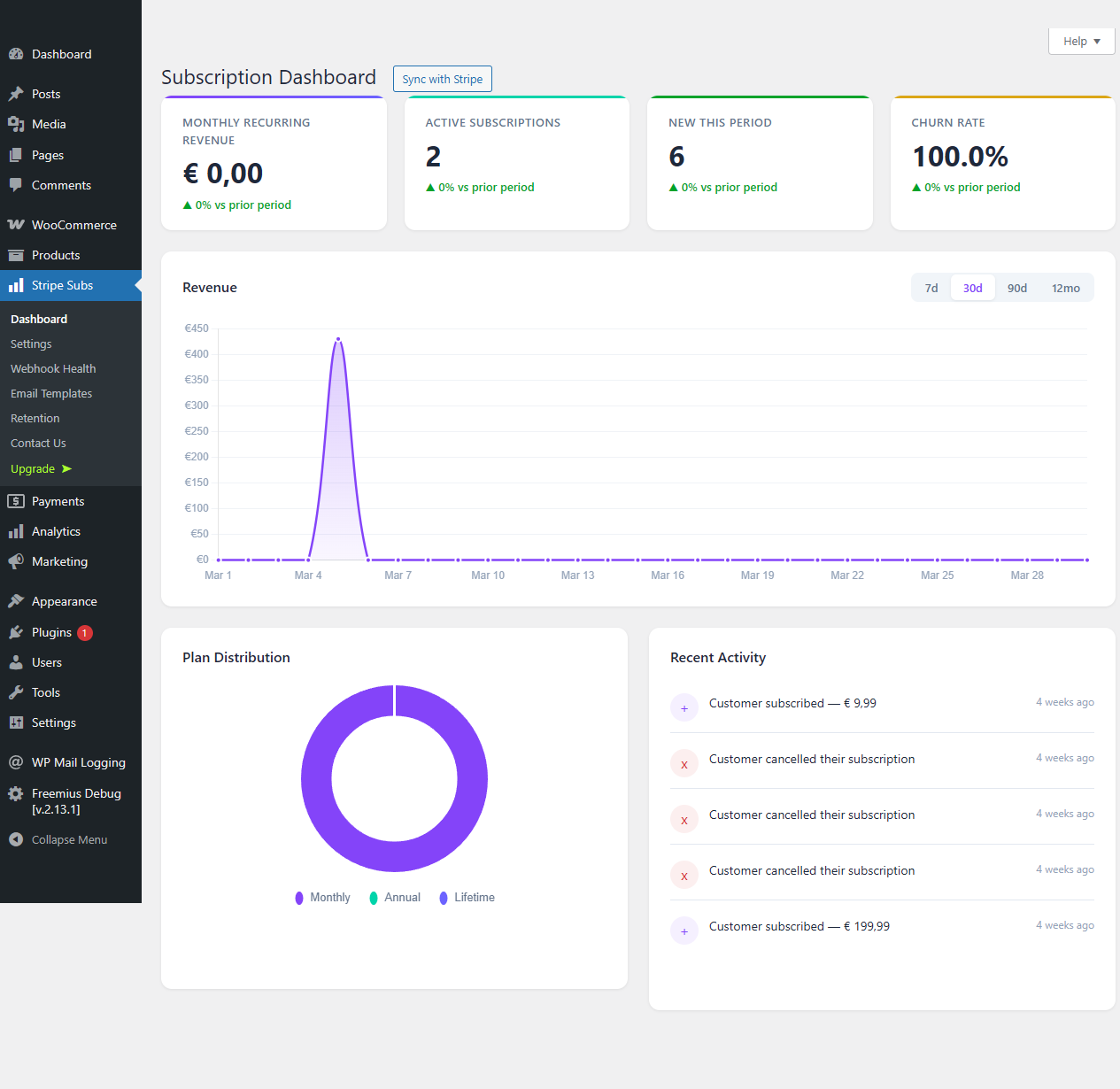
Analytics dashboard showing MRR, churn rate, and revenue trend charts with subscriber KPI cards.
You built the product. Why give away 2-5% of every recurring payment to your plugin vendor?
Most WordPress subscription plugins charge per-transaction fees on top of Stripe’s processing costs. That means the more successful your business becomes, the more you pay them. On $10,000/month in recurring revenue, that is $200-500/month leaving your pocket — every single month, forever.
Stripe Subscription Manager charges 0% transaction fees. Zero. On every plan, including free.
You pay Stripe’s standard processing rate. That is it. No revenue sharing. No percentage skimmed off the top. Your growth is yours to keep.
Why SaaS Founders and Membership Operators Choose Stripe Subscription Manager
This is not another payment gateway wrapper. Stripe Subscription Manager is a direct, Stripe-native billing layer for WordPress that uses the same infrastructure powering Shopify, Notion, and Figma.
Stripe-native architecture — Connect via OAuth 2.0, accept payments through Stripe Checkout, let customers self-manage through Stripe Billing Portal, and automate tax compliance with Stripe Tax. No middleware. No abstraction layers. Just Stripe, working the way Stripe intended.
Usage-based (metered) billing — The first WordPress plugin to support Stripe Billing meters for consumption-based pricing. Perfect for AI/API platforms, cloud services, and any SaaS model where customers pay for what they use. Send meter events from your application and let Stripe handle the invoicing.
European payment methods on every plan — Accept iDEAL (Netherlands), Bancontact (Belgium), and SEPA Direct Debit (EU-wide) alongside cards. Apple Pay and Google Pay come standard through Stripe Checkout. No premium upsell required for basic payment method support.
How It Compares
- vs. WooCommerce Subscriptions — No annual license. No transaction fees. Native Stripe Checkout instead of on-site card forms. Usage-based billing included.
- vs. MemberPress / Restrict Content Pro — Stripe-native architecture vs. custom payment processing. Metered billing support. Built-in affiliate tracking. 0% transaction fees.
- vs. building it yourself — Months of Stripe API integration, webhook handling, retry logic, and portal management — done in 5 minutes with a setup wizard.
Everything You Need to Run Subscriptions
- Stripe OAuth 2.0 — Secure account connection. No copy-pasting API keys.
- Stripe Checkout — PCI-compliant, conversion-optimized hosted payment page with Apple Pay and Google Pay.
- Stripe Billing Portal — Customers update cards, switch plans, and view invoices without touching your support team.
- Stripe Tax — Automatic sales tax, VAT, and GST calculation and collection. Stay compliant without spreadsheets.
- Cancellation retention flow — When a customer tries to cancel, present a targeted save offer. Reduce churn before it happens.
- Analytics dashboard — Track MRR, churn rate, revenue trends, and subscriber counts with built-in charts. No third-party analytics tool required.
- Built-in affiliate system — Recruit partners to sell your subscriptions. Track referrals, calculate commissions, and manage payouts from your WordPress dashboard.
- WooCommerce email integration — Six customizable email types managed through WooCommerce Settings for payment confirmations, renewal notices, trial reminders, and more.
- Webhook retry queue — Missed a webhook? The built-in retry system ensures no payment event is lost.
- 14-day free trial — Every paid plan includes a 14-day trial so you can validate the full feature set before committing.
Who Is This For?
- SaaS founders running their marketing site or customer portal on WordPress
- Membership and online course operators who want Stripe-native billing
- Newsletter and content creators selling paid subscriptions
- API and AI service providers who need usage-based billing
- Agencies building subscription-powered sites for clients
- Any WordPress operator tired of paying transaction fees to their plugin vendor
Privacy and Security
Stripe Subscription Manager stores only the minimum data required for subscription management: Stripe customer IDs, subscription references, and OAuth tokens. All payment processing happens on Stripe’s PCI Level 1 certified infrastructure. No card numbers ever touch your server.
OAuth tokens are removed when you disconnect your Stripe account. Full privacy details are available in the plugin settings documentation.
External services
This plugin connects to Stripe to process subscription payments, manage billing, and handle customer data. Stripe is a third-party payment processing platform.
Stripe API
The plugin communicates with Stripe’s API servers (https://api.stripe.com) for:
- Creating and managing subscriptions, customers, and checkout sessions
- Processing recurring payments, refunds, and cancellations
- Managing the Stripe Billing Portal for customer self-service
- Handling webhook events for payment lifecycle notifications
- Calculating tax via Stripe Tax (when enabled)
Data sent to Stripe includes: customer email addresses, subscription plan selections, payment method tokens (handled by Stripe Checkout — no card data touches your server), billing addresses (when required for tax), and usage meter events (for metered billing plans). This data is sent whenever a customer initiates checkout, manages their subscription, or when webhook events are received.
- Stripe Terms of Service: https://stripe.com/legal
- Stripe Privacy Policy: https://stripe.com/privacy
Stripe.js
The plugin loads Stripe’s JavaScript library (https://js.stripe.com/v3/) on checkout pages to redirect customers to Stripe’s hosted payment page (Stripe Checkout). No payment data is collected on your site.
- Stripe.js Terms: https://stripe.com/legal
- Stripe Privacy Policy: https://stripe.com/privacy
Freemius SDK
This plugin uses the Freemius SDK for license management, update delivery, and opt-in anonymous usage tracking. When activated, the SDK may communicate with Freemius servers (https://api.freemius.com) to verify licenses and check for updates. Users are prompted for consent before any usage data is shared.
- Freemius Terms of Service: https://freemius.com/terms/
- Freemius Privacy Policy: https://freemius.com/privacy/