

Query Forge
Query Forge lets you design and build queries from your posts, pages, or custom post types anywhere on your WordPress site with our unique Visual Node Canvas! And the Pro version goes deeper into the users or comments table, internal or external SQL tables, or any API data sources, all without writing code!
You can build a member directory, a WooCommerce product grid, a related posts section, an event listing, or a staff page. Really your imagination is the limit here. But the real power of Query Forge is the fact that you can not only filter by any field, or sort any way you want, but add MULTIPLE sources combined to create data sets that just are not possible with any other tool without writing code.
And the best part is that you can display those results in a fully styled card grid which works with the Gutenberg Block Editor OR Elementor (free or pro).
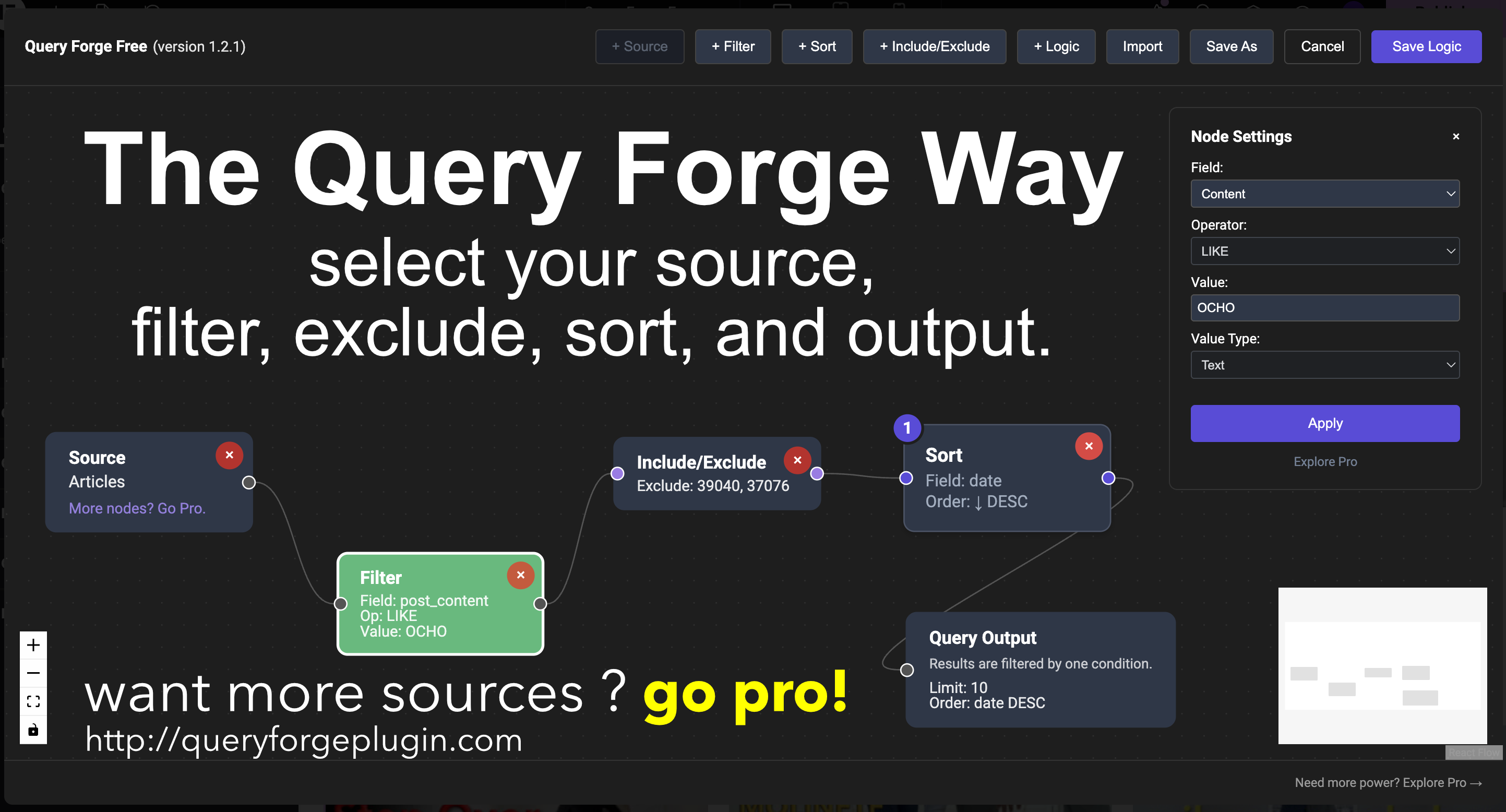
The process is simple. Open the canvas, drop a source node, connect your filter, sort, and save your logic. Then you stylize the card, and/or the page the way you want. Voila, results. No other plugin does this, not without having you write code, or with shortcodes. Query Forge does that all out of the box.
Key Features
- Visual Node-Based Interface — Drag and drop nodes to build queries visually
- Works with Gutenberg OR Elementor — one plugin, both editors
- Post Type Support — Query Posts, Pages, and all Custom Post Types
- Multiple Source Node configurations for combining multiple types of data (Pro Only)
- Advanced data sources — internal and external SQL tables and REST APIs, authenticated or unauthenticated (Pro Only)
- Taxonomy Filtering — Filter by categories, tags, and custom taxonomies
- Multi-Condition Filters — multiple conditions per filter node with internal AND/OR logic
- Meta Filtering — Filter by custom fields with operators (=, !=, LIKE, NOT LIKE, BETWEEN, IN, NOT IN, EXISTS, NOT EXISTS)
- Flexible Sorting — Sort by Date, Title, or ID
- Include/Exclude Posts — Fine-tune which posts appear in your results
- AND/OR Logic — Combine multiple filters with AND or OR logic
- Standard Pagination — Built-in pagination support
- Save, Export & Import Queries — Save and move your query configurations across multiple domains
- Card Design Controls — Typography, colors, alignment, image ratio, border radius, and shadow — no CSS required
- Inline Preview — See your query results directly in the editor canvas (Pro Only)
- Server-Side Rendering — Block output is rendered by PHP for fast, SEO-friendly results
- Frontend Search — Live AJAX search bar for any query output. Works in both Gutenberg and Elementor
- Query Result Caching — Cache rendered query output as HTML. Free supports up to 2 hours. Pro supports up to 7 days with auto-refresh
Perfect For
- Real estate listings. Filter by price range, bedrooms, or any property meta field.
- WooCommerce product grids. Filter by price, category, sale status, or any product meta.
- Job boards. Filter open positions by department, location, or employment type.
- Portfolio grids. Display work by type, client, or any custom taxonomy.
- Member directories and staff pages. Display users by role with avatar, bio, and custom fields.
- Related posts sections. Show posts from the same category, tag, or custom taxonomy automatically.
- Event listings. Sort by event date, filter by location or type, display with custom field details.
- Restaurant and location finders. Display locations filtered by city, cuisine, or amenity.
- Sports and leaderboards. Display rankings, stats, or standings from any data source.
- Any custom post type displayed as a fully styled, filterable card grid.
Free vs Pro
Free Version Includes:
- One source node per query (Posts, Pages, all CPTs)
- Taxonomy filters — categories, tags, and custom taxonomies (Has any of, Does not have, Has all of)
- Multi-Condition Filters — multiple conditions per filter node with internal AND/OR logic
- Meta filters — filter by custom fields with operators (=, !=, LIKE, NOT LIKE, BETWEEN, IN, NOT IN, EXISTS, NOT EXISTS)
- AND/OR logic within filter nodes
- Basic sorting (Date, Title, ID)
- Standard pagination
- 5 Canned Card Styles
- Full Card Design Controls — typography, colors, alignment, image ratio, border, shadow
- Works with Gutenberg block editor and Elementor
- Query result caching (up to 2 hours)
- Single Templates (5 styles)
Pro Version Unlocks:
- Multiple source nodes per query
- Advanced data sources (Users, Comments, SQL Tables, REST APIs)
- OR logic and nested logic groups across multiple source nodes
- Advanced sorting (Random, Menu Order, Meta Value)
- Dynamic data tags ({{ current_post_id }}, {{ current_user_id }}, etc.)
- SQL Joins
- AJAX pagination, Load More, and Infinite Scroll
- Related content logic
- Context-aware behavior
- Preview Node — see live query results on the canvas as you build, before saving
- Source Preview — browse and search raw source content inline on any Source node
- Custom Card Templates for Elementor (via Elementor Loop Item)
- Custom Card Templates for Gutenberg (shortcode-based system)
- Query result caching up to 7 days with auto-refresh via WP-Cron
- Dynamic Custom Fields with per-field typography, alignment, and color controls
- Single Templates (15 styles)
Founders Edition — Limited to 50 Units
A one-time lifetime license for Query Forge Pro. Every Pro feature, one payment, no annual renewal. Ever. Available to the first 50 users only.
External services
This plugin does not connect to any third-party or external web services. All data is stored and processed within your own WordPress site.
Some fields in the visual builder may show example URLs such as https://api.example.com/endpoint. These are placeholder examples only. Query Forge itself does not send any data to those URLs or to any external API.
If you integrate Query Forge with your own APIs or services, please review the terms of service and privacy policies for those services.
Support
For support, feature requests, and documentation, please visit:
* Query Forge Website: https://queryforgeplugin.com
* Documentation: https://queryforgeplugin.com/documentation.html
Credits
Built with:
- React Flow (https://reactflow.dev) — Node-based UI framework
- WordPress Block Editor (Gutenberg) — Block integration
- Elementor (https://elementor.com) — Widget integration
License
Query Forge is licensed under the GPL v2 or later.
Need more power? Upgrade to Query Forge Pro (https://queryforgeplugin.com) for advanced features like multiple data sources, dynamic data, SQL joins, AJAX pagination, and more.