

AutifyDigital Lloyds® Pay Now for payment
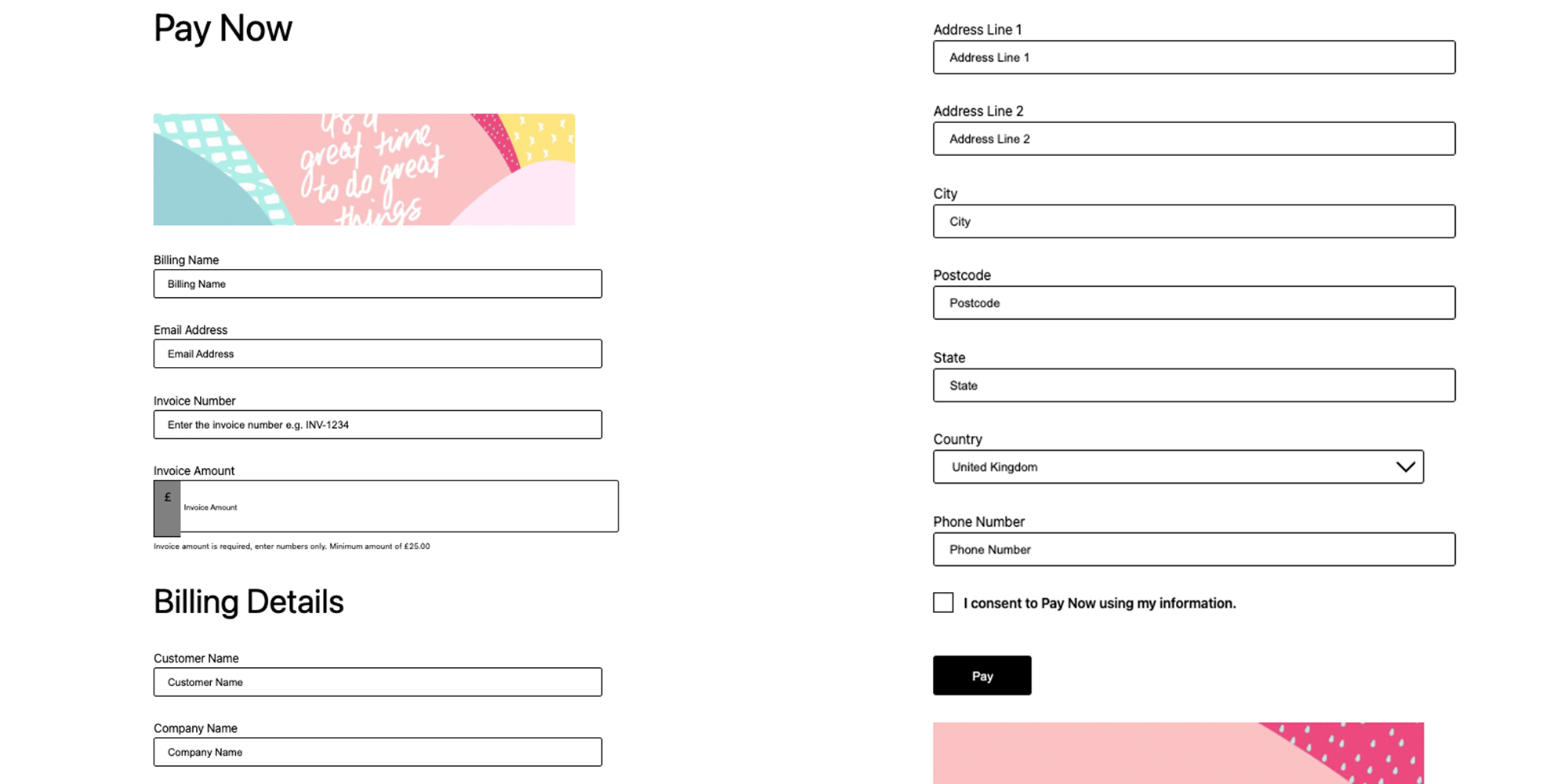
Payment form displayed on the frontend with billing details and invoice fields.
This plugin is for standalone WordPress setups. If you are looking for a WooCommerce integration, please search Lloyds WooCommerce.
Connect your WordPress site to Lloyds acquiring with Pay Now the secure payment gateway plugin. Offer your customers a reliable and seamless way to pay outstanding invoices or balances directly from your website, with real-time processing and flexible configuration options to suit your business needs.
What is Lloyds Pay Now?
Combining Lloyds acquiring with the Pay Now plugin offers a secure payment solution that enables businesses to accept a variety of payment methods, including credit and debit cards, Apple Pay, and Google Pay, through a hosted payment page on their website. This integration seamlessly enhances transaction efficiency and improves customer experience by offering users a smooth, uninterrupted payment journey.
How the Plugin Works
The Pay Now plugin for WordPress enables your customers to pay outstanding invoices or balances directly from a dedicated payment page on your site — no need to navigate through a traditional checkout process. Simply provide your customer with a link or direct them to the payment page where they can enter the invoice reference or amount owed, then securely complete their payment via the Lloyds hosted payment page. Once the transaction is authorised, the payment is confirmed in real time through webhook integration, and both you and your customer receive instant notification of the successful transaction.
From your WordPress admin panel, you have complete control over the payment experience. Configure minimum and maximum payment amounts, customise the form fields displayed on the payment page, and set up automated email notifications to keep your accounts team and customers informed at every stage. The built-in reporting dashboard gives you a clear overview of all incoming payments, making it easy to reconcile invoices, track payment history, and manage your cash flow effectively.
When to Use This Plugin
This plugin is ideal for B2B merchants who invoice clients and need a simple, secure way to collect payments online. Whether you supply goods on account, offer trade credit terms, or simply want to give customers a convenient way to settle balances without placing a new order, the Pay Now integration streamlines the payment collection process. It eliminates the need for manual bank transfers or phone payments, reducing admin time and accelerating cash flow.
The Customer Experience
Your customers will appreciate the simplicity and professionalism of the payment process. They receive a link or visit your payment page, enter the relevant invoice details or payment amount, and are directed to the secure Lloyds hosted payment page to complete the transaction. The entire process takes just moments, and customers receive immediate confirmation once their payment is successful — no account registration or checkout steps required.
Features
- Redirected Payment Method — Start accepting online payments via a secure hosted payment page, providing customers with a trusted environment to complete their transactions.
- Secure Payment Processing — Process online payments securely through the Lloyds gateway, ensuring peace of mind for both you and your customers.
- Apple Pay Support — Allow customers to pay quickly using Apple Pay on compatible devices and browsers for a fast, native payment experience.
- Google Pay Support — Accept payments via Google Pay for a frictionless checkout experience across Android and Chrome.
- Refund Management — Process full or partial refunds directly from the WordPress admin dashboard with a simple, intuitive interface.
- Tailored Experience — Configure the payment gateway to meet your business needs. Control settings such as minimum and maximum payment amounts, form fields, and both customer-facing and internal email notifications.
- Reporting Dashboard — Keep on top of transactions easily with access to the detailed reporting dashboard in your admin panel.
- Real-Time Processing — Enjoy instant payment confirmations, feedback, and status updates for you and your customers via webhook integration.
- Rate Limiting — Configurable rate limiting to protect your payment forms from abuse, with adjustable attempt limits per IP address.
- reCAPTCHA & Math CAPTCHA — Protect your payment forms from spam and bot submissions with Google reCAPTCHA or a built-in Math CAPTCHA.
- Custom Branding — Upload custom banner images and configure the look and feel of your payment page.
- Billing & Shipping Details — Collect billing and shipping information with fully customisable form fields.
- DataLayer & GTM Integration — Track purchase events via Google Tag Manager dataLayer for analytics and conversion tracking.
- Custom Tracking Code — Add custom tracking scripts (e.g. Meta Pixel, Google Analytics) to the head or body of your payment pages.
- Logging — Enable detailed logging for debugging and transaction auditing with automatic PII redaction.
- Multi-Device Support — Responsive payment forms that work seamlessly across desktop, tablet, and mobile devices.
- Dedicated Customer Support — Enjoy robust, first-line support from our team of integration experts.
Security
The Pay Now plugin uses a redirect payment method to ensure the highest level of security for your business and your customers. When a customer is ready to make a payment, they are seamlessly redirected from your WordPress site to the secure Lloyds hosted payment page. All sensitive payment information, including credit and debit card details, is entered directly on Lloyds’ PCI DSS compliant servers — never on your WordPress website.
This redirect approach means that no customer payment data is entered into, processed by, or stored on your server at any point during the transaction. Your server only receives non-sensitive transaction confirmation data via secure webhook notifications, such as the payment status and reference number. As a result, this integration supports PCI DSS SAQ A compliance, the simplest and least burdensome level of PCI compliance for merchants, significantly reducing your compliance obligations and security risks.
The Lloyds Online Payment gateway combined with our Pay Now solution offers a redirected payment method, meaning transactions are handled by Lloyds directly, and not on the business’s server. Therefore, businesses can enjoy peace of mind that their online payment processing is compliant and meets the necessary standards.
Businesses are responsible for ensuring they are compliant with any necessary financial regulations when using Lloyds.
Account & Pricing
A separate Lloyds merchant services account is required to use this plugin. The account must be set up directly with Lloyds before installing and configuring the plugin — it is not created during the plugin installation process.
To apply for a Lloyds merchant services account, visit: Lloyds Bank Cardnet®
Additional fees apply for payment processing services provided by Lloyds. These fees are separate from the cost of this plugin and are determined by Lloyds based on your business requirements and transaction volumes. For detailed pricing information, please visit the Lloyds website https://www.lloydsbank.com/business/take-payments-with-cardnet/our-prices.html or contact their sales team directly.
Please note, Autify Digital cannot assist with the Lloyds account setup process or pricing enquiries. For account-related questions, please contact Lloyds directly through their website.
Additional requirements:
- For Apple Pay: An Apple Developer account with a configured Apple Pay merchant identifier and certificates.
- For Google Pay: A Google Pay merchant account (for production use).
Customise Your Integration
Looking for something more specific? Get in touch to discuss any custom features or tailored configurations that might enhance your Pay Now integration for WordPress. Contact us via [email protected].
Trademark
Lloyds and Lloyds Bank are trading names of Lloyds Bank plc. Registered Office: 25 Gresham Street, London EC2V 7HN. Registered in England and Wales no. 2065. Lloyds Bank plc is authorised by the Prudential Regulation Authority and regulated by the Financial Conduct Authority and the Prudential Regulation Authority under registration number 119278. All trademarks, service marks, and trade names referenced in this material are the property of their respective owners.
Support
For technical support, customisation requests, or general inquiries:
- Email: [email protected]
- Visit: autify.co.uk
External Services
This plugin relies on several third-party services to provide its functionality. By using this plugin, you acknowledge that data will be transmitted to these external services as described below.
1. Fiserv Payment Gateway (IPG Online)
This service processes credit and debit card payments securely.
What data is sent:
– Customer billing information (name, address, email, phone)
– Customer shipping information (if provided)
– Payment amount and currency
– Transaction reference/order ID
– Store credentials for authentication
When data is sent:
– When a customer submits a payment form
– When processing refunds through the admin panel
API Endpoints:
– Hosted Payment Page (Sandbox): https://test.ipg-online.com/connect/gateway/processing
– Hosted Payment Page (Production): https://www.ipg-online.com/connect/gateway/processing
– Refund API (Sandbox): https://cert.api.firstdata.com/gateway/v2/payments
– Refund API (Production): https://prod.api.firstdata.com/gateway/v2/payments
Service Provider: Fiserv (formerly First Data)
– Terms of Service
– Privacy Policy
2. Lloyds
Lloyds is the merchant services provider that facilitates the payment processing relationship.
Service Provider: Lloyds Bank
– Service Information
– Terms of Use
– Privacy Policy
3. Google reCAPTCHA
This service is used to protect payment forms from spam and abuse. It is only active if enabled in the plugin settings.
What data is sent:
– The reCAPTCHA token generated by user interaction
– Your site’s secret key for verification
When data is sent:
– When a customer submits the payment form (if reCAPTCHA is enabled)
API Endpoint: https://www.google.com/recaptcha/api/siteverify
Service Provider: Google
– Terms of Service
– Privacy Policy
4. Google Pay API
This service is used to enable Google Pay as a payment method. It is only active if Google Pay is enabled in the plugin settings.
What data is sent:
– Payment request details (amount, currency, merchant info)
– Transaction token after user authorization
When data is sent:
– When a customer chooses to pay with Google Pay
– When the Google Pay button is loaded on the payment form
API Endpoint: https://pay.google.com/gp/p/js/pay.js
Service Provider: Google
– Terms of Service
– Privacy Policy
5. Apple Pay
This service is used to enable Apple Pay as a payment method. It is only active if Apple Pay is enabled in the plugin settings and the user is on a compatible Apple device/browser.
What data is sent:
– Merchant validation request to Apple’s servers
– Payment request details (amount, currency, merchant info)
– Transaction token after user authorization
When data is sent:
– When a customer chooses to pay with Apple Pay
– When validating the merchant session with Apple
API Endpoint: Apple Pay merchant validation endpoints (*.apple.com)
Service Provider: Apple Inc.
– Apple Pay Developer Documentation
– Terms of Service
– Privacy Policy
6. Autify Digital License
This service is used for plugin license verification, and support.
What data is sent:
– Your website domain name
– Plugin version number
– License key (for activation/verification)
– Admin email address (for license and support purposes)
– Admin contact name (if available)
– Activation status (active/inactive/deactivated)
When data is sent:
– When generating or activating a license key
API Endpoint: https://plugin-licenses.autify.co.uk/wp-json/autifydigital/v1/plugin
Service Provider: Autify Digital Ltd
– Website
– Terms of Service
– Privacy Policy
– Contact: [email protected]
Note: License activation are optional. The plugin will function without a license, but premium support require license activation.
Third-Party Libraries
This plugin includes the following third-party JavaScript libraries:
jQuery Validation Plugin
Files:
– assets/js/jquery.validate.min.js (v1.21.0)
– assets/js/additional-methods.min.js (v1.21.0)
Description: A jQuery plugin that provides client-side form validation.
Source Code: https://github.com/jquery-validation/jquery-validation
Documentation: https://jqueryvalidation.org/
License: MIT License
Copyright: Jörn Zaefferer
To build from source:
1. Clone the repository: git clone https://github.com/jquery-validation/jquery-validation.git
2. Install dependencies: npm install
3. Build: grunt
Privacy Notice
Please review the privacy policies of all third-party services listed above to understand how your data and your customers’ data is handled. It is your responsibility to ensure compliance with applicable data protection regulations (such as GDPR) when using this plugin.
For any questions about data handling or privacy, please contact: [email protected]