

List2Play Servers

Admin settings page with server selection
List2Play Servers is a powerful WordPress plugin that allows you to display game servers from List2Play.net on your WordPress website. Perfect for gaming communities, server owners, and gaming websites.
Key Features
- Server Selection & Management: Choose specific servers to display via admin panel with drag-and-drop reordering. Select from your own servers or add any public server by ID.
- Multiple Display Methods: Use shortcode
[list2play_servers], WordPress Widget, or Gutenberg Block to display servers anywhere on your site. - Customizable Display Options: Control what information to show – hostname, status, address, game type, region, players, map, votes, player history charts, server stats, and vote buttons.
- Player History Charts: Beautiful Chart.js charts showing player count over time (24-hour history).
- Vote Integration: Display total votes and vote buttons that link directly to List2Play voting page.
- Advanced Filtering: Filter servers by game type, category, country, status (online/offline), and more.
- Flexible Sorting: Sort by votes, activity, newest, or server name in ascending or descending order.
- Pagination: Built-in pagination support with customizable servers per page (default: 20, max: 100).
- WordPress Widget: Full-featured widget with all display options and ability to show a single server by ID.
- Gutenberg Block: Native Gutenberg block with live preview and all customization options.
- Responsive Design: Mobile-friendly layouts that work perfectly on all devices (desktop, tablet, mobile).
- Performance Optimized: Built-in caching system for API responses to reduce server load and improve page speed.
- GDPR Compliant: Privacy-focused with optional metadata collection and clear privacy policy.
- Easy Configuration: Simple admin interface with automatic server loading and intuitive controls.
Installation
- Upload the
list2play-serversfolder to/wp-content/plugins/directory - Activate the plugin through the ‘Plugins’ menu in WordPress
- Go to Settings > List2Play Servers to configure the plugin
- Enter your API token from your List2Play profile settings
- Select which servers to display
- Use the shortcode
[list2play_servers]on any page or post
Configuration
API Settings:
* API Base URL: API base URL (default: https://list2play.net/api)
* API Token: Enter your API token from your List2Play profile settings
* Cache Duration: Set how long to cache API responses (default: 300 seconds)
Server Selection:
* Click “Refresh Servers” to fetch your servers from the API
* Select which servers to display by default using the checkboxes
* Drag and drop servers to reorder them (custom order is preserved)
* Click “Save Selection” to save your choices
* Add servers by ID if needed (enter server ID from List2Play server URL, e.g., https://list2play.net/servers/discord/922 where 922 is the server ID)
Display Options:
* Control what information is displayed by default for shortcode, widget, and block
* Options include: Hostname, Status, Address, Game, Region, Players, Map, Votes, Player History Chart, Server Stats, Vote Button
* Each option can be enabled or disabled individually
* Options can be overridden per shortcode/widget/block instance
* Default style preset can be configured globally in plugin settings
Privacy Settings:
* Option to send detailed usage statistics (plugin version, WordPress version, PHP version, domain, site URL) to List2Play for support and analytics
* Basic API usage statistics (user ID, endpoints, IP, timestamps) are automatically logged by List2Play API for service operation and security (required, cannot be disabled)
* All data stored locally can be cleared or deleted at any time
Usage
Shortcode:
[list2play_servers]
Parameters:
* game_type – Filter by game type slug (see Supported Games below)
* category – Filter by category slug
* country – Filter by country code (e.g., US, GB, LT)
* status – Filter by status: online or offline
* sort – Sort by: votes, activity, newest, server
* direction – Sort direction: asc or desc (default: desc)
* per_page – Number of servers per page (default: 20, max: 100)
* show_stats – Show server statistics: true or false (default: true)
* show_votes – Show vote count: true or false (default: true)
* show_vote_button – Show vote button: true or false (default: true)
* style_preset – Visual style preset: default, neon-cyan, neon-purple, neon-red, neon-toxic
Supported Games
List2Play platform supports the following game types. Use the slug in the game_type parameter:
Counter-Strike Series:
* cs16 – Counter-Strike 1.6
* css – Counter-Strike: Source
* csgo – Counter-Strike: Global Offensive
* cs2 – Counter-Strike 2
Minecraft:
* minecraft – Minecraft
* minecraftpe – Minecraft Pocket Edition
Valve Games:
* tf2 – Team Fortress 2
* gmod – Garry’s Mod
* l4d – Left 4 Dead
* l4d2 – Left 4 Dead 2
* hl1 – Half-Life 1
* hl2dm – Half-Life 2 Deathmatch
* dod – Day of Defeat
* dods – Day of Defeat Source
Survival Games:
* rust – Rust
* arkse – ARK: Survival Evolved
* sevendaystodie – 7 Days to Die
* theforest – The Forest
* terraria – Terraria
Other Games:
* killingfloor – Killing Floor
* killingfloor2 – Killing Floor 2
* arma3 – ARMA 3
* cod – Call of Duty
* cod2 – Call of Duty 2
* cod4 – Call of Duty 4
* samp – San Andreas Multiplayer
* gta5m – GTA Five M
* mta – Multi Theft Auto
* discord – Discord
* And many more!
Example:
[list2play_servers game_type=”cs16″ status=”online”] – Display online Counter-Strike 1.6 servers
WordPress Widget:
Add the “List2Play Servers” widget to any widget area. The widget displays servers selected in the admin settings.
Widget options:
* Title – Widget title (optional)
* Show Single Server – Enter a server ID to display only that specific server (optional)
* Number of servers – How many servers to display (1-20, ignored if single server ID is set)
* Status – Filter by status: All, Online Only, or Offline Only
* Sort by – Sort by: Votes, Activity, or Newest
* Sort direction – Ascending or Descending
* Game Type – Filter by game type slug (optional)
* Country Code – Filter by country code (optional, e.g., US, GB, LT)
* Style preset – Select visual style preset for server cards/charts
* Display Options – Choose which information to display:
* Hostname
* Status
* Address
* Game
* Region
* Players
* Map
* Votes
* Player History Chart
* Server Stats
* Vote Button
Gutenberg Block:
Use the “List2Play Servers” block in the Gutenberg editor. The block displays servers selected in the admin settings.
Block options:
* Number of servers – How many servers to display (1-100)
* Status – Filter by status: All, Online Only, or Offline Only
* Sort by – Sort by: Votes, Activity, Newest, or Server Name
* Sort direction – Ascending or Descending
* Game Type – Filter by game type slug (optional)
* Country Code – Filter by country code (optional, e.g., US, GB, LT)
* Style preset – Select visual style preset (uses global default if not set)
* Display Options – Choose which information to display:
* Hostname
* Status
* Address
* Game
* Region
* Players
* Map
* Votes
* Player History Chart
* Server Stats
* Vote Button
API Requirements
This plugin requires a List2Play API token. To get your API token:
- Log in to your List2Play account
- Go to your profile settings
- Navigate to the “API Access” section
- Generate an API token
- Copy the token and paste it into the plugin settings
Screenshots
- Admin settings page with server selection
- Admin settings page showing server list
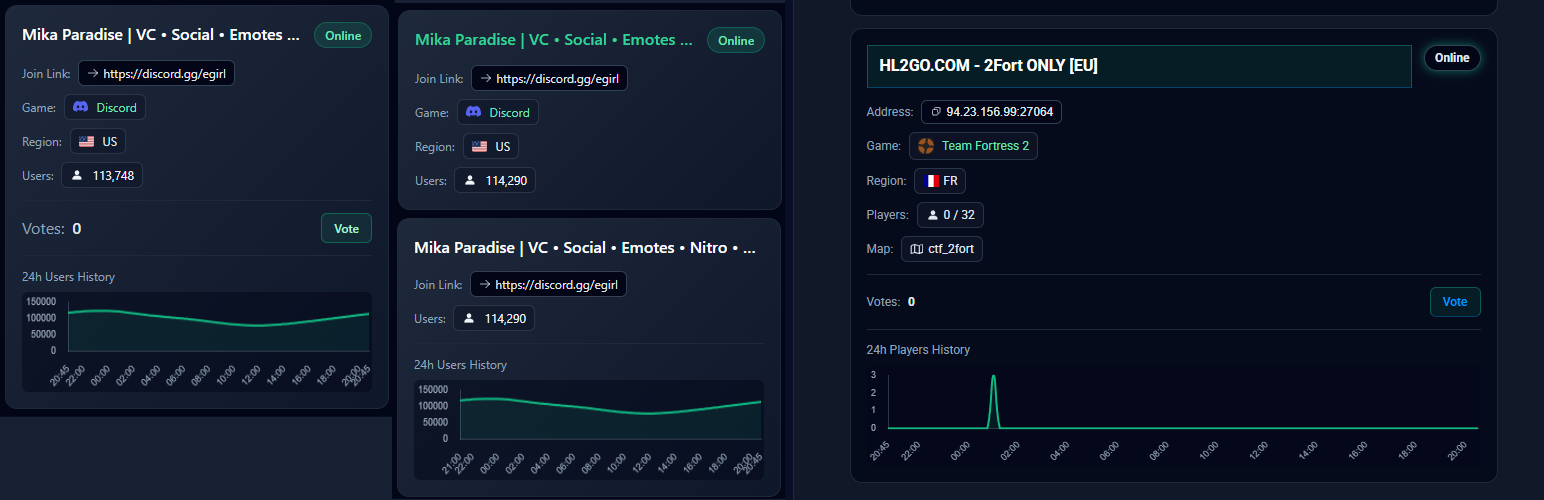
- Server list displayed on frontend with shortcode/widget
- Pagination example
- WordPress Widget configuration
Frequently Asked Questions
Do I need a List2Play account?
Yes, you need a List2Play account and an API token to use this plugin.
Can I display servers from other users?
Yes, you can add servers by ID to display any public server from List2Play.
Does the plugin work without an API token?
No, an API token is required to use this plugin. You need to obtain an API token from your List2Play account profile settings.
Can I customize the appearance?
Yes, the plugin includes default styles that work with most WordPress themes. You can customize the appearance by adding custom CSS to your theme.
How does caching work?
The plugin caches API responses to improve performance. Cache duration can be configured in the settings. You can manually clear the cache from the admin settings page.
Support
For bug reports, feature requests, or general support, please contact us:
- Email: [email protected]
- Website: https://list2play.net
- Report Bugs: [email protected] (subject: “List2Play Servers Plugin Bug Report”)
- Feature Requests: [email protected] (subject: “List2Play Servers Plugin Feature Request”)
Privacy Policy
This plugin collects and processes the following data:
Data Collected:
* API Token: Stored locally in WordPress database using WordPress Options API (stored as plain text in database, protected by WordPress access controls)
* Server Data: Fetched from List2Play API and cached locally
* API Usage Statistics (Required): User ID, API endpoints accessed, request method, IP address, User-Agent, response status, timestamp
* Client Metadata (Optional): Plugin version, WordPress version, PHP version, domain, and site URL
Data Usage:
* Server data is fetched from List2Play API to display on your website
* API usage statistics are automatically logged by List2Play API for service operation, security, rate limiting, and monitoring purposes (required, cannot be disabled)
* Client metadata is sent to List2Play API for detailed statistics and support purposes (optional, can be disabled in settings)
* All data is stored locally in WordPress database using WordPress Transients and Options API
Data Sharing:
* Server data is fetched from List2Play.net API
* API usage statistics are automatically logged by List2Play.net API (required for service operation)
* Client metadata (if enabled) is sent to List2Play.net API for statistics
* No data is shared with third parties
Your Rights:
* You can disable detailed metadata collection (domain, site URL, versions) in plugin settings
* Basic API usage statistics (endpoints, user ID, IP, timestamps) are required for service operation and cannot be disabled
* You can clear cached data at any time
* You can delete the plugin and all its data will be removed (see Uninstall section)
GDPR Compliance:
* This plugin does not collect personal data directly from your website visitors. However, when the plugin makes API requests to List2Play.net, basic API usage statistics (user ID, endpoints accessed, IP address, User-Agent, timestamps) are automatically logged by List2Play API as required for service operation, security, rate limiting, and monitoring. This is necessary for the API service to function and cannot be disabled (legal basis: legitimate interest under GDPR Article 6(1)(f) and contract performance)
* Detailed client metadata (domain, site URL, plugin/WordPress/PHP versions) may be considered personal data under GDPR and is optional – you can disable it in plugin settings
* All data stored locally in WordPress can be deleted at any time
* List2Play has the right to know who and how uses their API service for operational, security, and business purposes
Third-Party Services:
* List2Play.net API: Used to fetch server data
* Chart.js CDN: Used for player history charts (loaded from jsdelivr.net)
For more information about List2Play’s privacy practices, visit: https://list2play.net/privacy
Support
For bug reports, feature requests, or general support, please contact us:
- Email: [email protected]
- Website: https://list2play.net
- Report Bugs: [email protected] (subject: “List2Play Servers Plugin Bug Report”)
- Feature Requests: [email protected] (subject: “List2Play Servers Plugin Feature Request”)