

Cron Pulse
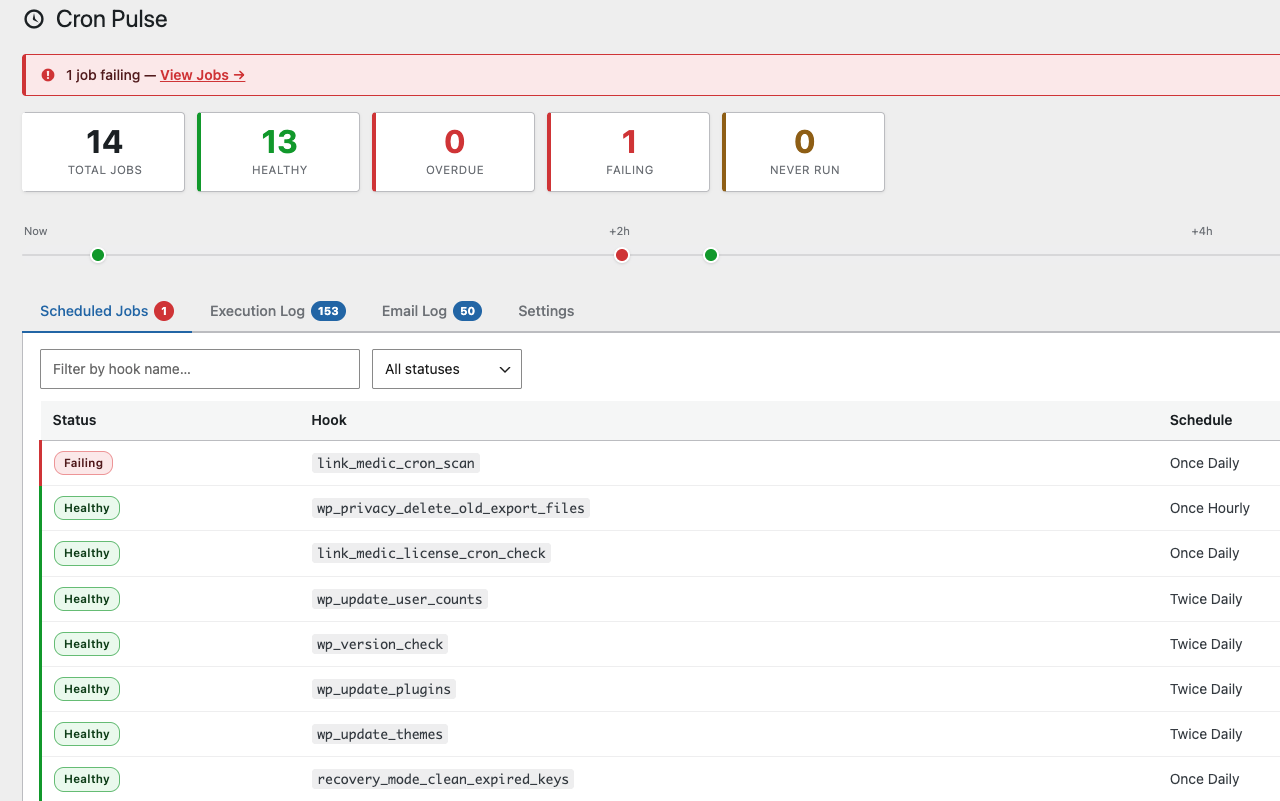
Dashboard overview — scheduled jobs with live status indicators, overdue/failing badges, and the 8-hour schedule strip
WordPress developers fly blind with WP-Cron. The core tools give you no visibility into whether scheduled jobs are actually running, how long they take, or when they last fired.
Cron Pulse adds a clean dashboard under Tools Cron Pulse that shows everything you need at a glance:
Features
- Scheduled Jobs table — hook name, recurrence schedule, next run time, last run time, execution duration
- Status indicators — Healthy / Overdue / Failing / Pending color coding so problems jump out immediately
- Overdue detection — instantly see jobs that should have fired but haven’t
- Admin bar badge — a small warning indicator on every wp-admin (and front-end) page when something needs attention, so you don’t have to remember to check the dashboard
- Run Now — manually trigger any cron hook with one click (great for testing)
- Unschedule — delete a stuck or duplicate scheduled event straight from the dashboard
- Sortable columns and pagination — click Next Run or Duration to sort; 25 jobs per page on sites with large schedules
- Duration sparkline — tiny trend line per hook so a creeping-up execution time is visible before it becomes a timeout
- Execution Log — persistent log of run history with duration and pass/fail status; retention is configurable
- Hook and status filters — search by hook name or narrow the table to just Overdue/Failing/Healthy/Never Run
- DISABLE_WP_CRON warning — alerts you when automatic cron execution is disabled
- Email and webhook alerts — get notified after N consecutive failed runs or when a job has been overdue too long, with optional per-job thresholds and a one-click snooze for incidents you already know about. Webhook payloads work directly with Slack and Discord, no relay needed — setup instructions are built into the Settings tab
- Built-in SMTP settings — route alert emails through your own mail provider instead of the server’s default mail() function, no separate SMTP plugin required
- Email Log — see every alert/test email Cron Pulse has sent, with delivery status and the underlying error if one failed
- Email Debug Log — the raw SMTP conversation (connection, TLS, auth, server responses) for diagnosing delivery problems beyond a generic failure message — credentials are never written to it
- Send Test Email / Send Test Webhook — confirm your notification settings actually work before you need them
- WP-CLI support —
wp cronpulse statusfor scripting health checks across sites - REST API —
GET /wp-json/cronpulse/v1/statusfor remote dashboards, authenticated like any other WP REST route - Zero external dependencies — pure PHP and vanilla jQuery
Who is this for?
- WordPress developers debugging cron-based features
- Agencies maintaining multiple client sites
- Enterprise teams needing visibility into scheduled background tasks
- Anyone tired of checking wp-cron manually or reading cryptic log files
Privacy
This plugin stores cron execution data (hook name, timestamp, duration) in the WordPress options table. No data is sent externally unless you explicitly configure a webhook URL under alert settings, in which case alert payloads are POSTed to that URL. The REST API endpoint is read-only and pull-based — nothing is sent anywhere on its own. If you enable SMTP, your SMTP credentials are stored in the WordPress options table, same as any other plugin setting — no third-party service receives them except the SMTP server you configure. The email log stores recipient addresses and subjects for emails Cron Pulse has sent. All data is deleted on plugin uninstall.