


BPOTech Confirm Step for Contact Form 7
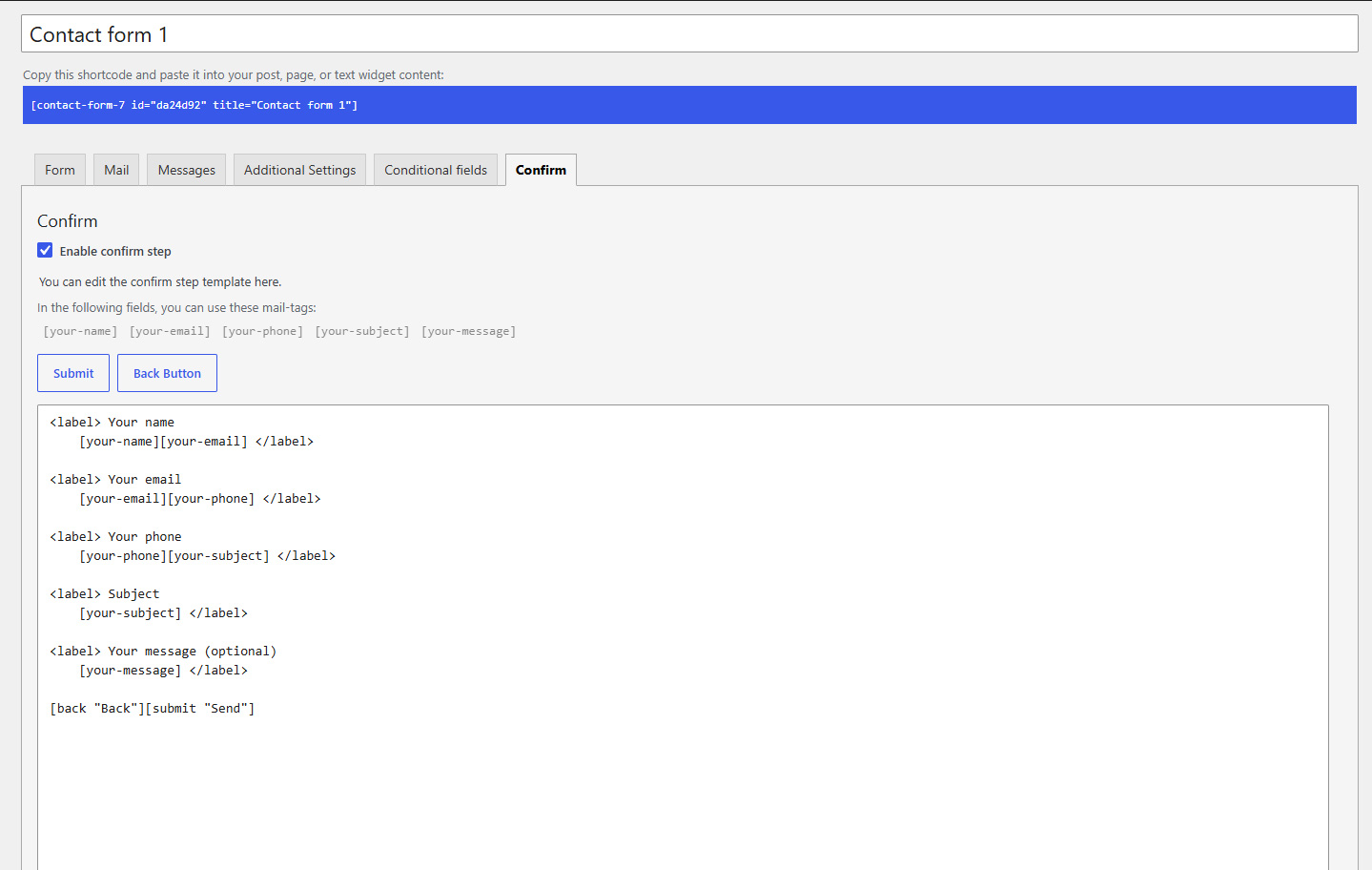
Confirm tab with enable checkbox, confirm template, and tag buttons.
Confirm Step for Contact Form 7 adds a review step between filling in a form and sending it. Visitors see a confirmation screen with their answers (using the same mail-tags as your emails), can go back to edit, or submit for real.
All options are managed inside each Contact Form 7 form (a Confirm tab in the form editor). There is no separate settings page in WordPress admin.
Requires Contact Form 7 to be installed and active. If CF7 is missing, this plugin deactivates itself and shows an admin notice.
How it works (front end)
- The visitor completes the input step (your normal Form tab template) and clicks the Confirm button (
[confirm]). - Contact Form 7 validates the input. The plugin does not send mail yet; the response switches to the confirm step.
- The confirm template (Confirm tab) is shown with values filled in via mail-tags.
- The visitor clicks Submit (
[submit]) to send, or Back ([back]) to return to the input step without reloading the page. - After a successful send, the form returns to the input step.
Features
- Per-form enable — Checkbox “Enable confirm step” on the Confirm tab; disabled forms behave like plain CF7 forms.
- Confirm tab — Dedicated template textarea, mail-tag helper, and tag generator buttons for Submit and Back.
- Form tags —
[confirm](step 1, Form tab generator),[submit](CF7 core, insert from Confirm tab),[back](step 2, Confirm tab generator). Labels and classes follow CF7 conventions. - Step status markers — Add
cf7cfstep-status-classorcf7cfstep-status-class-{formid}to any page element; the plugin togglescf7cfstep-status-input/cf7cfstep-status-confirmfor theme CSS (progress text, sidebars, etc.). - Confirm Settings — Optional scroll target class and offset (px) when entering the confirm step only (positive offset scrolls further down, negative scrolls further up; leave class empty to disable).
- Editor UX — Confirm tab panel hides when disabled; admin styles and collapsible help/settings boxes on the Confirm tab.
- Legacy-compatible storage — Confirm body and options use the same meta keys as the earlier function-based plugin where applicable.
For developers
- PHP 8.0+, namespaced class architecture (
CF7ConfirmStep\), no Composer dependency. - Front-end script is vanilla JavaScript (no jQuery on the public site).
- Form-specific scroll options are passed via
window.cf7csFormSettings[formId]when a scroll class is configured.
Hooks & Filters
cf7cs_custom_confirm_tags (filter) — Register custom tags for the confirm template. Each tag appears as a clickable mail-tag in the Confirm tab editor and is replaced by its content on the front end.
Parameters:
$tags(array) — Array of tag definitions. Each item has keys:tag(string, tag name without brackets),content(string, HTML replacement on front end).$contact_form(WPCF7_ContactForm) — The current contact form instance.
Example:
add_filter( 'cf7cs_custom_confirm_tags', function ( $tags, $form ) {
    $tags[] = array(
        'tag'     => 'privacy-notice',
        'content' => '<p class="privacy">Your data is safe.</p>',
    );
    return $tags;
}, 10, 2 );
In the Confirm tab, [privacy-notice] appears alongside other mail-tags. Click it to insert into the template.
cf7cs_before_confirm_step (filter) — Add HTML before the confirm step content on the front end.
Parameters:
$html(string) — HTML to prepend (default empty).$contact_form(WPCF7_ContactForm) — The current contact form.
Example:
add_filter( 'cf7cs_before_confirm_step', function ( $html, $form ) {
    return '<div class="confirm-header">Please review your data</div>';
}, 10, 2 );
cf7cs_after_confirm_step (filter) — Add HTML after the confirm step content on the front end.
Parameters:
$html(string) — HTML to append (default empty).$contact_form(WPCF7_ContactForm) — The current contact form.
Example:
add_filter( 'cf7cs_after_confirm_step', function ( $html, $form ) {
    return '<p class="confirm-footer">Click Submit to send or Back to edit.</p>';
}, 10, 2 );
cf7cs_confirm_template (filter) — Filter the confirm template HTML after all built-in processing (mail-tag placeholders, control tags, and custom tags have been replaced).
Parameters:
$template(string) — Processed confirm template HTML.$contact_form(WPCF7_ContactForm) — The current contact form.
cf7cs_confirm_tag_buttons (action) — Fires after the default and custom tag generator buttons on the Confirm tab. Use this to output fully custom button HTML.
Usage
- Confirm tab — Enable confirm step, write the review template with mail-tags, add
[submit]and[back], save. - Form tab — Add your fields and a
[confirm]button (tag generator: Confirm Button). Use[submit]only on the confirm step if you want a single send action. - Confirm Settings (optional) — Scroll target class + offset when entering the confirm step; leave class empty to skip scrolling.
- Step status markers (optional) — Add
cf7cfstep-status-classorcf7cfstep-status-class-{formid}on page elements; style withcf7cfstep-status-input/cf7cfstep-status-confirm.