


Blocks for GitHub
0/5 (0 ratings) 10 active installs Updated Nov 23, 2024
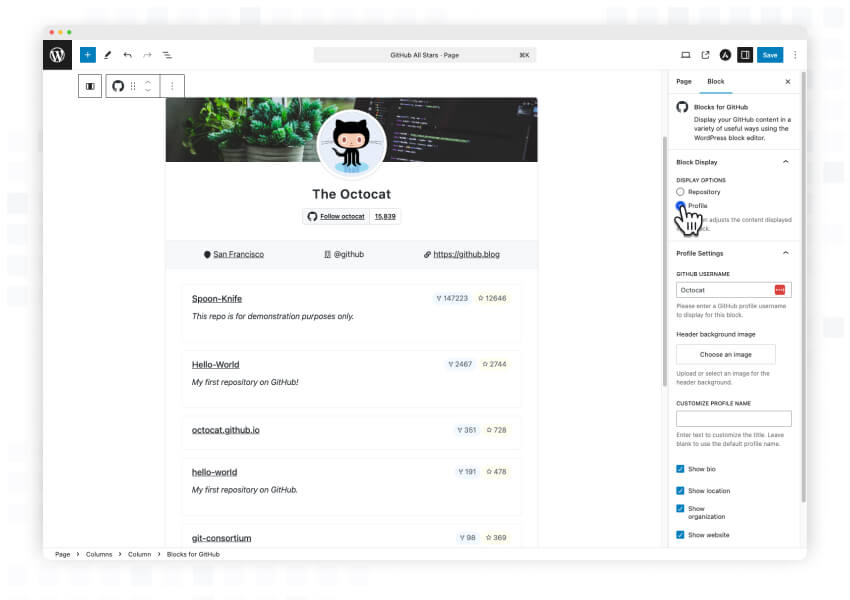
<p>Display and configure any GitHub profile or organization within the WordPress block editor. Customize the display options to show exactly what you want your visitors to see.</p>
Seamlessly integrate GitHub content into your WordPress website using the block editor. This lightweight plugin lets you showcase GitHub profiles, organizations, and repositories with just a few clicks.
Key Features
-
GitHub Profile Block: Display any GitHub user profile complete with:
- Profile picture and bio
- Location and website information
- Follow button with follower count
- Customizable display options
-
Repository Block: Showcase GitHub repositories with:
- Repository description and statistics
- Star count and fork information
- Last update timestamps
- Customizable repository display options
-
Flexible Display Options:
- Show/hide various profile elements (bio, location, website, etc.)
- Customize repository information display
- Control header background images
- Adjust profile name display
Perfect For
- Developers showcasing their GitHub projects
- Organizations displaying their open-source contributions
- Portfolio websites
- Development blogs
- Project documentation sites
Contributing
This is an open-source project and we welcome contributions of all kinds! Whether you’re fixing bugs, improving documentation, or proposing new features, your help is welcome.
- View the source code on GitHub
- Found a bug? Open an issue
- Want to contribute? View our contribution guidelines