


0 Day Analytics
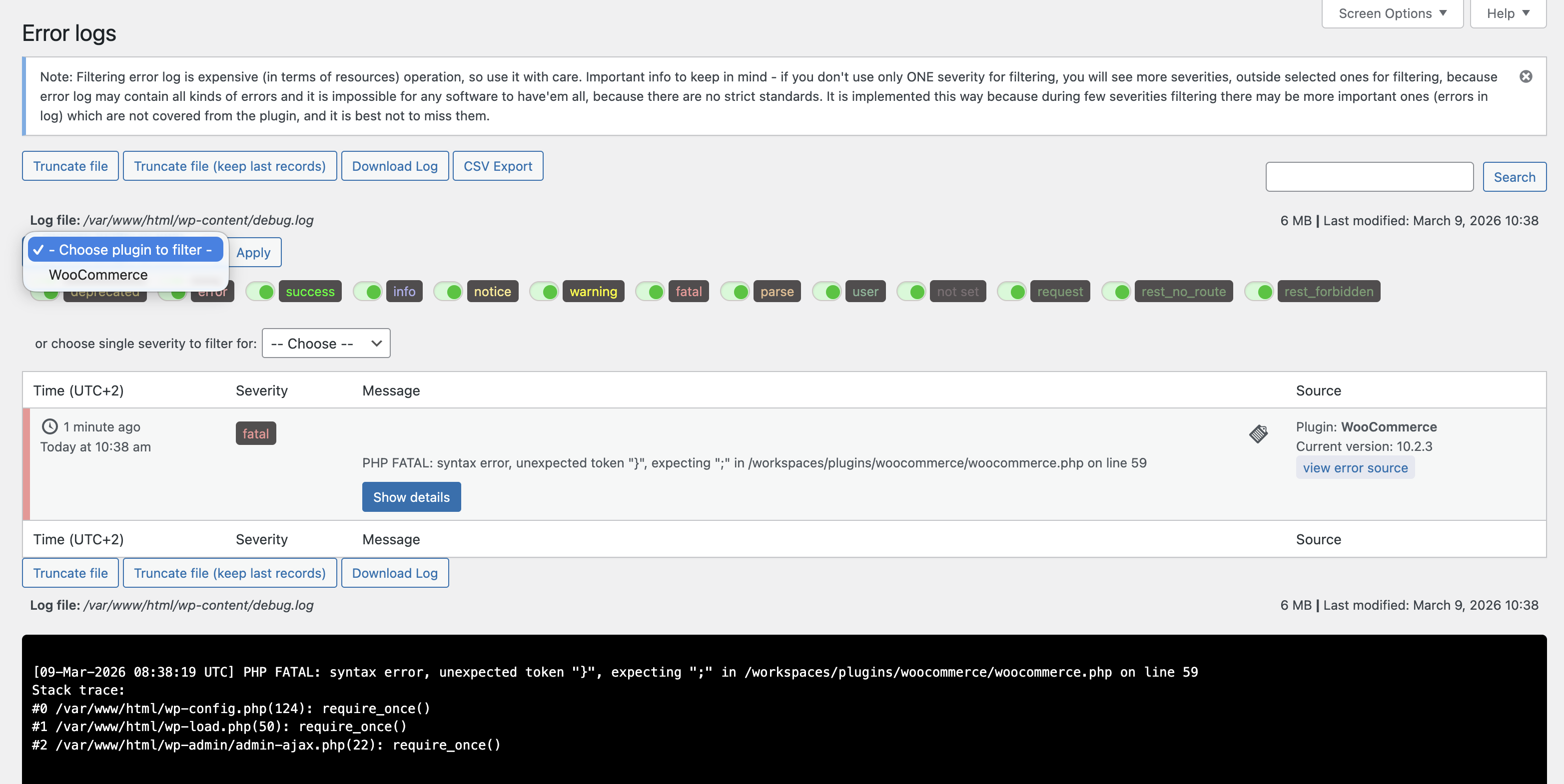
Error Log Manager — real-time PHP/WordPress error log with severity filters, code-context viewer, and file operations (truncate, download).
0 Day Analytics is a comprehensive WordPress debugging and operational
intelligence plugin. It is purpose-built for developers and site administrators
who need real-time visibility into their PHP errors, scheduled tasks, database
state, outgoing emails, HTTP requests, hook behaviour, and overall site health —
all from a single admin interface.
Unlike general monitoring services, 0 Day Analytics runs entirely inside your
WordPress installation with no third-party data collection. Every module is
opt-in and designed with performance in mind.
Plugin Website: 0-day-analytics.com
User Documentation: User Guide
Dashboard
A centralised overview page providing at-a-glance status for all active plugin
modules. Displays real-time widgets for Error Log, Fatal Errors, Cron Jobs,
Transients, HTTP Requests, WP Mail, REST API, and Security — each showing
key metrics and recent events. Toggle individual module widgets on or off.
The Dashboard is the default landing page when clicking the main plugin menu
item, giving administrators immediate visibility into site health and activity
without navigating to each module separately.
Error Log Manager
Read, search, filter, and manage your PHP/WordPress error log without leaving
the admin. Engineered for very large (GB-sized) logs using a reverse-line reader
that never performs a full-file read. Supports code-context viewing (click any
error to see the surrounding source), per-severity filtering, log truncation,
and download. Optionally randomise the log filename to reduce exposure.
PHP Fatal Error Tracker
Captures and stores PHP fatal errors in a dedicated database table, it records PHP errors even if the WP_DEBUG is turned off so they persist even after the log is rotated or overwritten. Each record includes
error type, file, line, stack trace, and timestamp — searchable and filterable
directly in the admin.
Site Performance & Security Scanner
Runs 32+ automated checks across three categories — Security, Speed, and
Resources used — and presents a scored dashboard with actionable
recommendations. Checks include: PHP version, WordPress version, SSL
certificate, debug mode exposure, file permissions, database prefix, XML-RPC,
login URL, active plugin count, autoloaded options, cron health, page caching,
object caching, gzip compression, lazy loading, image optimisation, and more.
Google PageSpeed & Core Web Vitals
Analyse any URL directly from the WordPress admin using the Google PageSpeed
Insights API. Displays Performance, Accessibility, Best Practices, and SEO
scores with Lighthouse category breakdowns for both desktop and mobile. For that you need to provide your own PageSpeed Google API key.
URL Tracker & Asset Analyser
Automatically tracks visited page URLs on your site. For each recorded URL,
you can collect all associated JS, CSS, and media assets (with file sizes), run
a Google PageSpeed analysis, and review visit counts — making it easy to audit
page weight and performance regressions over time.
Cron Manager
View, search, edit, manually run, and delete WordPress scheduled tasks. Shows
next run time (UTC), recurrence interval, arguments, and last execution status.
Supports bulk actions and advanced filtering.
Transients Manager
Browse, search, edit, and safely delete database transients. Displays expiry
time, serialised value (pretty-printed), and size. Bulk delete supports
filtered selections.
Outgoing HTTP Requests Viewer
Logs all outgoing wp_remote_* calls made by WordPress core, themes, and
plugins. Records URL, method, status code, response time, triggering plugin,
user, and full request/response detail. Export to CSV for external analysis.
Advanced filtering by domain, plugin, status, and date range.
Mail Logger & Composer
Records every email sent through wp_mail() — including headers, body,
attachments, CC, and BCC — and stores it in a searchable log. View the
rendered email body, resend any logged email, or compose and send new emails
directly from the admin. Supports HTML and plain-text previews.
SMTP Configuration
Configure custom SMTP settings (host, port, encryption, username, password)
with a built-in test email tool. Optionally log SMTP debug output to the
WordPress debug log.
WP Hooks Monitor
Define which WordPress actions and filters (core or custom) you want to
observe. The Hooks Capture module records each invocation with its parameters,
return value (for filters), and a full stack backtrace. Organise monitoring
rules into named groups, enable/disable per hook, and review the captured
output in a dedicated list view.
DB Table Manager
Browse, search, edit, and delete records across any table in your
WordPress database — including custom plugin tables. Displays table size,
engine, collation, row count, and schema information. Supports full and
filtered truncation and table drop with confirmation.
Server Info & System Status
Displays real-time server metrics (CPU load, memory usage, disk space,
PHP version, active extensions) as both admin-bar badges and a dashboard
widget. Also provides a detailed environment report useful for support tickets
and deployment checks.
Plugin Version Switcher
Roll back or switch between any previously downloaded version of an installed
plugin without leaving the admin. Useful for quickly reverting after a bad
update. Supports only free plugins from the WordPress repo.
Code Snippets
Write, save, and execute custom PHP snippets from the admin. Snippets support
shortcodes, can be enabled/disabled individually, and are sandboxed before
execution. Useful for one-off data migrations, testing custom logic, or
generating dynamic output without creating a custom plugin.
REST API Manager
A security and management tool that gives full visibility and control over
every registered REST API endpoint (/wp-json/). Inspect all registered
routes, disable individual endpoints, restrict HTTP methods, and hide routes
from discovery responses. Useful for hardening your site by removing
unnecessary API surface area.
WP Panel
A centralised control panel for toggling WordPress core features and settings.
Enable or disable comments, revisions, auto-updates, XML-RPC, the REST API,
emojis, embeds, heartbeat behaviour, frontend asset loading, and more — all
from a single, organised admin page. No code changes or custom snippets
required.
Traffic Analytics
Privacy-focused website traffic monitoring built directly into WordPress — no external services or third-party scripts. Tracks unique visitors, pageviews, top pages, referrers, and technology breakdown (devices, browsers, operating systems) with a visual SVG-based dashboard. Choose between server-side (PHP) or client-side (JavaScript) tracking. Includes real-time visitor count automatic period comparison, configurable data retention, and a high-performance file-based write buffer.
Important: By default, Traffic Analytics uses server-side (PHP) tracking mode. This method is less accurate because it cannot distinguish bots from real visitors as effectively and may miss visitors served from full-page caches. If you need more precise analytics, switch to client-side (JavaScript) tracking in the module settings — this mode runs a lightweight script in the browser that provides significantly more accurate visitor detection and pageview counting.
Security Monitor
Real-time security event monitoring and threat detection for your WordPress
site. Tracks brute-force login attempts, burst rate limiting (DoS protection),
user enumeration attempts, and blocked requests. Displays a summary dashboard
with total events, critical alerts, blocked requests, and active incidents over
the last 7 days. Includes an Emergency Lockdown button to immediately restrict
site access during an active attack. Events are logged with severity level,
IP hash (privacy-preserving), attempt counts, and detailed request information.
Login & Auth Audit
Comprehensive authentication event logging that tracks all login activity on
your site. Records successful logins, failed login attempts, session expirations,
and password resets with full context — including user, IP hash, user agent,
and timestamp. Displays summary statistics (total events, successful logins,
failed logins, password resets) for the last 7 days. Supports filtering by
event type and severity, search, and CSV export.
Recovery Mode
Generate single-use recovery links that can disable a specific plugin or
trigger a custom action — delivered via Slack, Telegram, or any configured
webhook channel. Designed for emergency recovery when the site is inaccessible through normal means. The recovery URLs are sent in Slack and Telegram channels for security.
Other Features
- Dark mode for all admin screens.
- CSV export on all list views (requests, errors, mails, hooks, etc.).
- Screen Options on every screen (configure columns, items per page).
- WP CLI compatible scaffolding for background operations.
- Multisite aware (note: recovery mode has core multisite limitations).
Requirements & Compatibility
- WordPress 6.0+ (tested up to 6.9)
- PHP 7.4+ (compatible with PHP 8.0, 8.1, 8.2, 8.3, 8.4, 8.5)
- MySQL 5.7+ / MariaDB 10.3+
- Not intended as a primary multisite recovery tool (see FAQ)
Best Practices & Security Notes
- Keep log files outside the webroot when possible, or restrict access via
server rules (.htaccess / nginx) to prevent public exposure. - Use the built-in “Randomise Log Filename” feature when logs must stay in the
webroot. - All plugin capabilities are restricted to
manage_options(administrators)
by default. The menu can optionally be restricted to admins only. - Sanitize and escape all output; nonces are enforced on all state-changing
actions. - Secure SMTP credentials using TLS/STARTTLS; credentials are stored in the
WordPress options table. - Set file permissions tightly (e.g., 600/640) and restrict ownership to the
web server user. - Backup database and files before using bulk delete or table truncation.
- Disable unused modules to reduce footprint and potential attack surface.
- Disable or throttle high-frequency background polling on high-load sites.
Usage Notes & Performance
- The Error Log viewer reads the last N lines (default 100, max configurable
via Screen Options) to avoid full-file reads on GB-sized logs. - No pagination on error logs by design — pagination would force repeated
expensive full-file reads. - The PHP Fatal Error Tracker uses its own DB table; apply a retention policy
in Settings to avoid unbounded growth. - The Hooks Capture module adds minimal overhead per captured hook invocation;
disable capturing on production when not actively debugging. - The URL Tracker records page visits in a custom table; configure retention
or pause tracking on high-traffic sites.
Support & Notes
- Secure log paths and consider randomising filenames in production.
- Disable unused modules to reduce footprint and attack surface.
- Recovery Mode has limitations on multisite — test before relying on it.
- For bugs or feature requests, open an issue on the plugin page.
Live preview and full details:
https://wordpress.org/plugins/0-day-analytics/
Plugin website and documentation:
https://0-day-analytics.com