
Malware Scan & Cleanup
Scan every file on your site for malware, suspicious code, and tampered WordPress core files — then clean up what's found with a single click.
- On-demand & scheduled scans
- One-click quarantine & cleanup
- WordPress core integrity checks
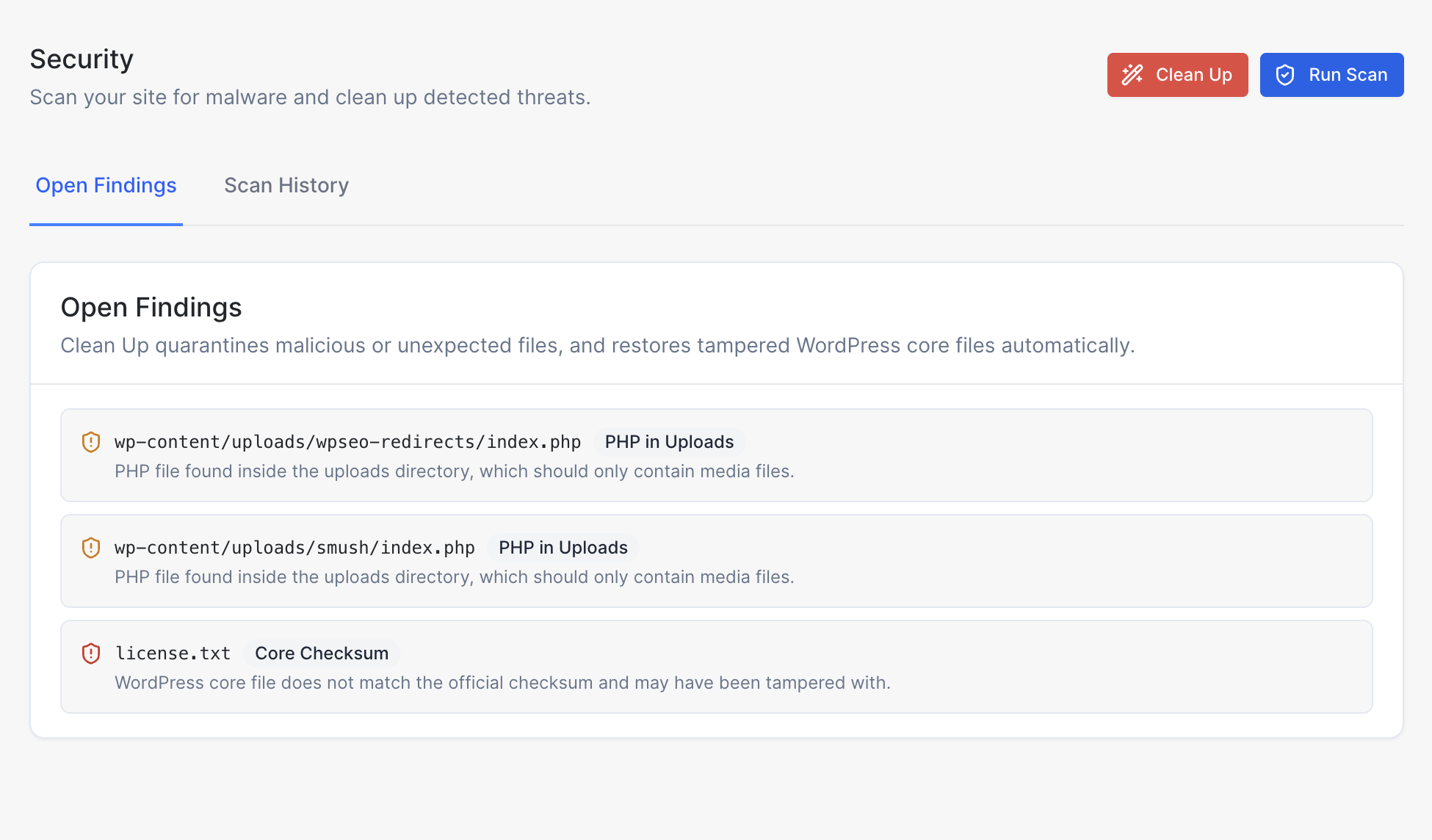
Security that watches your files for you
No plugin to install or configure — scanning and clean up are built into every site from day one.
Full-Site Malware Scanning
Every file in your WordPress installation is scanned for known malware signatures, suspicious PHP, and unexpected code — run it on demand or on a schedule.
One-Click Clean Up
Found something? Click Clean Up to quarantine malicious or unexpected files and automatically restore tampered WordPress core files to their official versions.
Core File Integrity Checks
Every WordPress core file is checksummed against the official release, so tampering — even a single modified line — is flagged.
Full Scan History
Review every past scan and its findings from the Scan History tab, so you always know when an issue appeared and when it was resolved.
Common findings Clean Up catches
PHP in Uploads
Flags PHP files found inside the uploads directory, which should only ever contain media files.
Core Checksum
Flags WordPress core files that no longer match the official checksum and may have been tampered with.
Suspicious Code
Flags obfuscated or eval-based code patterns commonly used to hide malware inside otherwise normal-looking files.
Common questions about malware scanning
You can run a scan manually at any time from the Security tab, and we also recommend keeping an eye out after installing new plugins or themes. Scan History keeps a record of every past run.
Clean Up quarantines malicious or unexpected files it finds — such as PHP files hiding in your uploads directory — and automatically restores any tampered WordPress core files to their official versions.
No. Clean Up only acts on files it identifies as malicious, unexpected, or tampered — your posts, pages, media, and plugin/theme settings are never touched.
Yes. The Scan History tab keeps a full record of every scan that has run on your site, along with what was found and when it was cleaned up.
Malware scanning and clean up is built into every XeroWP site at the hosting level, so most sites never need a separate security plugin. You are still free to install one if you want extra features.
Explore more features
Everything else that comes standard with every XeroWP site.
Docker-Based Infrastructure
Every site runs in its own secure, isolated Docker container — no shared resources, no noisy neighbors.
Easy Site Creation
Create and launch WordPress sites in seconds with our intuitive one-click setup.
Automated Backups
Daily automated backups with one-click restore functionality.
File Manager
Browse, upload, edit, and manage your WordPress files directly from the dashboard.
Keep your site clean, automatically
No credit card required
Malware scanning and one-click cleanup come standard on every site — try it free for 7 days.
14-day money-back guarantee, no questions asked
Already hosting elsewhere? We'll migrate your site free.