


Zen Site Security
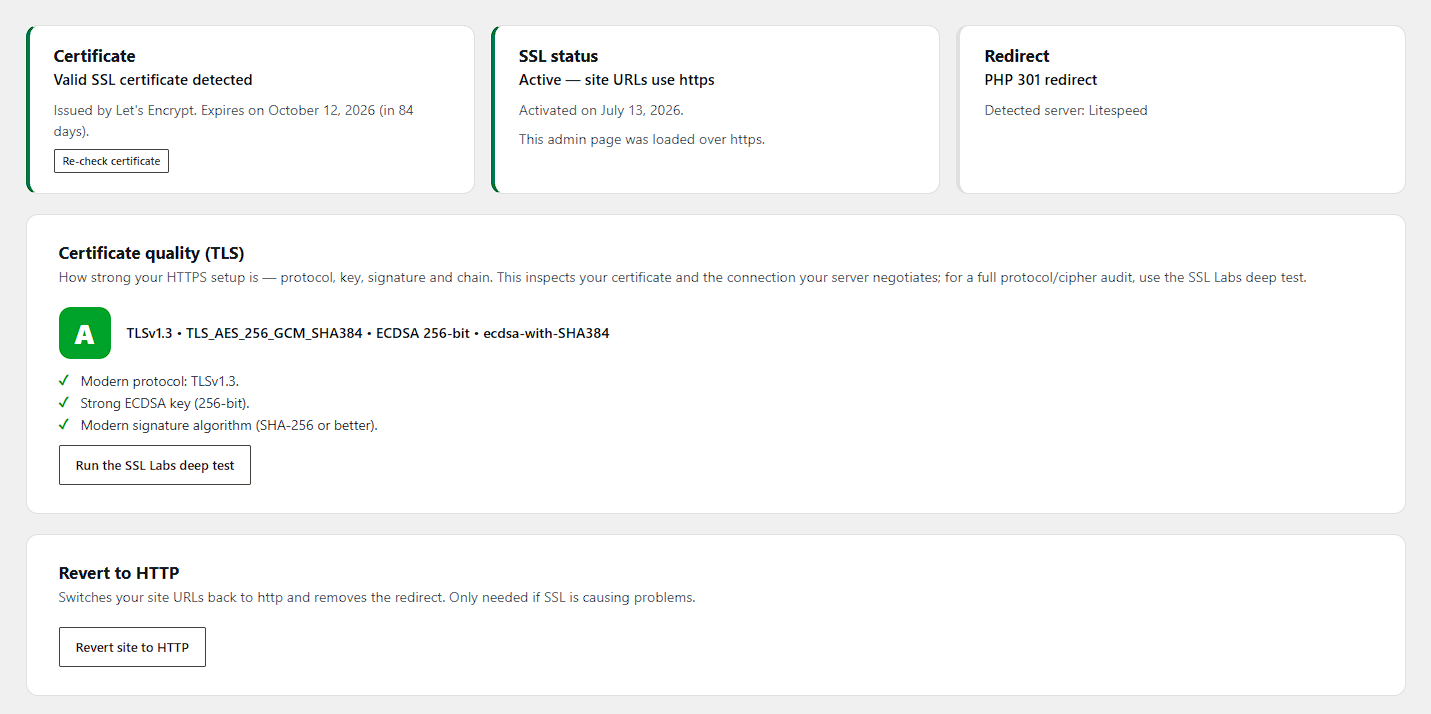
One-click SSL activation: certificate status, active-SSL and redirect cards, and a live TLS quality grade (A) that inspects your protocol, key, signature and chain.
Zen Site Security migrates your WordPress site to HTTPS safely and keeps it there.
One-click activation
The plugin first verifies that a valid SSL certificate is actually installed for your domain — activation is blocked until one is found, so you can never lock yourself out by accident. Activation then:
- switches your WordPress Address and Site Address to https,
- 301-redirects every HTTP request (pages, REST API) to HTTPS,
- fixes mixed content on your pages on the fly.
HTTP to HTTPS redirect, your way
- PHP 301 redirect (default) — works on every server and disappears automatically when the plugin is deactivated.
- .htaccess 301 redirect (advanced, Apache/LiteSpeed) — redirects at server level before WordPress loads, with the PHP redirect kept as a safety net. The rules are placed above the WordPress block, wrapped in clear markers, and removed on deactivation.
- On nginx the plugin shows you the exact server snippet to copy instead.
Mixed content fixer
Insecure http:// references to your own site (including www/non-www variants and JSON-escaped URLs), plus common src, href, action, og:image, url() and srcset patterns, are rewritten to https:// just before the page is sent to the browser. Feeds, sitemaps and JSON responses are left untouched. An optional fixer for the WordPress admin is available too.
Certificate monitoring
The dashboard shows the certificate issuer, expiry date, and whether it covers your domain (wildcards included). When SSL is active and the certificate is about to expire (or already has), administrators see a warning.
HTTP Strict Transport Security (HSTS) — opt-in
Once your site runs reliably on https, you can send the Strict-Transport-Security header. Max-age starts at one day for safe testing; the preload-eligible configuration (1 year + includeSubDomains) requires explicit opt-in, because it is hard to undo.
Security hardening — XSS, CSRF, and injection defense in depth (all opt-in)
- Security headers:
X-Content-Type-Options: nosniff,X-Frame-Options(clickjacking),Referrer-Policy(keeps tokens out of cross-site referrers), a conservativePermissions-Policy, and CSPupgrade-insecure-requests. Every header stands down automatically if another plugin already sends it. - SameSite login cookies: the WordPress auth cookies are re-issued with an explicit
SameSite=Laxattribute, so CSRF protection no longer depends on browser defaults — a second layer next to WordPress nonces. - Attack-surface reduction: disable the wp-admin file editors (
DISALLOW_FILE_EDIT), block PHP execution in the uploads directory (an uploaded webshell becomes a dead file), deny web access to sensitive files (logs, database dumps, backup copies, wp-config variants), disable directory listings, disable XML-RPC and pingbacks, and hide the WordPress version and PHPX-Powered-Byheader.
Built to pair with Zen Login & Authentication
The two Zen plugins split the work cleanly: Zen Login & Authentication owns identity security (login forms, brute-force protection, 2FA, passkeys, user enumeration, XML-RPC), while this plugin owns transport and platform security (HTTPS, headers, cookies, file-system attack surface). When both are active, each control has exactly one owner — for example, this plugin’s XML-RPC switch automatically defers to its sibling. Each plugin is fully standalone; neither requires the other.
Web cache deception protection
When a CDN or page cache sits in front of your site, an attacker can try to trick it into storing a victim’s private page under a URL they control (for example by appending a fake .css to an account page). This plugin marks logged-in pages and authenticated REST responses as Cache-Control: no-store, private, and refuses to let a dynamic response be cached under a static-looking URL — the origin-side defense recommended by OWASP and PortSwigger.
Honest scope: these features reduce attack surface and blunt common exploit paths. They are defense in depth — they cannot fix an injection, XSS or XXE vulnerability inside another plugin’s or theme’s code, and no plugin can. Server-side injection (SQL/NoSQL), XML external entity (XXE) and web LLM/prompt-injection flaws are fixed in the application code that has the bug; keep WordPress, plugins and themes updated, and use security headers here as a second layer.
Locked out? Built-in emergency recovery
If anything goes wrong, add one line to wp-config.php:
define( 'ZENSS_DISABLE_SSL', true );
On the next visit the plugin reverts your site to http, disables the redirect, and removes its .htaccess rules.