

WPMelon Product Customization Fields – Product Options & Add-ons for WooCommerce

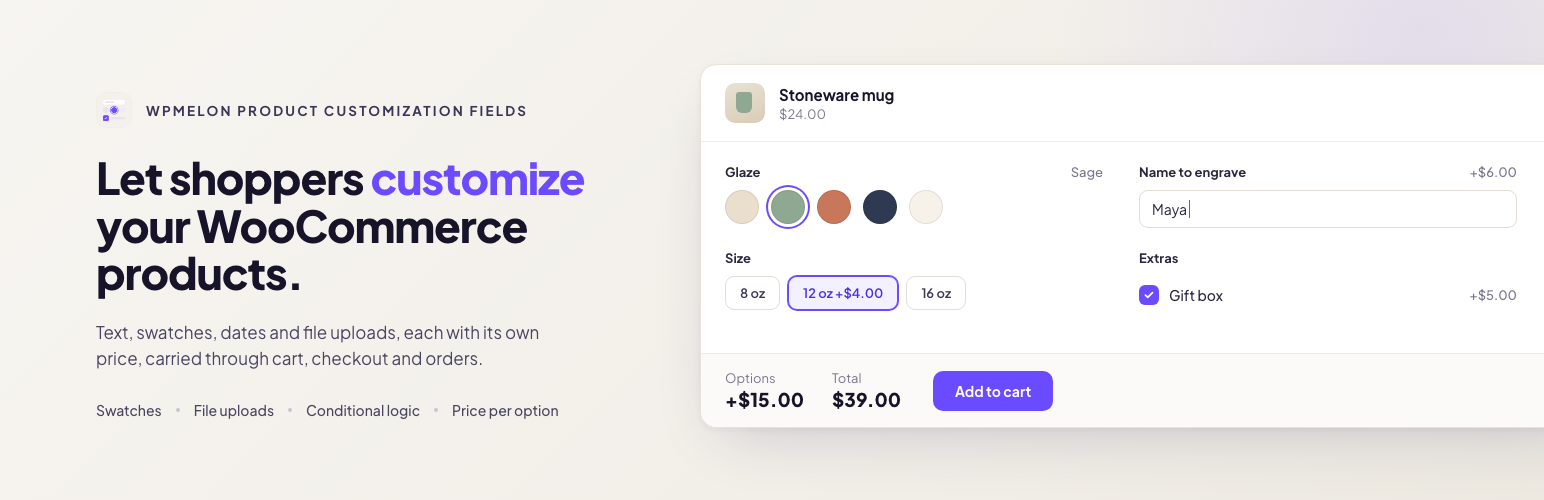
Shoppers personalize the product, and the total updates as they pick.
Let shoppers personalize your WooCommerce products: a name to engrave, a gift message, a size or color swatch, a logo to print. Each choice can change the price, the total updates as they pick, and everything they chose follows the order through the cart, checkout, emails and My Account.
Good for personalized gifts, engraving, custom clothing and print, made-to-order products, delivery dates, and set-up fees for small runs.
Free, and complete on its own
- 14 field types, plus headings and paragraphs to organize longer forms
- Flat and percentage prices per option, added or subtracted
- One-time fees, charged once per cart line whatever the quantity
- Conditional logic with several rules, including number comparisons
- Color and label swatches
- File uploads, kept private and downloadable only by shop managers
- Reusable option groups: apply one to every product, to chosen products, categories or tags (with exclusions), or attach it on a product’s edit screen
- Classic and block cart and checkout
- WPML and Polylang
- JSON import and export of option groups
- One small script (about 5 KB gzipped, no jQuery), loaded only on products that have options
- No external requests and no usage data collected
Field types
- Text and textarea
- Email, URL and phone, checked when the product is added to the cart and shown as plain text (never as links)
- Number
- Select, radio buttons and checkboxes
- Color swatches and label swatches
- Date and time, with earliest and latest values per field (times also take a step in minutes, and a window can run past midnight)
- File upload, with allowed types and maximum size per field
- Headings and paragraphs (conditions can show or hide them too)
Pricing per option
- No price, a flat amount, or a percentage of the product price, added or subtracted (a discount needs no minus sign)
- Charge a price per item, or once per cart line as a one-time fee (set-up fees, engraving plates): the fee gets its own row in the cart and at checkout and does not change with the quantity
- Percentages follow the price of the selected variation, sale price included
- Option prices use the same tax setting as your product prices, and work with quantities and coupons
Conditional logic
Show or hide a field depending on the fields above it. Combine several rules and choose whether all or any of them must match; each rule checks whether a field is, is not, is empty or is not empty. Number fields can also be compared: greater than, less than, at least or at most a number, for example “show Bulk engraving when Names is at least 10”. Hidden fields are ignored when the order is placed, and prices are always worked out again on the server.
What the shopper sees
On the product page, the fields sit above the Add to cart button, and the options total, any one-time fee and the new total update as the shopper picks. Their choices and prices then show in the cart and at checkout, are saved on the order, and appear in the order emails and in My Account. Uploaded files show by name only; shop managers download them from the order screen.
Compatibility
Tested with the Storefront and Twenty Twenty-Five themes, and works with classic and block themes. Works with simple and variable products, and with the classic and block cart and checkout. In the shop, a product with a required field that shows by default gets “Select options” instead of “Add to cart”.
Privacy
The free plugin makes no external requests and collects no usage data.
Known limitations
- With currency switchers or other price filters, the product page shows option prices before conversion; cart, checkout and orders show converted amounts.
- With WPML Multilingual & Multicurrency for WooCommerce, flat option amounts and one-time fees are not converted to the shopper’s currency: a flat amount of 5 is charged as 5 in every currency. Percentages are converted along with the product price.
Pro
WPMelon Product Customization Fields Pro adds to the free version, which stays complete on its own:
- Price formulas: a price calculated from the customer’s answers, with ready-made templates
- Image swatches, with the chosen image in the cart and on the order
- Prices per character, per word, or entered by the customer
- Conditions on product attributes, and “contains” rules on text
- Minimum and maximum choices on checkboxes, lead time and booking window on dates
- Option groups for chosen customer roles
- A catalog overview: which groups each product gets, and why
- Import between sites that finds the same products, updates groups and brings their images
Early-bird buyers keep their early-bird price for as long as their license stays active.
From the makers of WPMelon Advanced Bulk Edit for WooCommerce.
Developer notes
Export file. Plain JSON: "format": "wpm-pcf-groups", a format_version (1), the plugin version and a groups list. Each group has a stable uid, its title, fields and assignment as stored (field and choice ids included, because conditions point at them), refs (SKU, slug and name of assigned products and terms) and attachments (products it is attached to). The file also has a media list: the address, file name and alt text of the images the groups’ choices use. A newer plugin always reads older files; an older one refuses a newer format_version.
Customer text. Text and textarea values are plain text with HTML tags removed. Escape them for the context you print them in (esc_html(), esc_attr()), as WooCommerce and this plugin do.
Uploads behind a proxy. Upload limits count per visitor IP (20 uploads per 10 minutes). Behind Cloudflare or another proxy, return the real visitor IP from the wpm_pcf_upload_client_ip filter (for example from CF-Connecting-IP); without it, all visitors share one limit. The wpm_pcf_upload_rate_limit, wpm_pcf_pending_max_files (default 500) and wpm_pcf_pending_max_bytes (default 1 GB) filters change the limits.
WPML and the block checkout. Use directories or a domain per language (WPML Languages Language URL format). With a language URL parameter (?lang=), the block checkout runs in the default language and the order, options included, is saved in that language.