

WPCreatix ViewMeter – WordPress Visitor Counter
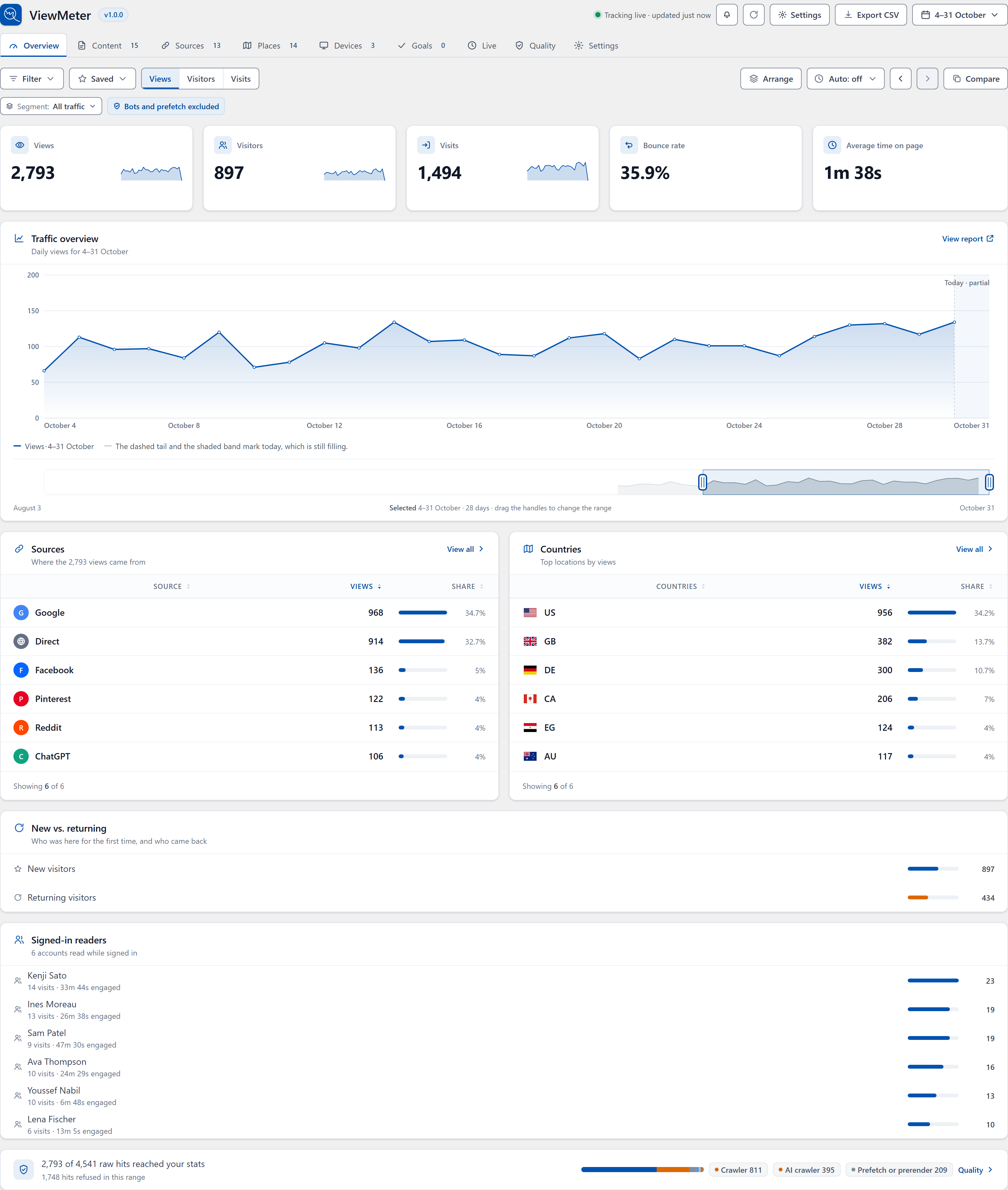
See views, visitors and visits at a glance. Today is marked as partial, so a half-finished day never looks like a drop.
ViewMeter is a visitor counter and analytics plugin for WordPress. It counts page views, post views and visitors on your own server. There is no account to create, and nothing about your visitors is sent anywhere.
Most counters show a number and ask you to trust it. ViewMeter shows you how it got there:
- Bots stay out, and you can see them. Search crawlers, AI scrapers such as GPTBot and ClaudeBot, headless browsers and browser prefetches are not counted. The Quality screen shows how many of each were kept out.
- It counts behind your cache. Pages served by a cache plugin or a CDN still count. There is nothing to set up.
- It tells you when counting stops. Eight health checks watch the counter. If one fails, it says what is wrong and how to fix it.
You also get sources and campaigns, countries and cities, devices, goals, live visitors, email reports and traffic alerts, and a Views column on your posts list.
Moving from another plugin? ViewMeter can import your history from Post Views Counter, WP Statistics, Koko Analytics, Burst Statistics, Independent Analytics and more, without touching the old plugin’s data.
Show post views on your site
Show a view count on any post or page with the View count block, the [viewmeter] shortcode or a template tag. List your most viewed posts with the Most viewed block or [viewmeter_most_viewed]. In wp-admin, every post list gets a sortable Views column.
The screens
- Overview — views, visitors, visits, bounce rate, engaged time, and a chart that marks today as partial.
- Content — what was read, sortable, with a rail for one page’s detail, plus links clicked and forms submitted.
- Sources — referrers classified as direct, search, social, referral, ad or AI, plus UTM campaigns decomposed into all five parameters.
- Places — countries and cities, on a map and in a table.
- Devices — device kind, browser, operating system.
- Goals — score a goal against one of four signals: a page reached, a link clicked, time on site, or pages read. Give it a value and the screen reports what the conversions were worth, not just how many there were.
- Live — who is reading right now, with the page, where they came from, their country, their browser and how long they have been on the page.
- Quality — what was refused and why, and the eight health checks.
- Settings — everything in groups you can search, plus import and export.
- Debugger — replay a visit and see what counting would do with it. Nothing is written, so a replay never moves a number.
- Privacy Audit — reads your live settings and tables and says what is stored.
Filters stack across screens, every reading screen exports CSV, and the whole app runs on one wp-admin page.
External services
ViewMeter can use five outside services. Only the crawler list is on by default. Nothing about your visitors is sent to any of them.
WPCreatix crawler list: https://wpcreatix.com/viewmeter/crawlers.json
Downloads new bot and AI crawler names once a week, so they are filtered before the next plugin release. It is a plain download of one file; nothing about your site or visitors is sent (like any WordPress request, the server sees your server’s IP address and WordPress user agent). The file can only add names, never remove them. Turn it off with “Keep the crawler list up to date” in Settings Advanced.
Terms: https://wpcreatix.com/terms-and-conditions/ · Privacy policy: https://wpcreatix.com/privacy-policy/
DB-IP: https://download.db-ip.com/free/ (country or city Lite database)
Off by default. If you turn on “Keep the location database up to date”, ViewMeter downloads DB-IP’s free location database about once a month and looks up visitors on your own server. Nothing about your visitors is sent; DB-IP only sees your server’s IP address and your site address in the user agent. The database is licensed CC BY 4.0, so location screens show an “IP Geolocation by DB-IP” credit.
Terms: https://db-ip.com/tos/ · Privacy policy: https://db-ip.com/privacy/ · Licence: https://creativecommons.org/licenses/by/4.0/
Moz: https://lsapi.seomoz.com/v2/url_metrics
Off by default. Used only if you add your own Moz API key to show an authority score for the sites that send you visitors. Sends those site domains and your key, once a day. Turn it off in Settings Connected services.
Terms: https://moz.com/terms-of-use · Privacy policy: https://moz.com/privacy-policy
DeepL: https://api-free.deepl.com/v2/translate or https://api.deepl.com/v2/translate
Off by default. Used only if you add your own DeepL key to get translation suggestions for your goal names and count labels. Sends the label text, the languages and your key, once a day and when you press Suggest. Turn it off in Settings Connected services.
Terms: https://www.deepl.com/pro-license · Privacy policy: https://www.deepl.com/privacy
WPCreatix usage data and newsletter (opt-in): https://connect.wpcreatix.com
Nothing is sent unless you click one of these buttons. Skip sends nothing.
- Allow (usage data): your site address, your WordPress, PHP and plugin versions, the plugins and themes you use, and rounded usage counts, plus your name and email for product news, tips and offers. Usage data is sent once a week and when a WPCreatix plugin is activated, updated or removed; your name and email only once. Never your content, your visitors or their statistics, customers, orders or passwords.
- Subscribe (newsletter): the email you enter, with proof of the signup. Every email has an unsubscribe link.
- Submit and deactivate (feedback): the reason you pick, your note, and your email only if you tick the box.
On ViewMeter Data sharing you can see what is sent, turn sharing off, or delete your site’s data at any time.
Terms: https://wpcreatix.com/terms-and-conditions/ · Privacy policy: https://wpcreatix.com/privacy-policy/
No other data is sent anywhere. The health check and the fast endpoint only call your own site.
Credits
Country outlines are drawn from Natural Earth 1:50m admin-0 boundaries, which are public domain, redistributed as world-atlas (ISC): https://github.com/topojson/world-atlas
Everything else — icons, flags, drawings, the mark — was drawn for this plugin.