
Export All Posts, Products, Orders & Users | WP Ultimate Exporter | WordPress CSV Export
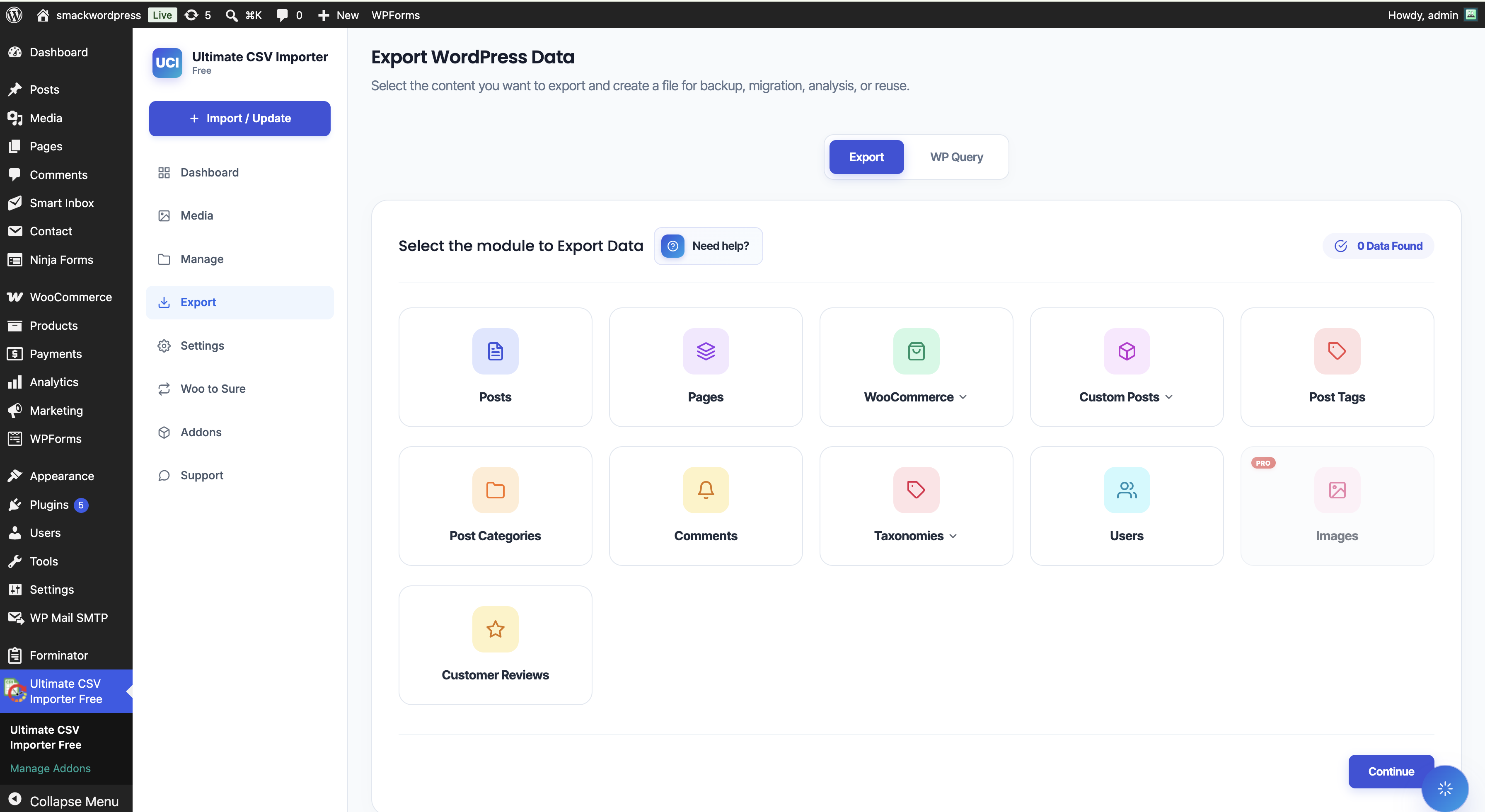
<p>Select module to export page.</p>
Export WooCommerce Products, Orders, Users & Any WordPress Content
Need to export WooCommerce products to CSV, bulk export orders to Excel, or migrate your entire WordPress site to a new host? WP Ultimate Exporter handles all of it — posts, pages, WooCommerce products, orders, coupons, users, custom post types, and more — exported to CSV, XML, XLS, XLSX, JSON, or TSV in just a few clicks.
Important Note: WP Ultimate Exporter is an add-on that requires the free WP Ultimate CSV Importer plugin to function.
This add-on is part of the WP Ultimate CSV Importer ecosystem:
- WP Ultimate CSV Importer (Free, required) — Import posts, pages, custom post types, and more from CSV, XML, or Excel.
- Import WooCommerce Suite — Import WooCommerce products, orders, coupons, customers, and reviews.
- Import Users & Customers with Meta — Bulk import WordPress users and WooCommerce customers with full meta support.
- WP Ultimate Exporter (This plugin) — Export any WordPress or WooCommerce data to CSV, XML, Excel, JSON, or TSV.
Install just what you need, or use all four together for a complete import/export solution.
Top Features & Benefits
- User-Friendly Export Process – Export data in just a few clicks, no coding required.
- Comprehensive Content Export – Export posts, pages, custom post types, custom fields, users, WooCommerce products, orders, reviews, and more.
- Versatile Media Export – Export WordPress media separately or along with posts and pages.
- Customizable Export Options – Choose specific data for export, including post types, authors, date range, and more.
- Metadata & Custom Fields Support – Preserve all custom fields and metadata associated with your content.
- Error-Free CSV & XML Files – The plugin automatically formats data to prevent errors.
- Time-Based Data Export – Export posts, orders, or records from a specific time frame.
- Post Status Filtering – Export data based on post status (Published, Draft, Pending, etc.).
- Author-Specific Export – Extract content created by specific authors.
- Quick Migration Zip Export – Export any post type as a bundled ZIP with default template info for easy migration using the One-Click Import option in the Importer.
- Query-Based Export – Use post type query, user query, and comment query to export exactly the data you need.
- Iteration-Based Export – Export large volumes of data in smaller batches to prevent timeouts and improve stability.
Unlock advanced filtering options and seamless Google Sheets export with Ultimate Exporter Pro.
Supported Third-Party Plugins
The exporter works out of the box with a wide range of popular WordPress plugins:
- SEO: All in One SEO, Rank Math, Slim SEO
- Page Builders / Custom Fields: ACF (Advanced Custom Fields), Meta Box (latest version), JetEngine (latest version), Secure Custom Fields, Toolset Types
- Multilingual: WPML, Polylang, Polylang for WooCommerce
- Membership: WP-Members, MemberPress
- WooCommerce Extensions: Product Bundles, Variation Swatcher, YITH Order Tracking, YITH Barcodes, Cost of Goods, Extra Product Options, PPOM
- LMS: LearnPress (Courses, Lessons, Quizzes, Orders)
- Directory & Listings: GeoDirectory, Business Directory Plugin, Advanced Classifieds & Directory Pro, Listeo theme
- eCommerce: Easy Digital Downloads (Downloads, Customers, Discounts), SureCart (Products, Coupons, Customers)
- Other: BBPress, WP Job Manager, Events Calendar, Jet Bookings, JetEngine CCT
Use Cases
- Export WooCommerce products to CSV — Bulk export your entire product catalog including variations, images, categories, and attributes for migration, backup, or supplier updates.
- Export WooCommerce orders to Excel — Pull all orders or filter by date range and export to XLS for accounting, fulfillment, or analysis.
- Export WooCommerce customers — Export your full customer database including billing and shipping details to CSV for CRM import or email marketing.
- Migrate WordPress site content — Export posts, pages, and custom post types with the one-click migration ZIP for clean site-to-site transfers.
- Export WordPress users — Bulk export user profiles, roles, and meta fields to CSV for backup or migration to another site.
- Export custom post types — Export content from any registered custom post type including ACF, Meta Box, and JetEngine fields.
- Export membership data — Export WP-Members or MemberPress subscriber data for analysis or platform migration.
- Back up WooCommerce coupons — Export all coupon codes and discount rules before a site migration or as a periodic backup.
Multilingual Data Export
Effortlessly export multilingual content from WordPress sites powered by WPML or Polylang. Ensure smooth migration of language-based data in CSV/XML formats while preserving translations accurately.
WordPress Users Export with WP Ultimate Exporter Add-On
Enhance your user data management by integrating the Import User Add-On to:
– Generate Complete User Lists – Export usernames, emails, roles, and more.
– Filter and Export Targeted User Data – Select user records based on specific criteria.
– Capture User Metadata & Custom Fields – Export additional user profile details securely.
Note: Exported passwords are encrypted (MD format) and cannot be used for direct login.
WooCommerce Export: Enhance Your Store Management
Combine the Import WooCommerce Add-On to unlock additional WooCommerce export features:
– Export Products & Variations – Extract complete product details for seamless migration.
– Export Product Images & Categories – Maintain product organization and visuals during transfers.
– Manage WooCommerce Orders – Export orders in CSV/XLS format for analysis and fulfillment.
– Export WooCommerce Reviews & Coupons – Store and analyze customer feedback and promotional data.
Why Export Your WordPress Data?
Exporting your WordPress content offers multiple benefits:
- Data Security & Backup – Prevent data loss from hosting issues, plugin conflicts, or accidental deletions.
- Seamless Website Migration – Easily move your website between hosting providers or domains.
- Streamlined Collaboration – Share specific content with team members effortlessly.
- Safe Testing Environment – Test new themes or plugins using a backup version of your site.
Exporting Made Simple
The WP Ultimate Exporter plugin follows a streamlined two-step process:
1. Select Content – Choose posts, pages, custom fields, users, WooCommerce products, or orders.
2. Customize & Export – Apply filters like file format, author, post status, or date range, then download the file.
Protect your WordPress content today with WP Ultimate Exporter. Download it now from the WordPress Plugin Directory.
Migration Made Easy
The latest release introduces a feature that allows you to download a migration ZIP file, which can then be imported into the target site using the importer plugin. Here’s how to export the migration file:
- Select Content Type – Go to the export page and choose a content or module type from the list.
- Configure Migrate Option – On the next page, provide a name for the file, select the file type, and configure any advanced export settings like filters. Once done, click the Migrate button to generate a ZIP file with all the data and default mapping info. After export is complete, click the Bundle button to download the ZIP file, ready for migration.
For more details on this migration feature, refer to our documentation on How to Migrate WordPress Site Data Using One-Click Import & Migrate Feature.
Unlock WP Ultimate Exporter Pro
Upgrade to Ultimate Exporter Pro for premium features:
– Scheduled & Automated Exports – Set up recurring exports with ease.
– Advanced Filtering by Category, Status, Column Selection, Post IDs, Title, and Custom Fields
– Google Sheets Integration – Export data directly to Google Sheets for real-time access.
– Support for ACF, Toolset Types, JetEngine, and Meta Box Fields
Try WP Ultimate Exporter in Action
Explore the plugin features through our live demos:
Support & Resources
Need help? Visit our Support Page for assistance.
Learn more with our WordPress Export & Import Tutorials.
If you find WP Ultimate Exporter helpful, please rate us. Thank you for your support!