

External Store for Shopify
Single Product
Display Shopify products on your WordPress website with simple shortcodes.
Free features
- Product grid and collection shortcodes with search filter
- Responsive grid with configurable columns, sorting and price display
- Single product page with gallery, price, sale price and sold out label
- Product structured data (JSON-LD) for better search results
- Built-in cache for fast pages, plus a Clear cache button
- Test connection, shortcode generator and one-click disconnect in the settings
- Secrets are never printed back into the settings page
- Accessible, translatable and lazy loaded images
Premium features (plug and play)
If the pro folder exists, the premium features switch on automatically. If it does not exist, the free version keeps working exactly as before.
- JS cart drawer with variant and quantity support, live cart counter and checkout button
- Quick “Add to cart” buttons inside the product grid
- Sale badges and list / cards layouts
[wp-shopify-related]related product recommendations[wp-shopify-cart-button]cart button anywhere- Premium product templates
New attributes in 1.7.0
[wp-shopify type="products" columns="4" sort="title" reverse="yes" show-price="yes"]
Sort values: title, price, newest, best-selling (collections also support manual and default).
How it works?
A) Set up all the apis as directed by the App
B) Set up two new pages on your WordPress website
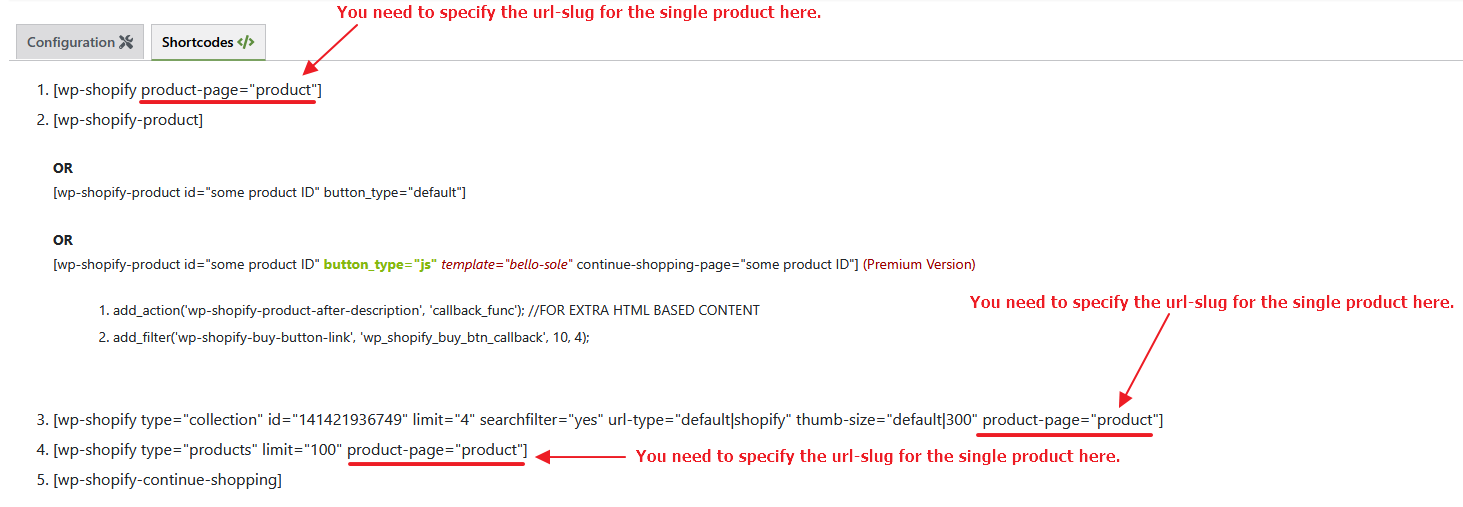
Page #1 Set the permalink to shopify (or products, shop, catalogue etc.) and add code [wp-shopify type=”products” limit=”100″ url-type=”default”]
Page #2 Set the permalink to product (note there is no “s” at the end of the product in the url, the slug/permalink should be with exactly “product”) and insert code [wp-shopify-product] (this is where product redirect link to shopify store will work on your WordPress website)
C) Modify the layout of your WordPress website pages with the CSS