
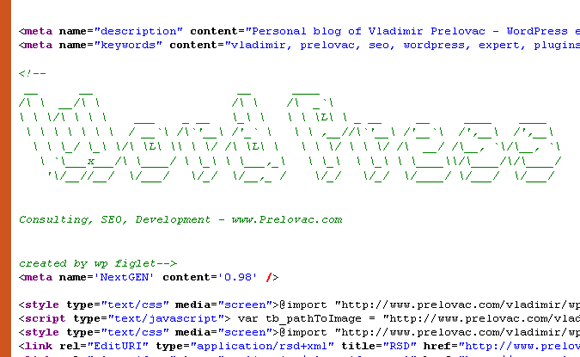
WP Figlet in action on my home page
WP Figlet allows you to draw ASCII art in your posts and page source.
Here is an example:
                 __                 __
|  |  _   _  _| |__)  _  _  _  _   |__)  _   _ |   _ |
|/\| (_) |  (_| |    |  (- _) _)   | \  (_) (_ |( _) .
You can use ASCII art to say a personal message about your site. Or it can say an advertisement.
Plugin by Vladimir Prelovac.
Credits
WP Figlet is based on Figlet (www.figlet.org) and Figlet PHP class (www.thebobo.com), the classical ASCII art program.
Thanks.
License
This file is part of WP Figlet.
WP Figlet is free software: you can redistribute it and/or modify it under the terms of the GNU General Public License as published by the Free Software Foundation, either version 3 of the License, or (at your option) any later version.
WP Figlet is distributed in the hope that it will be useful, but WITHOUT ANY WARRANTY; without even the implied warranty of MERCHANTABILITY or FITNESS FOR A PARTICULAR PURPOSE. See the GNU General Public License for more details.
You should have received a copy of the GNU General Public License along with WP Figlet. If not, see http://www.gnu.org/licenses/.