


Japanized for WooCommerce
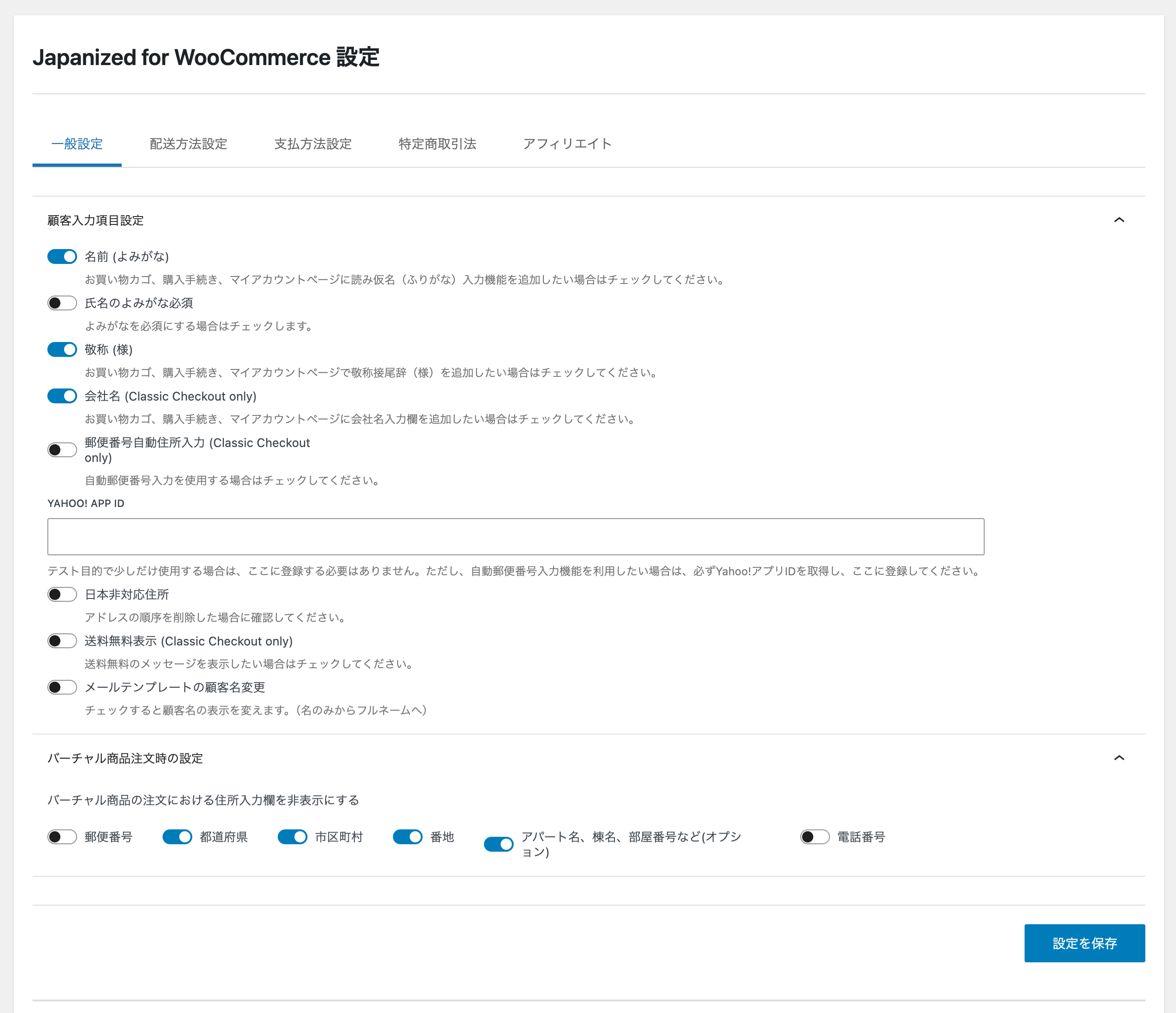
General Settings - Configure name reading (Yomigana) fields, address display options, and honorific titles.
Japanized for WooCommerce is the essential toolkit for running a WooCommerce store in Japan. This plugin bridges the gap between WooCommerce’s global features and Japan’s unique e-commerce requirements.
Why You Need This Plugin
Running an online store in Japan requires specific features that standard WooCommerce doesn’t provide out of the box:
* Japanese address formats with proper field ordering (postal code, prefecture, city, address lines)
* Name reading fields (Yomigana/Furigana) for accurate customer identification
* Delivery date and time selection that customers expect
* Popular Japanese payment methods like bank transfer and COD
* Legal compliance with Japan’s Specified Commercial Transaction Act (特定商取引法)
Who Should Use This
This plugin is designed for:
* Japanese e-commerce businesses using WooCommerce
* International stores shipping to Japanese customers
* Anyone who needs Japanese address handling and payment methods
* Stores requiring delivery date/time selection functionality
Seamless Integration
Works smoothly with WooCommerce core features and popular extensions. Fully compatible with the new WooCommerce Blocks checkout experience. All features are optional – enable only what you need for your store.
Key Features
Address & Name Management
* Name reading (Yomigana/Furigana) input fields for billing and shipping addresses
* Honorific title (様/sama) automatically added after customer names
* Japanese-style address format with proper field ordering
* Auto-fill address from postal code using Yahoo! API integration
* Company name field support
Shipping & Delivery
* Delivery date and time selection at checkout
* Delivery time slot management
* Holiday and non-delivery day settings
* Weekend and specific date exclusions
* Delivery-related fields hidden when free shipping is applied
Payment Methods
* Bank Transfer (Japanese banks)
* Japan Post Bank Transfer
* Cash on Delivery (COD) with fee calculation
* COD subscription support
* Pay at Store (over-the-counter payment)
* Paidy (Buy Now, Pay Later) – Official Japanese payment gateway
Legal & Compliance
* Specified Commercial Transaction Act (特定商取引法) page creator
* Shortcode support for legal information display
* Customizable legal notice templates
Security Check
* Checks the installed plugins, themes and WordPress against known vulnerabilities once a day (data from Wordfence Intelligence, delivered by wc.artws.info)
* 17 checks in all, including HTTPS on the checkout and My Account pages, two-factor authentication, file editing in the admin, and backups or logs left in public directories
* A score for each of the four requirements of Japan’s Credit Card Security Guidelines (クレジットカード・セキュリティガイドライン), with the items that need action and how to fix them; it shows what needs attention and does not guarantee compliance
* “Re-check now” on the Security tab; on by default and can be turned off there
* Login attempt limiter (off by default): counts failed logins per IP address and per user name on the WordPress and WooCommerce login forms, and stays out of the way when a security plugin, Jetpack or the server already protects the login page
* More hardening options (off by default): hide the user list of the REST API from visitors who are not logged in, forbid file editing in the admin screens (DISALLOW_FILE_EDIT), and turn XML-RPC off except for the methods you allow (Jetpack keeps working)
* Free security check by wc.artws.info (optional, only after you agree on the Security tab): sends the list of plugins and themes and the results of the checks, shows a report with the items that need action and how to fix them, and its data can be deleted from the same tab
* A record of the XML-RPC calls of the last 30 days, kept on the site, that shows which methods are used, by which client and whether they log in, so that you can tell integrations from password guessing before turning XML-RPC off
Additional Features
* Email template optimization for Japanese format
* Address validation for Japanese postal codes
* Affiliate integration (A8.net, Access Trade, Value Commerce)
* WooCommerce Blocks compatibility
Note: Paidy Checkout is also available as a standalone payment plugin.
External Services
This plugin connects to the following third-party services:
- Yahoo! Japan Web API (yahoo.co.jp) — used by the postal-code auto-fill feature to look up a Japanese address from a postal code entered at checkout. The postal code is sent to Yahoo! Japan’s address lookup API whenever a customer uses this feature; it uses a merchant-configured Application ID (Japan Settings Address Form) if one is set, and a bundled shared ID otherwise, so it is active whenever the postal-code auto-fill feature itself is used, not only once an ID is configured. See Yahoo! Japan’s own site for their terms of service and privacy policy.
- Paidy payment API (api.paidy.com) — used by the Paidy (Buy Now, Pay Later) payment gateway to process and verify payments. Only active when the Paidy gateway is enabled. See Paidy’s own site for their terms of service and privacy policy.
- Artisan Workshop Paidy onboarding intermediary (paidy.artws.info) — used only while applying for a Paidy merchant account through this plugin’s setup wizard (available even before the gateway is enabled, since onboarding is how it becomes eligible to be enabled). Submitting the application form sends the store’s site name and URL, the merchant’s contact details (email, phone), the representative’s name and date of birth, the submitted screening survey answers, and a site-specific verification hash, to this Artisan Workshop-operated intermediary, which relays the application to Paidy and later delivers the issued API credentials back to the site.
- Artisan Workshop promotion service (wc.artws.info) — the plugin’s own first-party service. It is contacted automatically (no setting to disable it) to fetch promotional notice content shown in the WordPress admin dashboard to users who can manage WooCommerce, on stores with at least one order placed in the last 5 days. No order, customer, or site-configuration data is sent or received beyond the request itself.
- Artisan Workshop vulnerability feed (wc.artws.info) — used by the security check (WooCommerce JP4WC Settings Security), which is on by default, including on sites updated from an earlier version. Shortly after the plugin is installed or updated, and then once a day, WP-Cron downloads the list of known vulnerabilities in WordPress plugins, themes and core from
https://wc.artws.info/feed/v1/(data from Wordfence Intelligence) and compares it with the installed software on the site itself; “Re-check now” on the Security tab also downloads it at once when no list is stored yet. The requests are plain downloads: they carry only a User-Agent header with the versions of this plugin, WordPress, WooCommerce and PHP, and like any request they reveal the server’s IP address. These downloads do not send the site URL, the list of installed plugins and themes or the results of the check (only the free security check below sends them, after consent); the other checks on the Security tab run on the site and send requests only to the site’s own address. Turning the security check off on the Security tab stops the requests and deletes the downloaded data and the results. Terms of use: https://wc.artws.info/security-assessment-term/ Privacy policy: https://wc.artws.info/privacy-policy/ - Artisan Workshop free security check (wc.artws.info, operated by 職人工房 合同会社) — optional, and nothing is sent until it is used. Only when a store manager agrees to the terms of use and the privacy policy on the Security tab and clicks “Agree and run the check” (later “Run the check again”), the plugin sends
POST https://wc.artws.info/wp-json/artws-sec/v1/scanwith:schema_version,site_url(the site address),wp_ver,wc_ver,php_verandjp4wc_ver(the versions of WordPress, WooCommerce, PHP and this plugin),locale,software(thetype,slug,versionandactivestate of every installed plugin and theme),local_findings(thecheck_idandstatusof each check on the Security tab, never the settings behind them),consent_versionand, only when a separate box is ticked (off by default, offered only to stores in Japanese yen),revenue_bandandorder_band(the revenue and the number of paid orders of the last 12 months as band codes, never the amounts). The consent screen shows every value before it is sent. The administrator’s e-mail address, customer data, order amounts, API keys, the contents of wp-config.php and server paths are not sent. The response is a report shown on the Security tab and, on the first check, a site identification token issued by wc.artws.info, which the plugin keeps without showing it and sends with later checks and with the deletion. wc.artws.info keeps the data for 180 days. It uses the data to make the report, to improve the service, for security information on wc.artws.info (aggregated so that no site can be identified) and, through staff of 職人工房 合同会社 looking at each registration, to answer inquiries, investigate problems, confirm deletion requests and review the priority of measures for the size of the store. The bands are used only to show that priority in the report, to improve the service, for the aggregated security information and for the staff check. The data and the reports are never used for sales or advertising. “Delete check data” on the Security tab sendsDELETE https://wc.artws.info/wp-json/artws-sec/v1/siteand removes the consent, the token and the report from the site; deleting the plugin from the Plugins screen sends the same request. Nothing is sent by WP-Cron. Terms of use: https://wc.artws.info/security-assessment-term/ Privacy policy: https://wc.artws.info/privacy-policy/