

SKU Label Changer For WooCommerce
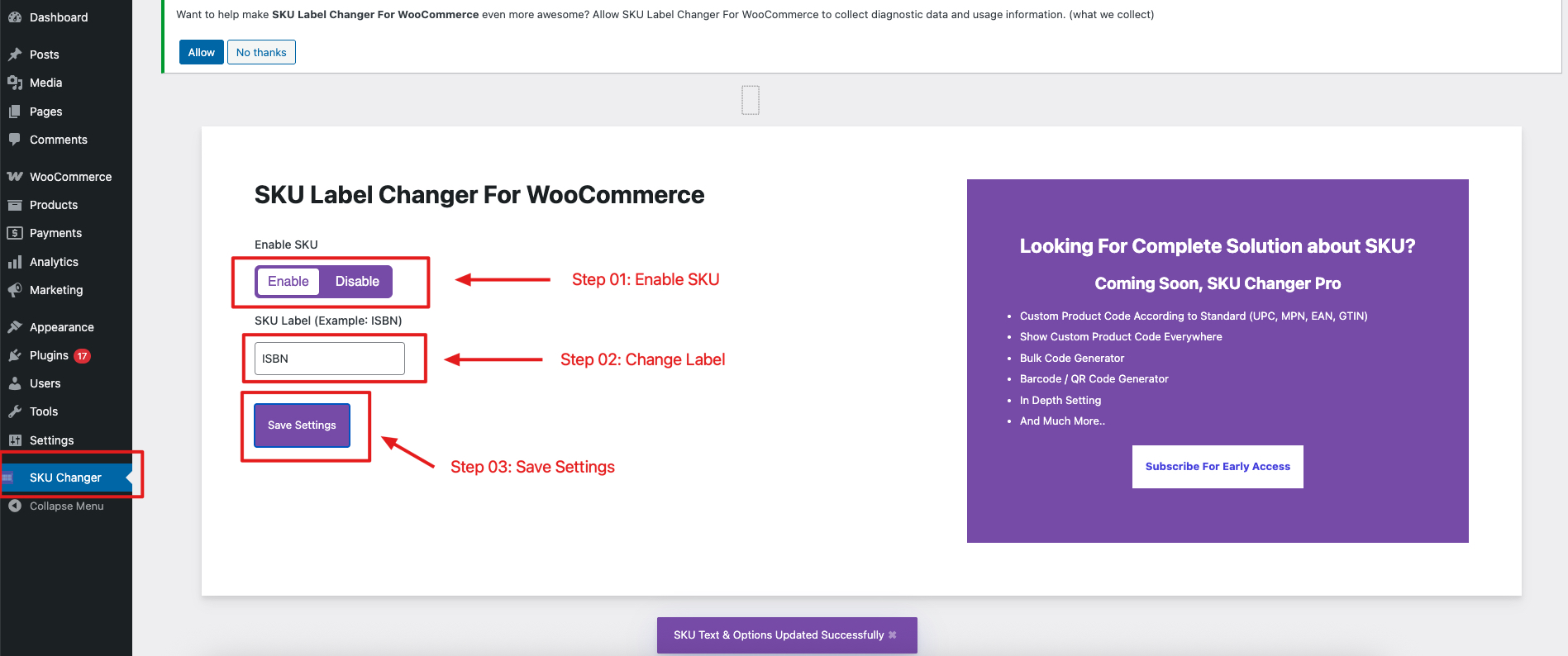
Settings Page
SKU Label Changer Now Support Dokan – Powerful WooCommerce Multivendor Marketplace Solution
SKU Label Changer For WooCommerce is a simple but effective plugin for WooCommerce users. Most of the users wants to change the default SKU label. But, unfortunately they don’t understand the codes. Also, hiring a web developer is not a good idea for change the simple text.
This plugin allows to to change the text easily. Here are the steps that you need to done.
- Install the plugin from WordPress.org Repository.
- After install you will find an option named ‘SKU Changer’ from WordPress sidebar. Click on it.
- Select Enable SKU
- Change the text from SKU Label textbox. Example: ISBN
- Click on ‘Save Settings’
- Done
Privacy Policy
SKU Label Changer For WooCommerce uses Appsero SDK to collect some telemetry data upon user’s confirmation. This helps us to troubleshoot problems faster & make product improvements.
Appsero SDK does not gather any data by default. The SDK only starts gathering basic telemetry data when a user allows it via the admin notice. We collect the data to ensure a great user experience for all our users.
Integrating Appsero SDK DOES NOT IMMEDIATELY start gathering data, without confirmation from users in any case.
Learn more about how Appsero collects and uses this data.