

Display Eventbrite Events
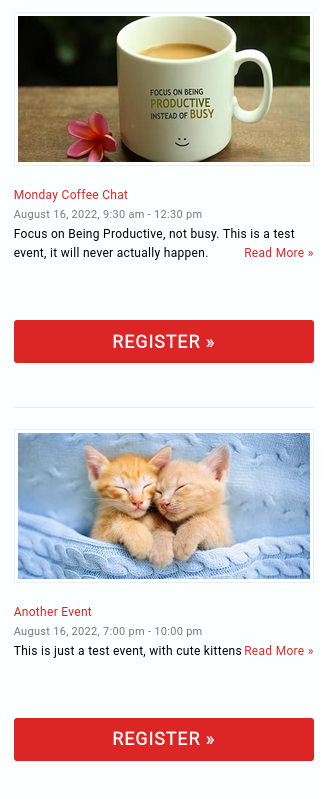
Widget Layout
Solve your problem by integrating Eventbrite events to display on your WordPress website, with this simple to set up, yet flexible plugin.
In a couple of minutes you can start seeing your Eventbrite events on WordPress without any custom code.
Eventbrite is undoubtedly a very easy and powerful way to set up an events calendar, whether for free events or ticketed events.
However, managing multiple events is an administrative burden and forgetting to update your event details manually may well cost you attendees and potential lost revenue.
This free plugin provides a display for Eventbrite using the API feed enabling you to show your forthcoming events, just like you would do for recent posts in an easy-to-use and familiar way.
If you want the most power and features there is a Pro plugin, which you can easily try for a trial period without obligation.
The plugin has 3 methods of displaying events:
* WordPress Block
* Elementor Widget
* Shortcode
The WordPress Block and Elementor widget enable you to get a realistic display of the layouts and settings within the editor.
The best part? Every time you add or update an Eventbrite listing, all the changes will appear on your WordPress website – no duplication of work or coding skills required.
This plugin uses the Eventbrite API to read directly from Eventbrite servers creating an event feed for Eventbrite. Don’t be put off by the words API, that just means the plugin is linked directly to Eventbrite data – no rekeying, no extra data to manage, simplifying and automating your event marketing.
See an interactive demo here
What it looks like on your site will depend on your theme and any extra styling you want to apply. It will blend in as though the Eventbrite events are posts on your own site.
The plugin provides options to easily set different pre-defined color styles.
The plugin gives you easy but powerful control over how you show Eventbrite events.
Choice of two free layouts – ‘widget layout’ and ‘card layout’.
I’m sure you will find this plugin the best way of showing Eventbrite events on WordPress.
Want to learn more about the many options of the best Eventbrite plugin for WordPress? Check out the Display Eventbrite Events demo page
Not everything on Eventbrite?
Display Eventbrite Events can also show events from EventKiln, the ticketing service from Fullworks, the team behind this plugin. List free events, or sell tickets with the money going straight to your own Stripe account. EventKiln events appear in the same layouts and calendar as your Eventbrite events, or on their own. EventKiln has a free Starter plan. Find out about EventKiln
PHP 8.5 compatible
Tested on PHP up to 8.5
Features Include
- Custom html or text before and/or after recent posts.
- Allow you to set title url.
- Display thumbnails, with customizable size and alignment.
- Exclude current event post
- Read more option, with a link direct to the event’s page.
- Book now option with a link direct to the event’s ticket page.
- Show EventKiln events alongside your Eventbrite events, or on their own
- Decide if you want Eventbrite to open in a new tab, or not
- Easy to customise CSS.
- Total of 22 options for the free version
- Developer friendly custom designs using templates in ( child ) theme
- Developer friendly filters
- Elementor Widget and WordPress Block support
Easy to get started with
Easy to build shortcodes
Use the demo shortcode builder to see what your events may look like, this works with your events. Click Here to go to the demo page
Easy to use with Elementor
A bespoke Elementor Widget so you can see your efforts inside the editor.
Easy to use with the Block Editor
A bespoke WordPress Block so you can see your efforts inside the editor.
The Original Widget for Eventbrite API
This plugin was the first to use the Eventbrite API to create a widget for Eventbrite. It has been around since 2017 when it was a simple widget, literally a ‘widget for eventbrite api’ and has been constantly updated and improved.
Now the free version is used by many thousands of users and the Pro version is used by a range of organisations from small community groups to very large music venue promoters.
Go Pro
Get so much more with the Pro version.
Upgrade to get new awesome features and support. Upgrade directly from the WordPress dashboard.
Additional features include:
Up to a total of 80 options giving so many configuration and filtering choices.
If you are not using the Block Editor or Elementor, you can use the demo shortcode builder to explore the pro options, this works with your events. See the shortcode builder here
Or review a full description of all options in the free and paid for plans. Free and Premium plan detailed option here
- filter events by Eventbrite collections
- cookie consent aware embedded checkout – nothing loads from Eventbrite, and no Eventbrite advertising or social cookies are set, until your visitor has given consent through your cookie banner. Works with any consent plugin that supports the WP Consent API, such as Complianz, CookieYes or Cookiebot
- choice of pre built shortcode templates tested on popular themes such as Divi, Astra, OceanWP, Enfold, Genesis and WP themes
- pre-built calendar page template with grid layout
- pre-built calendar view in month list format, and custom periods
- full width, venue, short date, card and grid layouts
- use different APIkeys for different shortcodes, so different organisation feeds can be used
- 5 star support
- additional filters so you can split events across pages
- link from summary lists to full page event on site
- additional features for Eventbrite Music venues & promoters
- stay onsite ‘checkout’ popup feature – never leave your website, with integrated checkout popup
- stay onsite long description modal options
- display only Online Events
- allocate a virtual location to Online Events
- listing private / invite only events
- listing only past events or only future events
- customise with developer friendly templates
- manage Eventbrite API cache time to optimise performance
External services
This plugin connects to the following services. No website visitor personal data is sent to either.
Eventbrite – to fetch your events, using the Eventbrite API key you enter in the settings. Requests go from your server to www.eventbriteapi.com and include your API key, plus the organization, event and collection IDs being displayed. In the Pro plugin, the optional on-site checkout loads Eventbrite’s checkout script from www.eventbrite.com in the visitor’s browser. Eventbrite API terms of use, Eventbrite privacy policy.
EventKiln (optional) – only if you enter an EventKiln API key in the settings. Your server then fetches your organisation’s published, public, upcoming events from EventKiln once a day (as often as your Eventbrite events are refreshed), and when you save the settings. Each request includes your EventKiln API key. In the Pro plugin, the optional on-site checkout loads EventKiln’s checkout script and checkout page from eventkiln.com in the visitor’s browser; EventKiln says these set no cookies and use no browser storage. In the Pro plugin, if your EventKiln API key has the webhooks permission, your server also registers this website’s webhook address with EventKiln so EventKiln can tell it when your events change; turn this off with the Instant updates setting. Nothing is sent to EventKiln until it is set up. EventKiln terms, EventKiln privacy policy.
Privacy and GDPR
This plugin does not collect, process or send any website visitor personal data anywhere