


WhoChanged – Admin Activity & Audit Log
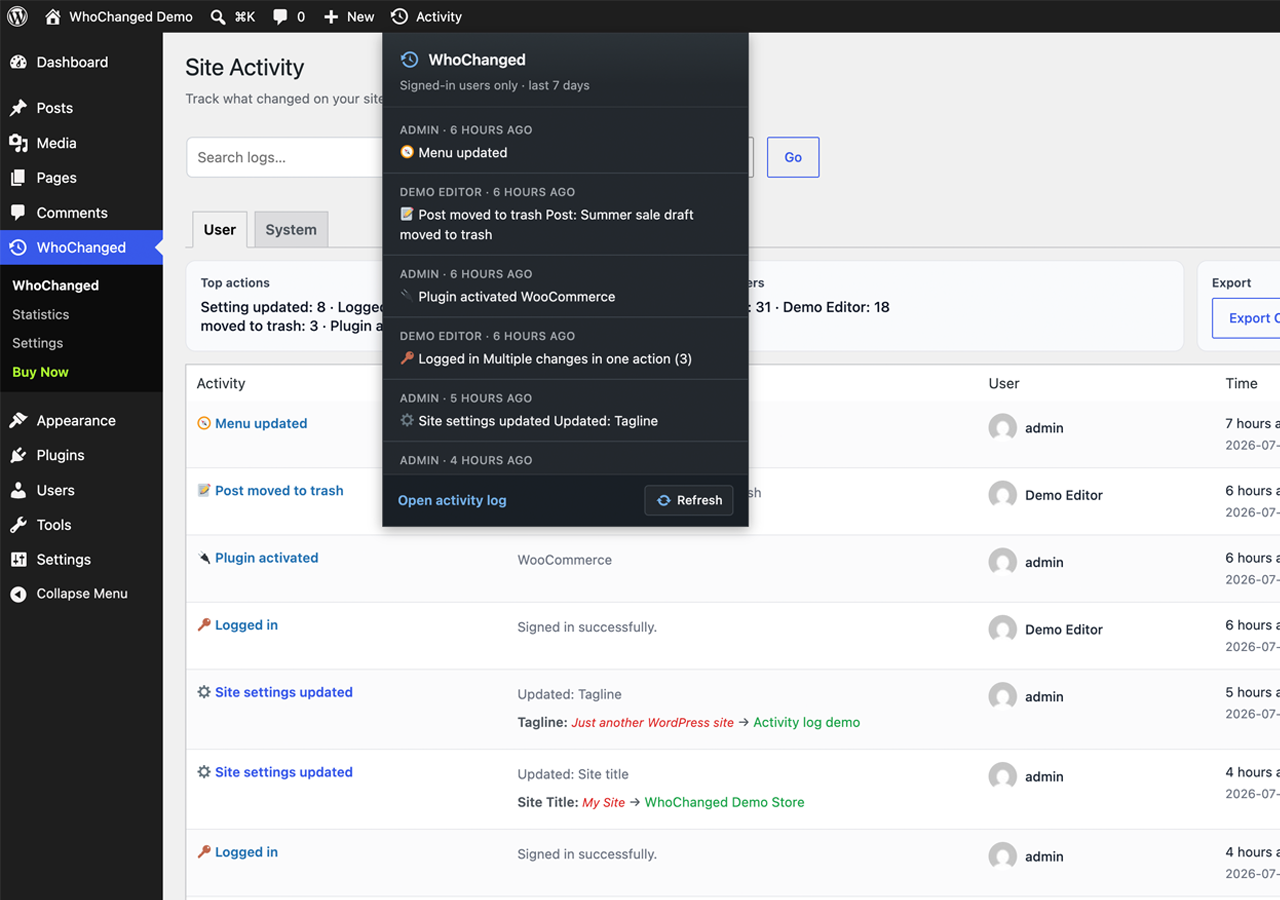
Activity log listing with filters and expandable before/after diffs for each change.
Plugin URL: https://douple.net/whochanged/
Docs: https://douple.net/whochanged/docs.html
Demo: https://douple.net/whochanged/demo.html
GitHub: https://github.com/thiendo/whochanged
Support: [email protected]
Get WhoChanged PRO: https://checkout.freemius.com/plugin/35452/plan/58744/
WhoChanged is a lightweight admin activity & audit log for WordPress. It quietly watches the admin area and records every meaningful change: who did it, what changed, and when — with clear before/after diffs.
When something breaks after an update, a setting disappears, or a client swears “I didn’t touch anything,” WhoChanged gives you the answer in seconds instead of hours of guesswork.
Features
- Before/after diffs — see exactly what the old and new values were, not just that something changed
- Settings & options — track option updates made through
wp-admin - Customizer — log Customizer saves with only the settings that actually changed
- Plugins — activation, deactivation, deletion, installs and upgrades
- Users — logins, failed login attempts, logouts and role changes
- Content — posts and comments moved to trash, restored, or permanently deleted
- Navigation menus — menu creation, updates and deletions
- WooCommerce — order deletions (when WooCommerce is active)
- Filterable activity log — search and filter by user, event type and date range
- Statistics dashboard — charts for actions, users, trends and activity by hour of day
- Admin bar quick menu — recent activity without leaving the page you are on
- CSV export — download your activity log whenever you need it
- 30-day activity history on every Free install — no setup required
- Privacy-friendly by default — log data stays in your own WordPress database
- Fully translatable — ready for WordPress.org language packs
Perfect for
- Agencies and freelancers managing client sites with multiple admins
- Site owners who need a clear audit trail after unexplained changes
- Teams that want accountability without a heavy security suite
- Developers debugging “who changed this option?” moments
PRO features
More info at https://douple.net/whochanged/ — or buy WhoChanged PRO.
The Free plan tells you what changed. PRO helps you act on it, prove it, and get notified the moment it happens:
- Configurable / unlimited retention — Free keeps 30 days; PRO unlocks 60/90 days or forever so nothing ages out before an audit
- Excel (XLS) & PDF reports — client- and auditor-ready exports beyond CSV, including a one-click PDF of the Statistics dashboard
- Instant email alerts — get notified when specific event types happen (theme switches, plugin installs, admin role changes, and more)
- Role-based access control — choose which roles can view the log, and which roles are tracked. On Free, only Administrators can view logs and every user is tracked
- One-click purge — wipe the entire activity log when you need a clean slate
Free is genuinely useful on its own — full event coverage, filtering, diffs, statistics and CSV export. PRO is for teams and agencies that need longer history, professional reports, real-time alerts and fine-grained access control.
Requirements
- WordPress 6.0 or higher
- PHP 7.4 or higher
- WooCommerce is optional (only needed for WooCommerce-specific events such as order deletions)
External services
This plugin optionally connects to Freemius (https://freemius.com/) for:
- Optional opt-in usage tracking (skipped unless you explicitly agree on the Freemius connect screen)
- PRO checkout, license activation / deactivation, and PRO plugin updates
When those flows run, Freemius may receive data such as site URL, admin email / name (when provided), license key, plugin version, and basic WordPress / PHP environment info needed for licensing and support.
- Freemius Terms of Service: https://freemius.com/terms/
- Freemius Privacy Policy: https://freemius.com/privacy/
- Freemius data practices: https://freemius.com/privacy/data-practices/
No Freemius connection is required to use the free activity log features.
Development
Human-readable source for plugin-owned JavaScript and CSS is included in this package under assets/js/ and assets/css/ (admin.js, admin-bar.js, stats-charts.js, and matching stylesheets). Third-party libraries under assets/js/vendor/ and assets/css/vendor/ ship as upstream distribution builds (Chart.js, Flatpickr).
Public source repository: https://github.com/thiendo/whochanged
No build tools are required to review or modify the plugin-owned admin scripts and styles.