

WebWerk Service Quote
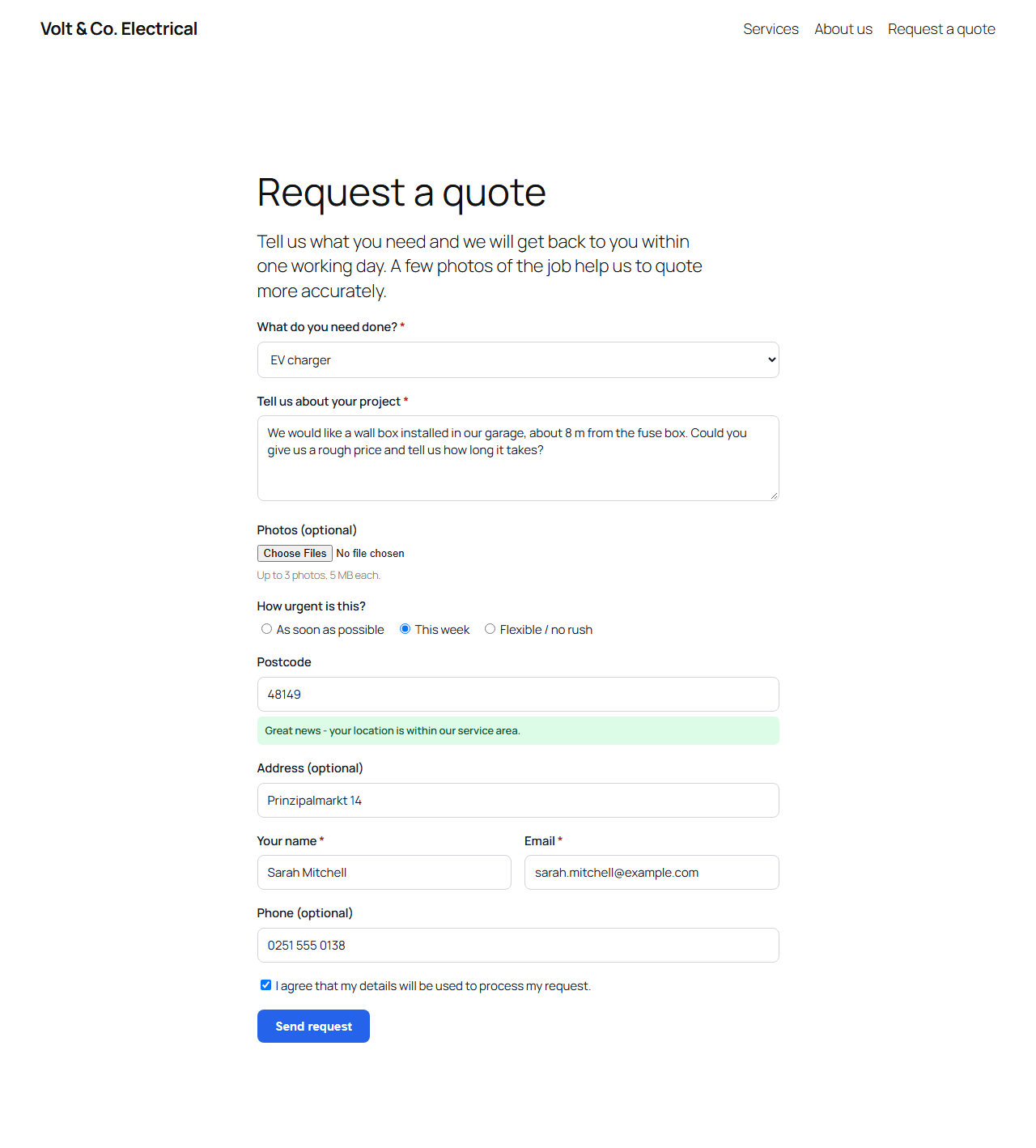
The request form on your website, with a live service-area check
A plain “Name / Email / Message” contact form forces every visitor’s request through a phone call before you even know if it’s worth quoting. WebWerk Service Quote asks the right questions up front instead:
- Which service is needed (your own list, e.g. Electrical, Plumbing, Heating, Roofing…)
- A description of the project
- Photos of the job (a phone photo of a leaking pipe often saves a site visit just to look)
- How urgent it is
- A postcode check against the area you actually serve
- Contact details
Submitted requests aren’t just emailed and forgotten – they land in a lightweight CRM built into the plugin: every request is linked to a customer record, moves through a 5-stage pipeline (New / Contacted / Quoted / Won / Lost), and can carry a deal value, a follow-up date and internal notes for your team.
You can also email the customer straight from a request – the message is logged automatically, and the customer can reply from a secure link in the email without ever needing a password or account. Every sent message and every reply shows up in one chronological history, right next to your team’s internal notes. No mailbox, IMAP connection or external service required.
Everything runs from its own frontend portal – a dedicated page on your site with its own login, so you and your staff can process requests without ever opening wp-admin. Plugin configuration stays in wp-admin, reserved for the site administrator.
Features
- Shortcode
[wwsq_form]or the “Service Quote Form” block to place the request form anywhere - Configurable list of services
- Photo upload (up to 3 images, size and file-type checked)
- Service-area check by postcode list, with a live “you’re in our area” / “that’s outside our area” response as the visitor types
- Customer records, auto-matched by email, with the full request history for each customer
- A 5-stage pipeline (New / Contacted / Quoted / Won / Lost) with a deal value per request
- Follow-up (Wiedervorlage) dates with a “due today or overdue” list, so nothing falls through the cracks
- Send emails to the customer directly from a request, with a secure reply link – no account needed on their side, no mailbox connection needed on yours
- A unified history per request: internal notes, sent emails and customer replies in one chronological timeline
- A frontend portal (its own page, its own login) for processing requests and customers – no wp-admin access needed for day-to-day work
- A dedicated staff role, so employees can be granted portal access without becoming WordPress administrators
- A mini dashboard (total requests, open pipeline value, win rate) and CSV export for both requests and customers
- Quick-setup wizard with industry templates (electrician, plumbing, roofing, cleaning, garden, photography, consulting and more) and a “Send test email” button
- Optional Cloudflare Turnstile spam protection for the request form
- Email notification to one or more addresses, plus an optional confirmation email to the customer (itself replyable, logged in the history)
- Optional webhook: send each new request as JSON to Zapier, Make, n8n or your own endpoint (off by default)
- GDPR tools: integrated with WordPress’s Export/Erase Personal Data tools, plus per-customer data export (JSON) and complete deletion from the portal
- GDPR consent checkbox, honeypot spam traps and rate limiting throughout
- No external services required and no tracking – data only leaves your site if you enter a webhook URL yourself
A paid Pro version is available separately
Adds a real quote module (turn a request into a priced quote the customer can accept online), a price calculator, a multi-step form, radius-based service-area checking with real postcode geodata, assigning requests to specific staff, automated follow-up emails, review requests, a referral program, payment collection for deposits, and more.
The free version remains fully functional on its own and does not require a license key.
External services
This plugin works without any external service. Two optional features contact a third party, and only after you switch them on yourself:
Cloudflare Turnstile (spam protection) – when you enter a Turnstile site key and secret key under Settings > Advanced, the request form loads a script from challenges.cloudflare.com, and each submission’s challenge token (plus the visitor’s IP address) is sent to Cloudflare’s verification endpoint challenges.cloudflare.com/turnstile/v0/siteverify. Leave the keys empty and nothing is loaded or sent. Service provided by Cloudflare, Inc.: Terms, Privacy Policy.
Webhook – when you enter a webhook URL under Settings > Notifications, each new request (name, email, phone, address, service and description) is sent to exactly that URL. You choose the receiving service (e.g. Zapier, Make, n8n or your own server) and are responsible for it. Leave the field empty and nothing is sent.