


WebDecoy Bot Detection – Block AI Crawlers, Spam Bots & Card Testing
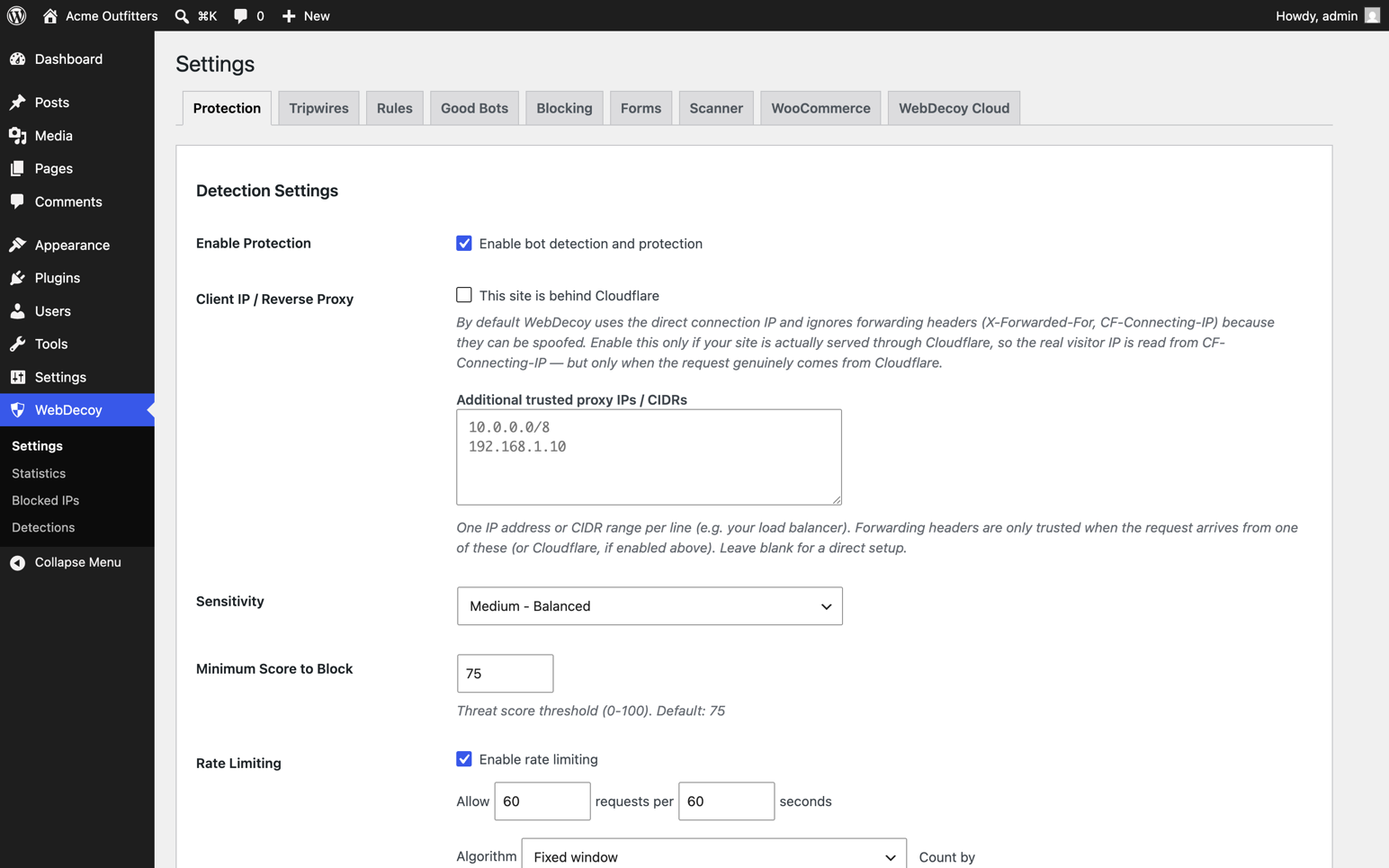
Protection settings: configure detection and blocking
WebDecoy is a free, fully-functional bot detection and protection plugin that works 100% locally. It stops the symptoms you actually see: card-testing hits on your WooCommerce checkout, waves of fake registrations, comment spam, login brute force, and content scraped by AI crawlers. Unlike CAPTCHA solutions that frustrate visitors, WebDecoy uses invisible multi-layer detection: legitimate users never see challenges or interruptions.
Works immediately on activation. No account needed. No API key required. No external connections at all until you optionally connect a WebDecoy Cloud account.
Why WebDecoy?
- Zero friction: humans never see CAPTCHAs or challenges
- Zero configuration: install, activate, done
- Zero dependencies: everything runs locally on your server
- Deception, not just filtering: hidden tripwires and honeytokens that only bots can touch, so a catch is a certainty, not a guess
- Multi-layer detection: server-side + client-side + proof-of-work challenges
- Free forever: full protection at no cost. Premium cloud features are optional.
Stop WooCommerce card testing and fake orders
Card-testing bots run stolen card numbers through your checkout. You pay a gateway fee for every attempt, your decline rate climbs until the processor takes notice, and real orders drown in the noise. WebDecoy watches checkout the way a fraud analyst would:
- Velocity limits per address (configurable attempts per time window)
- Card-testing pattern detection: small amounts, rapid succession, repeated declines across more than one card
- A hidden decoy coupon code that only bots ever find and apply
- Works with both the classic checkout and WooCommerce Blocks
Suspicious checkouts are refused and recorded, not silently allowed. And by default the whole plugin runs in monitor mode, so you can watch exactly what it would have done before you let it act.
Deception: the zero-false-positive layer
Most security plugins guess whether a visitor is a bot from signatures and scores. WebDecoy also sets traps that no legitimate visitor can trigger:
- Tripwires: hidden honeypot paths that only crawlers and scanners request
- Honeytoken links: invisible decoy links injected into your pages; following one is a deterministic bot signal
- Deceptive responses: fake .env, wp-config, SQL dump, and phpinfo responses seeded with per-site canary credentials; anyone who uses those credentials is flagged as critical
- WordPress-native traps: fake vulnerable-plugin paths, an optional XML-RPC trap, and an author-enumeration canary
- WooCommerce honeytoken coupon: a hidden decoy coupon code; applying it at checkout is proof of a bot
A visitor that touches a trap was not browsing your site. That is what makes deception the highest-confidence signal in the plugin: it does not need to guess.
An invisible reCAPTCHA alternative
Every form WebDecoy protects works without a visible challenge. Instead of asking humans to prove themselves, it asks the browser: an invisible SHA-256 proof-of-work challenge solves itself in the background in under a second for a real visitor, while bots and automation frameworks stall or fail. If you came here looking for a CAPTCHA alternative or an invisible reCAPTCHA replacement for comments, login, or registration, that is what this is: the same protection with none of the traffic-light puzzles, and nothing about your visitors sent to a third party.
Block fake registrations and comment spam
Registration spam and comment spam are the same disease: automation pointed at your forms. WebDecoy puts invisible honeypot fields on comment, login, and registration forms, scores each submission’s behavior, and adds login brute force protection with rate limiting on top. Real visitors notice nothing; the fake accounts and spam comments stop arriving.
Free Features (No API Key Needed)
Deception & Traps
* Tripwires on hidden honeypot paths (on by default)
* Auto-injected honeytoken decoy links
* Deceptive fake-file responses with canary credentials
* WordPress-native traps and author-enumeration canary
* WooCommerce decoy coupon
WooCommerce Protection
* Checkout carding attack prevention
* Velocity limiting (configurable attempts per time window)
* Card testing pattern detection
* WooCommerce Blocks compatible
Server-Side Detection
* User-Agent analysis and HTTP header inspection
* Good bot verification (reverse DNS for Googlebot, Bingbot, etc.)
* MITRE ATT&CK path analysis (admin probing, config file access)
* Rate limiting with automatic blocking
* IP blocking (individual + CIDR, IPv4/IPv6, expiration)
Client-Side Detection
* WebDriver detection (Selenium, Puppeteer, Playwright)
* Headless browser detection (Chrome headless, PhantomJS)
* Automation framework detection
* Behavioral analysis (mouse movement, click patterns, scroll behavior)
* Canvas/WebGL fingerprinting
* AI crawler detection (GPTBot, ClaudeBot, PerplexityBot)
Invisible Proof-of-Work Challenges
* SHA-256 challenges solved in background (no user interaction)
* Challenge mode for suspicious requests (checkbox widget, auto-solves)
* Difficulty scales based on threat signals
* No external CAPTCHA service needed
Form Protection
* Comment spam protection
* Login brute force protection
* Registration spam prevention
* Invisible honeypot fields on comment, login, and registration forms
Local Dashboard & Analytics
* Detection log with threat scores and MITRE tactic mapping
* Statistics page with 30-day trend charts
* Blocked IPs management
* Dashboard widget with threat overview
* CSV export
* Automatic data cleanup (30 days)
Smart Bot Recognition
* 60+ known good bots automatically allowed
* Search engines, social media, monitoring services, SEO tools
* Optional AI crawler blocking
* Custom allowlist support
Private by design: 100% local, GDPR-friendly
Until you deliberately connect a WebDecoy Cloud account, the plugin makes zero external connections:
- No visitor IP addresses sent to external servers
- No US data transfers and no third-party data processor to disclose
- No third-party cookies and no external CAPTCHA service
- No CDN-loaded scripts (even Chart.js for the admin charts is bundled locally)
Detection data lives in your own WordPress database and is cleaned up automatically after 30 days (configurable). If you build privacy-conscious or GDPR-focused sites, this is the architecture you have been filtering for: cloud CAPTCHAs and cloud WAFs make your visitors someone else’s data; WebDecoy keeps them yours.
Built for agencies: configure everything in code
Agencies do not click through wp-admin on 80 client sites. WebDecoy is fully controllable from a deploy script:
wp plugin install webdecoy --activate
wp webdecoy config set mode monitor
wp webdecoy allowlist add 203.0.113.7
wp webdecoy status
The wp webdecoy command covers status, every safe setting (config list), the IP allowlist (whitelist your agency VPN across every client site in one loop), and log flushing.
Settings you never want a client to change live in wp-config.php:
WEBDECOY_DEFAULT_MODE(‘monitor’ or ‘block’): forces the mode and locks the admin toggleWEBDECOY_HIDE_ADMIN_UI(true): hides the WebDecoy menu, dashboard widget, and notices from the client’s viewWEBDECOY_MAX_LOG_RETENTION(days): keep client databases lightWEBDECOY_DISABLE(true): emergency kill switch
And because monitor mode is the default, baking WebDecoy into your boilerplate cannot break a client site on day one: it detects, logs, and reports everything but blocks nothing until you decide otherwise.
Premium Features (Optional WebDecoy Cloud)
Connect an API key to unlock cloud-powered intelligence:
- WAF Integrations: arm your existing edge. Push confirmed attackers to Cloudflare or AWS WAF so they’re blocked before a request ever reaches WordPress, plus webhooks for any other firewall
- IP Reputation: AbuseIPDB integration, threat scoring
- VPN/Proxy Detection: identify visitors hiding behind VPNs, proxies, and Tor
- GeoIP Enrichment: geographic data from MaxMind
- Cloud Sync: forward detections to a centralized dashboard
- Cross-Site Intelligence: aggregate threat data from all WebDecoy customers
- Advanced Analytics: cloud dashboard at app.webdecoy.com with indefinite history
- Webhooks & Alerts: automated response chains, email notifications
Explore Plans | Start Free Trial
Threat Scoring
WebDecoy uses an intelligent scoring system (0-100):
- 0-19 MINIMAL: allow (likely human)
- 20-39 LOW: log only
- 40-59 MEDIUM: optional challenge
- 60-74 HIGH: challenge or block
- 75-100 CRITICAL: automatic block
The threshold is fully configurable to match your site’s needs.
External Services
This plugin can optionally connect to the following external services when you connect a WebDecoy Cloud account, either with the one-click Connect button or by entering an API key manually:
WebDecoy Cloud: app.webdecoy.com, api.webdecoy.com and ingest.webdecoy.com
This plugin only contacts WebDecoy Cloud after you explicitly start a connection on the WebDecoy Cloud settings tab. With no connection made and no API key configured, no data is ever sent to these services.
What is sent, and when:
* When you click “Connect to WebDecoy Cloud”: your browser is redirected to app.webdecoy.com to approve the connection (carrying your site URL, site name, a one-time nonce, and your monthly-report preference). After you approve, the plugin exchanges a one-time token with api.webdecoy.com (sending the token, your site URL and the nonce) to receive the site’s API keys. Cancelling sends nothing further.
* After connecting: the plugin fetches your plan entitlements from ingest.webdecoy.com (authenticated with your API key) twice daily.
* When a detection or rule violation occurs: the visitor’s IP address, user agent, request path, threat score and detection flags are sent to ingest.webdecoy.com so the event appears in your cloud dashboard.
* When a visitor arrives from an AI product such as ChatGPT, Claude, Perplexity or Gemini: the plugin adds one to a count for that AI product and the landing page’s path, and sends those counts to ingest.webdecoy.com every fifteen minutes so they appear on your AI Traffic page. Only the AI product’s name, the path and the count are sent; nothing about the visitor. Turn it off with the webdecoy_count_ai_referrals filter.
* When you use an IP-reputation filter rule (e.g. ip.abuse_score, ip.tor): the visitor’s IP address is sent to ingest.webdecoy.com to look up reputation/geo data.
* When validating your key or forwarding a WooCommerce checkout detection: your API key, organization ID and the detection data above are sent to api.webdecoy.com / ingest.webdecoy.com.
All requests are made server-side over HTTPS. This is an optional cloud service provided by WebDecoy.
Terms of Service: https://webdecoy.com/terms
Privacy Policy: https://webdecoy.com/privacy
Without an API key, the plugin operates 100% locally, with no external connections on the front end or back end. Chart.js (used for the admin Statistics charts) is bundled with the plugin, not loaded from a CDN.
Bundled third-party libraries
Chart.js v4.5.1 (MIT license) is included at admin/js/vendor/chart.umd.min.js for the admin Statistics charts. It is the official distribution build; the human-readable source is available at https://github.com/chartjs/Chart.js/releases/tag/v4.5.1 . No other third-party libraries are bundled.
Reference URLs in the good-bot database
The bundled good-bot list (sdk/src/GoodBotList.php) stores a documentation URL for each known bot (e.g. developer.amazon.com/amazonbot, api.slack.com/robots) purely as reference metadata shown alongside detections. These URLs are never requested by the plugin. No connection of any kind is made to them.
Privacy Policy
WebDecoy collects the following data locally for bot detection purposes:
- IP addresses
- User agent strings
- HTTP headers
- Browser fingerprint signals
- Request patterns
This data is stored in your WordPress database and automatically cleaned up after 30 days. No data is sent externally unless you configure a WebDecoy Cloud API key.
For more information, see our Privacy Policy.