

WPHEKA Search & Filter Orders by Product
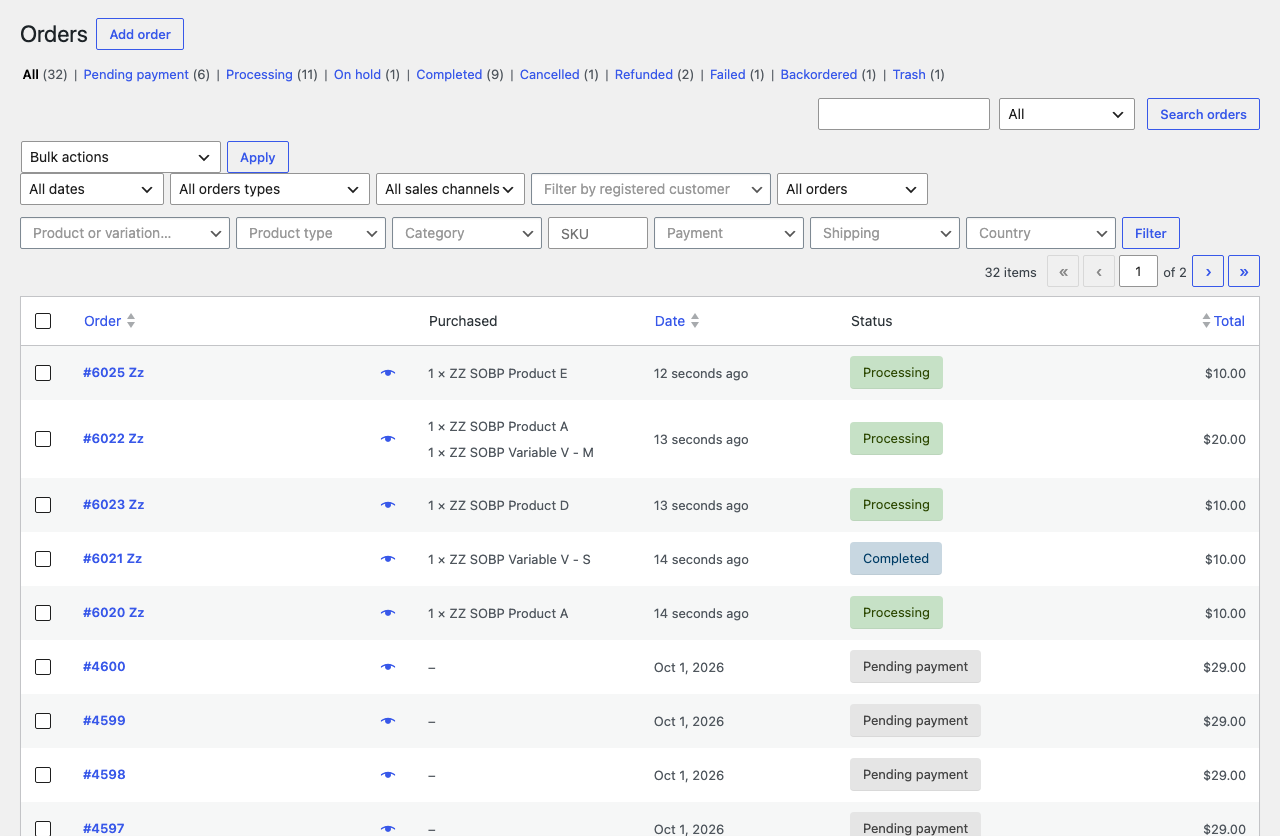
All seven filters on one row above the WooCommerce orders list, with the Purchased column showing what is in each order.
WooCommerce’s own order search is a text search. WPHEKA Search & Filter Orders by Product gives you real filters instead. Pick an exact product or a single variation from a list and the orders list shows only the orders holding it. A variable product also finds orders of its variations.
Filter orders by product type, category, SKU, payment method, shipping method or billing country. The filters work together: orders with this product, paid by cash on delivery, from Canada. The status tabs, search box and month filter you already use stay where they are. A Purchased column shows the items of each order, so you can read the list without opening anything.
🔍 FILTER ORDERS BY
- Product or a single variation. A variable product also finds orders of its variations.
- Product type
- Product category, including its sub-categories
- SKU or the start of a SKU
- Payment method
- Shipping method
- Billing country
Filters work together, so you can ask for “orders with this product, paid by cash on delivery, from Canada”.
✨ ALSO INCLUDED
- A “Purchased” column in the orders list showing the items of each order.
- Fast on large stores. Filters are added to WooCommerce’s own order query. When WooCommerce Analytics data is available its indexed tables are used. Tested with 100,000 orders.
- Works with High-Performance Order Storage (HPOS) and with the older posts storage.
- Developer hooks to add your own filters. See Developer hooks in the documentation.