

WPHEKA Backorder Split

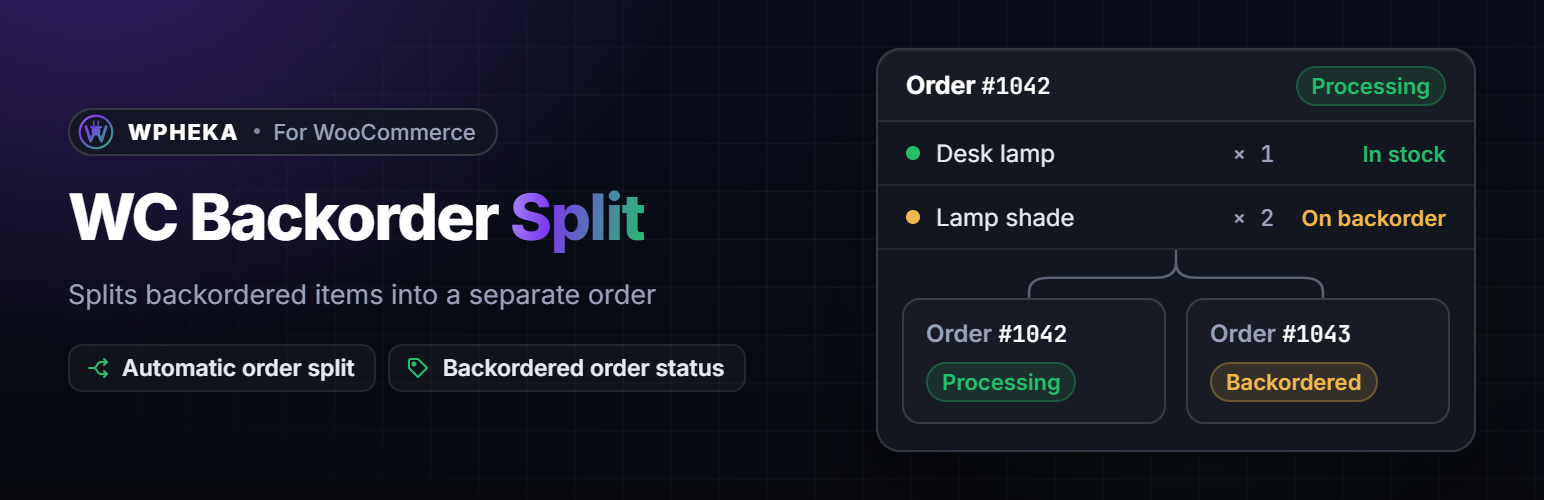
One order became two: the original ships today and the backordered items wait in their own linked order.
A customer orders five of something and you have three. WooCommerce takes the order whole and leaves you to work out what to do with it. WPHEKA Backorder Split moves the backordered quantity into its own linked order with a Backordered status as soon as the order confirmation page loads, so the part you have in stock ships today and the rest waits in one place you can see. The customer is not charged twice and does not get a second order email. The new order keeps the same shipping method at no extra cost. Shipping, fees and coupons stay on the original order, so the two orders add up to what the customer paid. There is nothing to set up.
✂️ KEY FEATURES
- Splits automatically after checkout – No settings, no screens to visit.
- Ship what is in stock today – The backordered quantity waits in its own order.
- Shipping is paid once – The backorder order keeps the same shipping method at no extra cost. Fees and coupons stay on the original order.
- Nothing more to pay – The customer pays nothing more and gets no second order email.
- Backordered status – Its own tab on the orders screen and a bulk action to set it.
- Linked orders – Both orders link to each other and each gets a note naming the other order.
- Overview page – WPHEKA > Backorder Split shows how many orders were split, what is backordered now and the latest splits.
- HPOS Compatible – Full support for WooCommerce High-Performance Order Storage
- Developer Friendly – Extensive hooks and filters for customization
🛠️ DEVELOPER FEATURES
Developers can extend the plugin using built-in hooks:
wcbs_before_split_order– Action before order splittingwcbs_after_split_order– Action after order splittingwcbs_backorder_created– Action when backorder is createdwcbs_split_order_error– Action on split errorwcbs_should_split_order– Filter to prevent splittingwcbs_backorder_items– Filter to modify backorder itemswcbs_backorder_status– Filter to change backorder statuswcbs_meta_fields_to_copy– Filter to add/remove meta fields copied to backorderwcbs_disable_emails_on_split– Filter to control email suppression during splitwcbs_copy_charges_to_backorder– Filter: return true to copy shipping costs, fees and coupons to the backorder order in full (the behaviour before 2.4.0)
Full documentation: docs.wpheka.com