


Waitlist for Tutor LMS
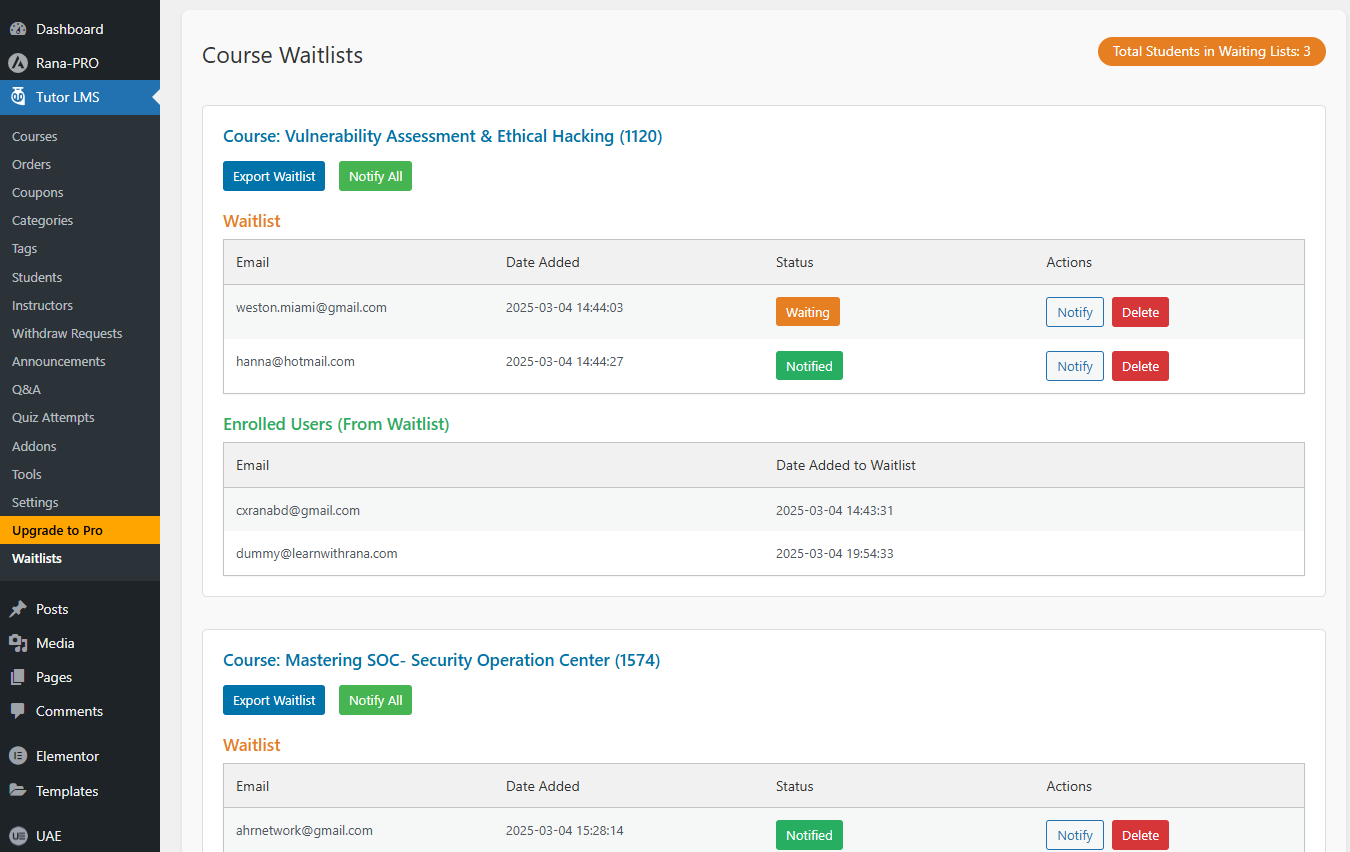
Admin dashboard displaying waitlist and enrolled users with Notify, Notify All, Export, and Delete options
Waitlist for Tutor LMS is a powerful Tutor LMS addon that helps you manage fully booked courses with ease. When a course reaches its maximum enrollment, students can simply join the waitlist instead of missing out.
👥 Stop losing students due to full courses—turn them into future enrollments with Waitlist For Tutor LMS!
🔹 Key Features:
✅ “Join Waitlist” – Automatically appears on fully booked Tutor LMS courses
📧 Email Notifications – Instantly notifies students when a spot becomes available
📊 Admin Dashboard – Manage Waitlists and Enrolled Users (From Waitlist)
📢 Bulk “Notify All” – One-click email alert to all waitlisted students
🎯 Individual Actions – Notify or remove students with a single click
📂 Export to CSV – Download waitlist data for easy record-keeping
🟠 Visual Status Indicators – 🟠 “Waiting” | ✅ “Notified” for quick tracking
✨ Modern UI – Clean, user-friendly interface for efficient management
🔢 Waitlist Counter – Displays the total waitlist count in the admin header
🔄 Seamless Tutor LMS Integration – Automatically detects enrolled users
🎯 How It Works
📌 For Students:
1️⃣ If a course is full, a “Join Waitlist” button appears.
2️⃣ Students enter their email and join the waitlist.
3️⃣ They receive an email notification when a seat opens.
📌 For Administrators:
1️⃣ Access the Waitlist Dashboard in Tutor LMS.
2️⃣ View and manage waitlist entries.
3️⃣ Notify students individually or in bulk.
4️⃣ Track students who enrolled from the waitlist.
5️⃣ Export waitlist data for records.
💡 This plugin requires Tutor LMS to function.
Additional Information
For support or feature requests, visit Website or submit a Feature Request. Check out more Tutor LMS addons at 📹 Video for Tutor LMS.
❤️ Love this plugin? Consider donating: Donate Here