


Visitor Lens
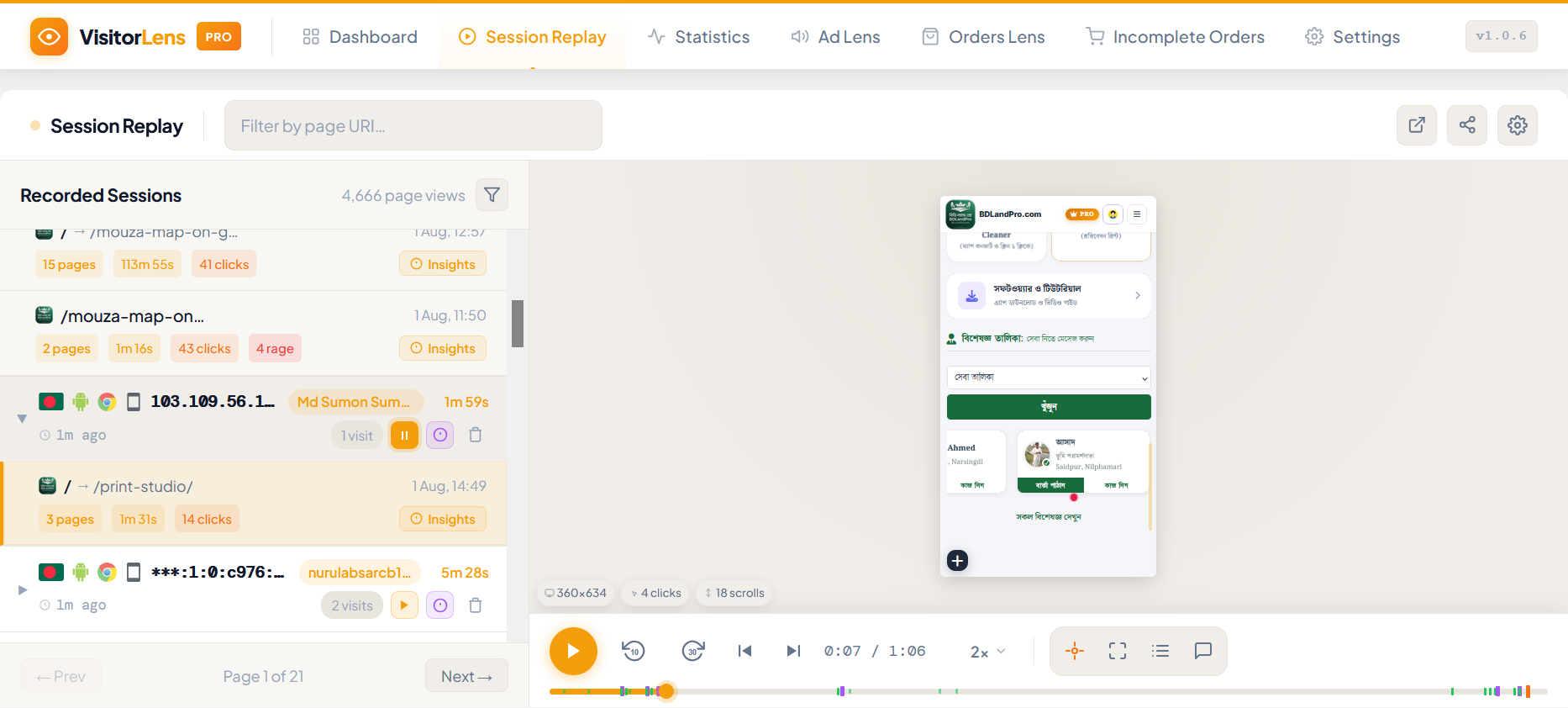
<strong>Session Replay</strong> — Filter and watch recorded visitor sessions in a visual player.
VisitorLens is a powerful yet lightweight visitor analytics and session replay plugin built natively for WordPress. Stop guessing why visitors leave and start watching their real journeys — every click, scroll, and mouse movement recorded and replayed directly inside your dashboard.
Whether you run a WooCommerce store, a membership site, or a content blog, VisitorLens gives you the UX data you need to increase conversions and fix friction points — without sending any data to third-party servers.
Why VisitorLens?
Most analytics tools tell you what happened. VisitorLens shows you why. Watch session recordings to discover rage clicks, form drop-offs, confusing navigation, and missed conversion opportunities — then fix them with confidence.
Core Features (Free)
Session Recording & Replay
* Record every visitor session: mouse movements, clicks, scrolls, form interactions
* Replay sessions in a built-in visual player inside your WP admin
* Filter replays by date, duration, page URL, device type, rage clicks, and error count
* Input masking enabled by default — sensitive form fields are never recorded
* Automatic session pruning (configurable retention: 1–90 days)
Visitor Analytics Dashboard
* Real-time visitor count with auto-refresh
* Daily, weekly, and monthly visitor trends (interactive line chart)
* Top pages ranked by page views
* Recent visitor log with location, browser, and device
Statistics Page
* Overview KPIs: total visitors, sessions, page views, bounce rate, avg. session duration
* Pages report: top landing pages, exit pages, most visited URLs
* Audience report: browser breakdown, OS/platform, device type, screen resolution
* Traffic sources: direct, organic, referral, social — with search engine and keyword breakdown
* Real-time active visitors with live page list
Geo-Location
* Country, region, and city detection via ip-api.com (free tier, optional)
* GeoIP lookup can be disabled in Settings General
Privacy & Consent
* Consent gate: show a banner before recording begins (opt-in or opt-out mode)
* Cookie-based consent persistence with configurable cookie name
* GDPR-compliant: privacy policy content auto-added to WP Privacy Policy page
* Personal data export and erasure via WP Tools Export/Erase Personal Data
* Honour Do Not Track (DNT) browser signal (optional)
* Exclude logged-in administrators, specific IP ranges, URLs, and user roles
Data Management
* Export sessions as CSV or JSON directly from the Replay page
* Bulk-delete filtered sessions
* Storage usage card in Settings showing DB table sizes
* Configurable automatic cleanup via WP-Cron
Who Is This For?
- eCommerce store owners — find cart abandonment causes, fix checkout friction
- Agency & freelance developers — include analytics in every client site build
- Bloggers & content sites — understand how readers consume content
- SaaS & membership sites — improve onboarding flows and feature discovery
- CRO specialists — validate A/B test hypotheses with real session evidence
Privacy & GDPR
VisitorLens is built with privacy at its core:
- Minimal third-party use — only ip-api.com for optional GeoIP (can be disabled in Settings)
- IP hashing — visitor IPs are hashed with a secret salt by default
- Input masking — form fields are masked and never sent to the server
- Consent tools — built-in opt-in/opt-out consent gate
- Data export & erasure — full WordPress personal data tools integration
- Configurable retention — auto-delete old sessions on a schedule
Performance
- Tracker script: ~4 KB gzipped
- Recorder script: ~9 KB gzipped
- All recording data is batched and sent asynchronously — zero impact on page load scores
- Uses WordPress REST API for all communication — no custom AJAX endpoints
- No external JavaScript libraries loaded on the frontend
External services
This plugin optionally connects to ip-api.com to perform GeoIP lookups (country, region, city) for each tracked visitor.
What is sent: The visitor’s IP address.
When it is sent: On every page-view tracking request, if the GeoIP setting is enabled (Settings General GeoIP Lookup). No data is sent if GeoIP is disabled.
Why: To display geographic location of visitors in the analytics dashboard and session list.
Service provider: ip-api.com (ip-api.com)
* Terms of Service: https://ip-api.com/docs/legal
* Privacy Policy: https://ip-api.com/docs/legal
You can disable GeoIP under VisitorLens Settings General GeoIP Lookup at any time.
Privacy Policy
VisitorLens collects the following data about your site visitors when activated:
- Hashed IP address and approximate geographic location (country, city, region)
- Browser, operating system, device type, and screen resolution
- Pages visited, referrer URL, UTM campaign parameters
- Session recordings: mouse movements, clicks, scroll depth (form inputs are masked by default)
- WordPress user ID (only for logged-in users)
All data is stored in your WordPress database. Nothing is sent to external servers.
You are responsible for disclosing your use of session recording technology to your visitors in your site’s Privacy Policy. VisitorLens automatically adds a suggested privacy policy text to your WordPress Privacy Policy page (Settings Privacy).