


Video Share VOD – Turnkey Video Site Builder Script
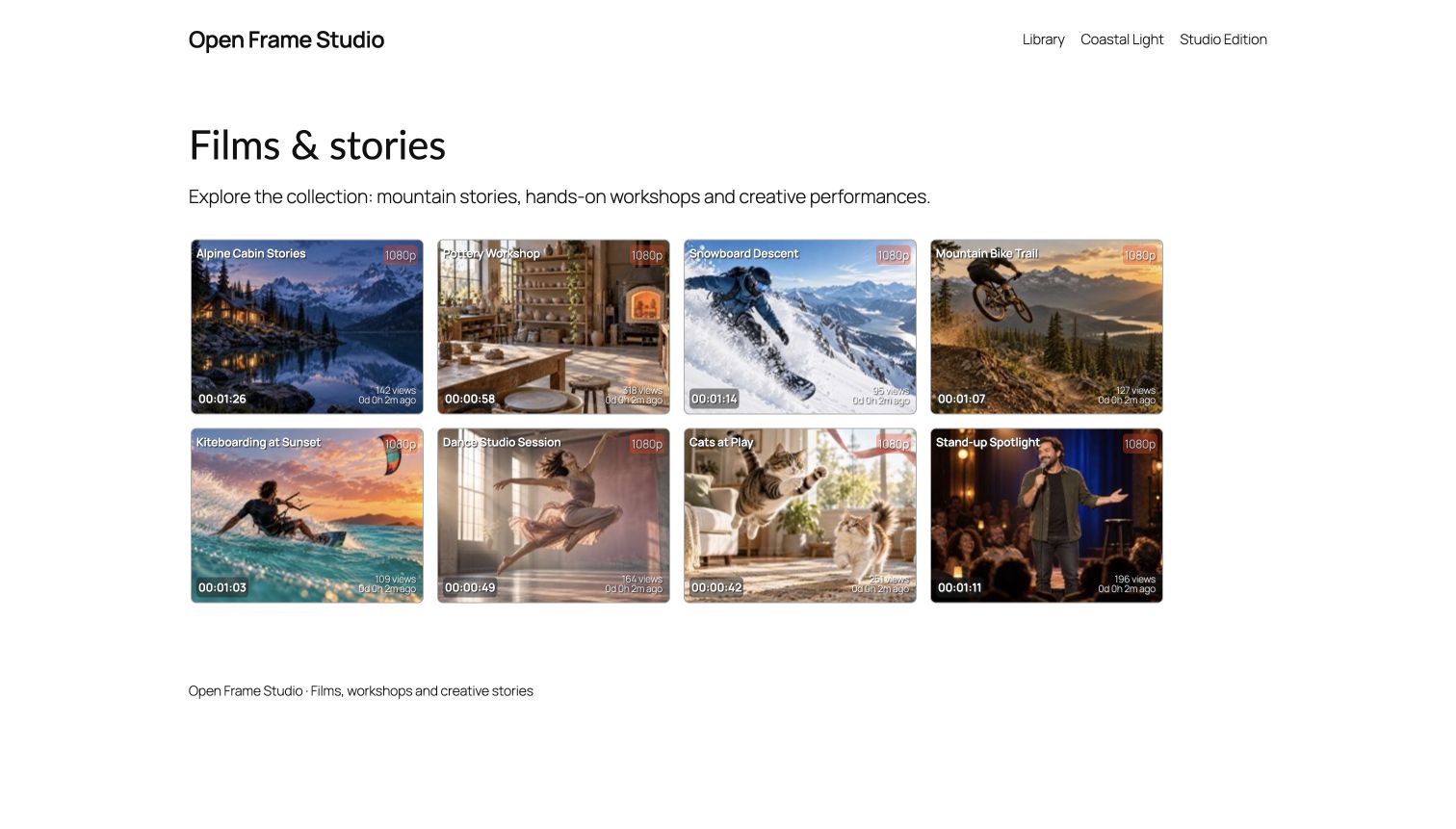
Video library with neutral generated demo posters, shown in a configured WordPress block theme.
Make your videos easy to find, watch and return to. Video Share VOD turns WordPress into an on-demand video library with frontend uploads, server imports, playlists and responsive browsing. Use it for one creator, a learning resource library or a community of contributors.
Start with video management and playback. Add optional recording, reviews or membership integrations when your site needs them, while keeping native video permissions and control of your media.
Key features and benefits
- Build a browsable video library: organize videos with playlists, categories and tags; help viewers search, filter and sort the collection.
- Choose how videos are discovered: Styled tiles, Cards, List, Creator feed and Justified rows support different viewing styles, with optional compact layout controls.
- Bring uploads and imports together: use frontend drag-and-drop batch uploads or import existing server files into native video posts.
- Prepare media on your own host: configured FFmpeg processing can create playback renditions, snapshots, short previews and HLS segments. A conversion queue helps manage processing work.
- Offer useful previews: approved posters and short hover clips let visitors explore a video before opening it. Public promotions and full-video access remain separate.
- Control contribution and viewing: choose native upload, publication, role and playlist rules; review submissions before publication when required.
- Connect your creator tools: optional Media Capture adds browser recording, Rate Star Review adds stars/likes, and MicroPayments adds supported content purchases and memberships.
- Support returning viewers: a contextual video page can show creator/duration details and accessible related videos. Optional private playback memory is available through MicroPayments.
Try the interactive video-library demo | Setup documentation | WordPress.org support
Popular ways to use Video Share VOD
- A creator’s video home: combine a searchable library with clear previews, playlists and optional individual or membership access.
- A tutorial or resource collection: organize recordings by topic so visitors can watch on demand and find related material.
- A contributor video community: let authorized members upload videos while staff manage review and publishing.
- An archive of live broadcasts: connect Broadcast Live Video to bring supported channel recordings into an on-demand collection.
Publish your first collection
- Install the plugin and open Video Share VOD > Creator setup. Review presentation and publication choices before saving.
- Upload or import a small video supported by your host and selected player. Configure FFmpeg when you need generated renditions, snapshots or previews.
- Add a video listing and player using the provided pages/shortcodes. Choose a layout, playlists and the browsing controls to display.
- Review the video and test playback as an intended viewer. Test any optional restricted-access route separately before opening it to users.
Presets retain existing roles, pages, prices, access rules and provider settings. Ordinary upload/import and standalone video tools remain available.
Video presentation and playback
Use native HTML5, Video.js or the WordPress player as configured. MP4 and HLS playback depend on the selected player, source codecs and delivery setup; test the actual files on the browsers and devices your site supports.
Listing controls include category, tag and title filtering; date, view and rating-related sorting; optional AJAX updates; and hover previews. Rate Star Review can supply independent stars, likes or both. The optional FansPaysite theme supports live light/dark/system presentation.
Administrators can configure video formats, conversion settings, watermark options, upload limits and review choices. Embed and playlist tools remain available under their native access rules. See the Documentation menu for shortcode and player options.
Upload, record, review and publish
The optional Media Capture plugin gives creators one upload/record/review entry. Check destination explains current native requirements before the first handoff. Creators can correct a blocked requirement and retry the retained source; uncertain earlier saves need recovery rather than another automatic creation.
New shared-workflow videos normally become review drafts. Direct publishing requires the administrator’s explicit setting, current native permission and playable media. Background preparation retains originals and reports status or retry needs. Creators and authorized staff can review private drafts without granting anyone another creator’s source ownership.
With configured private storage and local tools, generate private posters and bounded trailers, review them, then separately approve selected public copies. Approval of the full video does not automatically approve promotional assets. Previously shared public copies cannot be recalled. WordPress privacy export/erasure and optional finished-job retention cover workflow records while retaining native content, purchases and original media.
Optional access, memberships and advertising
MicroPayments can provide supported item purchases, creator subscriptions and explicitly assigned site memberships. Compatible new member content can use optional calendar or elapsed-day release rules. Native publication/password, watch/playlist and channel requirements still apply; an expired or refunded membership does not authorize playback. Unselected ordinary videos retain standalone behavior.
Configure VAST or Google IMA when advertising fits your site. Ad tags, provider eligibility and visitor privacy/consent need their own review. Other optional integrations include Broadcast Live Video for channel archives and the recorder plugins for captured posts or comments.
Hosting and protected media
Video management runs on your WordPress site. FFmpeg and appropriate codecs/resources are needed for conversion, generated snapshots, previews, watermarks and HLS segmentation. Upload size, PHP/process timeouts, storage, memory and proxy/CDN settings must suit the actual media workload.
Page or player restrictions do not protect an openly reachable original or HLS origin. Private progressive delivery needs configured storage outside public web roots and aliases, trusted local FFmpeg/FFprobe where required, and working cron for background preparation. Existing public originals are not moved or made private automatically. Private HLS/CDN delivery, migration of older sources and universal codec/device compatibility are not included. See the access and private-media FAQs before deployment.
External Service Dependencies
Video management and playback run on the site’s configured WordPress hosting. Processing features require compatible local FFmpeg configuration.
Advertising is disabled until an administrator supplies an ad tag. With Google IMA selected, the visitor’s browser loads Google’s IMA SDK from https://imasdk.googleapis.com/ and requests ads from the configured ad tag. These requests can send IP address, browser/device information, referring/page URLs, ad identifiers and playback/ad interaction events to Google and the configured advertising provider. Configure the site’s consent/privacy choices before enabling ads. Google requires the SDK to be loaded from its own domain. IMA service terms, Google privacy policy.
The VAST option contacts the administrator-configured advertising endpoint from the visitor’s browser instead of loading the IMA service. That provider’s terms, privacy policy, tracking and eligibility depend on the selected endpoint. Optional HLS/streaming servers likewise receive playback requests, IP/browser details and requested media URLs. The site operator configures these services and their policies; no provider account is created automatically by this plugin. Optional payment plugins communicate with their own selected providers under their respective documentation.
Bundled UI/player scripts and fonts load locally. Fomantic’s remote Twemoji image mappings use native Unicode glyphs instead, so selecting an emoji or flag does not request a third-party image. Native glyph appearance varies by platform. Source/build/license references are in interface/semantic/SOURCE.txt and video-js/SOURCE.txt.
Localization
This release is English-first and includes a current translation template, with no bundled translated locale catalogs. The old generic English PO/MO from 2017 are not a complete locale and are retained outside the release as development history. Existing WordPress.org/community or site-supplied language packs may still translate some messages. Video.js supplies its own player-language resources; those do not establish full plugin translation coverage. Future bundled translations may be generated and reviewed by AI agents and should be reviewed for the site’s use, especially access, billing and consent wording.
Documentation
Shortcodes
- videowhisper_videos playlist=”” perpage=”” perrow=”” – Video list.
- videowhisper_upload playlist=”” category=”” owner=”” – Upload form.
- videowhisper_player video=”0″ – Video player.
- videowhisper_preview video=”0″ – Preview only.
- videowhisper_player_html source=”” source_type=”” poster=”” width=”” height=”” – HTML file player.
- videowhisper_embed_code source=”” source_type=”” poster=”” width=”” height=”” – Embed code HTML player.
For more details see Video Share VOD – Documentation menu after installing plugin.