

Verified.net Email & Phone Validation
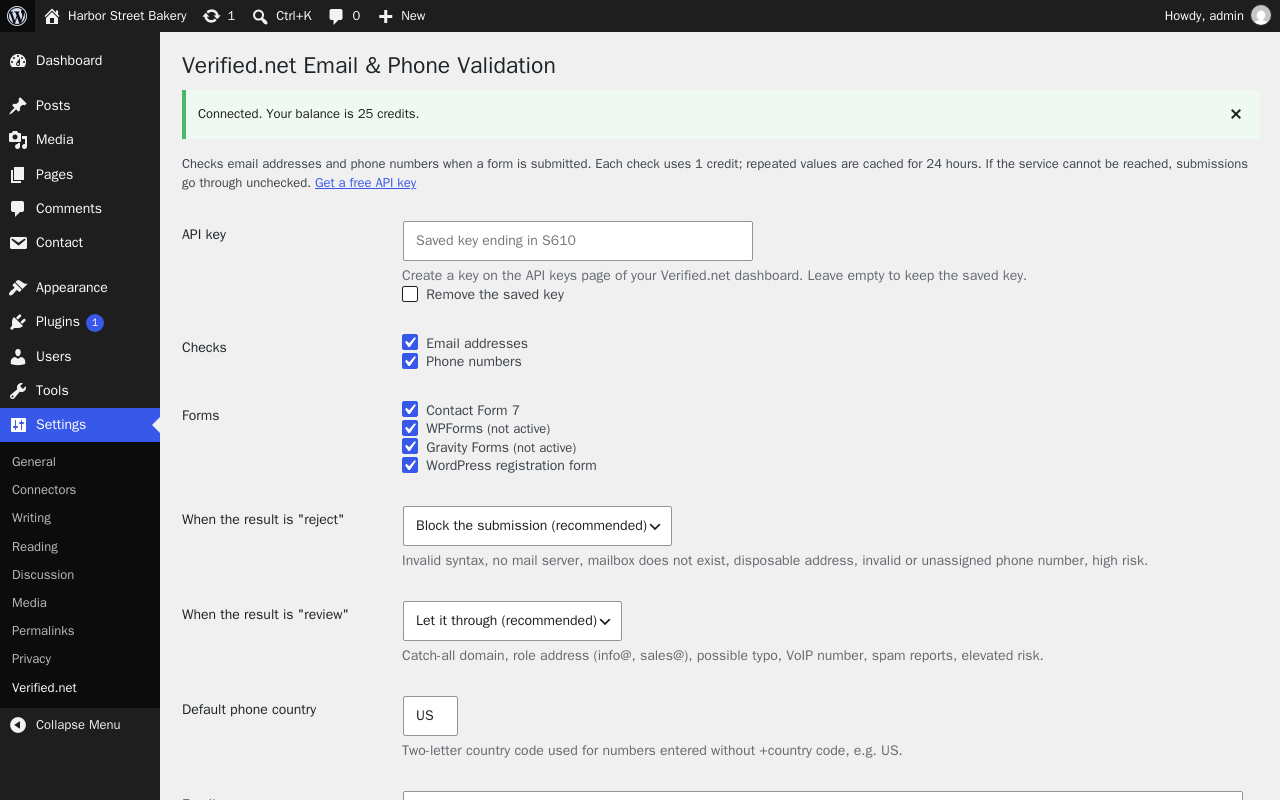
Settings → Verified.net after a successful connection test: choose the checks, the forms and what happens on "reject" and "review".
Verified.net checks email addresses and phone numbers the moment a form is submitted, and stops the ones that can’t be real before they reach your inbox, CRM or user list.
What it catches
- Disposable and throwaway email addresses (mailinator-style inboxes)
- Domains with no mail server, and mailboxes that don’t exist
- Mistyped addresses, with a “Did you mean …?” suggestion (gmial.com gmail.com)
- Invalid, unassigned and high-risk phone numbers, VoIP numbers and numbers reported for spam calls
Works with
- Contact Form 7 (email and tel fields)
- WPForms (email and phone fields)
- Gravity Forms (email and phone fields)
- The WordPress registration form (wp-login.php?action=register)
You decide what happens
Every check returns one of three recommendations: accept, review or reject. By default, reject blocks the submission with a friendly message and review (for example a role address such as info@, or a catch-all domain) is let through. Both are configurable, and so are the error messages.
Safe by design
- If the Verified.net service can’t be reached, is out of credits or times out (5 seconds), the submission goes through unchecked. Your forms never break because of us.
- Each value is checked once and the answer is cached for 24 hours, so a visitor correcting a mistake doesn’t cost you extra credits.
- Submitted values are never logged or stored by the plugin. Cache entries are keyed by a hash and only hold the recommendation.
Pricing
You need a Verified.net account and an API key. New accounts include free credits; each email or phone check uses 1 credit. See pricing.
External services
This plugin connects to the Verified.net API (https://api.verified.net), operated by Verified.net, to check email addresses and phone numbers. Nothing is sent until you enter an API key.
- What is sent and when: when a visitor submits a supported form, the email address and/or phone number entered in that form (and your default phone country) is sent to
https://api.verified.net/v1/emailorhttps://api.verified.net/v1/phone, together with your API key. No other form fields, and no visitor IP address, are sent. When you click “Test connection” on the settings page, your API key is sent tohttps://api.verified.net/v1/accountto read your credit balance. - Why: to tell whether the address or number is valid and safe to accept.
- Terms of service: https://verified.net/terms
- Privacy policy: https://verified.net/privacy