
VARGAL – Additional Variation Gallery for WooCommerce
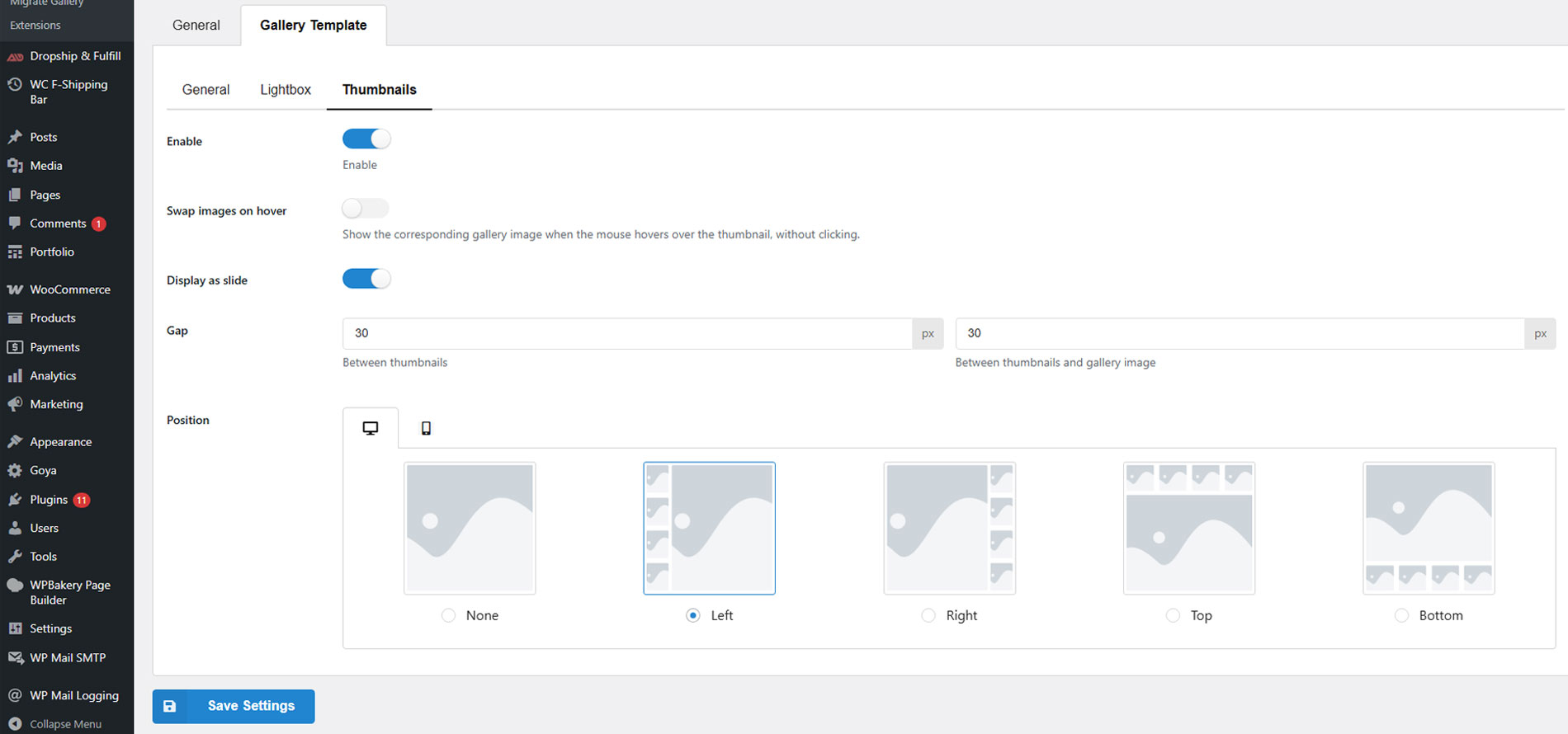
Setting gallery thumbnails
Additional variation gallery for WooCommerce is a feature that allows store owners to display a custom set of images for each product variation—such as different colors, sizes, or styles. Instead of showing just one image per variation, it creates a full image gallery tailored to each option a customer selects.
This kind of plugin is essential for stores where visuals play a key role – fashion, beauty, furniture, electronics, and more.
Introducing VARGAL – Additional Variation Gallery for WooCommerce. Your all-in-one solution for building dedicated media galleries for product variations in WooCommerce. With VARGAL, you can:
– Upload and display multiple images and videos for each variation
– Enable image zoom on hover and lightbox viewing
– Choose transition effects (fade, slide, zoom) and enable autoplay
– Show thumbnails with advanced layout options (spacing, position, hover swap)
– Include the main product image or default gallery in variation galleries
– Customize loading icons with different styles and colors
– Migrate from other gallery plugins with ease
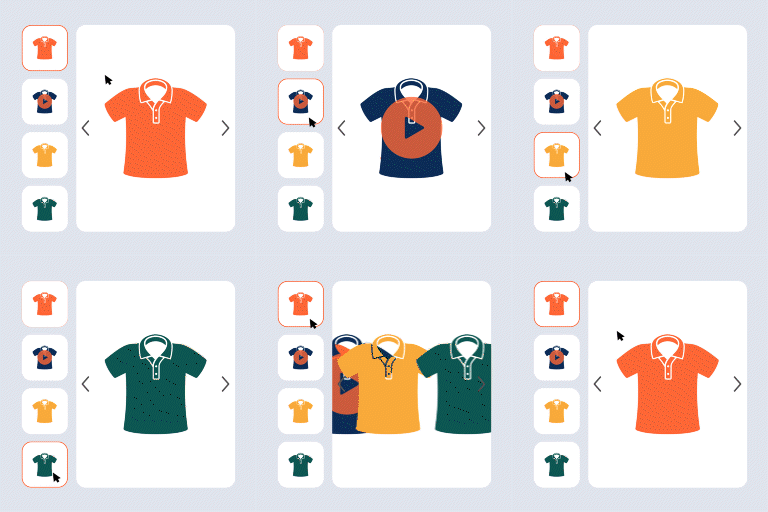
Preview
How to install and use the plugin
Important Notice:
-
Plugin works based on WooCommerce 7.x or higher, PHP 7.0+
-
It is released on WordPress.org and you can use plugin as free to build themes for sale.
FEATURES
► Dedicated Additional Variation Gallery:Highlight every variation with its own gallery. VARGAL allows you to go beyond WooCommerce’s single gallery system. With VARGAL, every variation of a product can have its own collection of media, including
-
Add multiple items at once – Save your time
-
Images and Videos: Upload both image and video files to your variation gallery. Give shoppers a full view of what each variation looks like in action.
-
Drag & Drop Sorting: Reorder gallery items easily by dragging and dropping them inside the upload interface—no coding or complex settings.
-
Use Product Image & Default Gallery: Optionally include the main product image and the default WooCommerce gallery in the variation gallery for a fuller visual presentation.
This is ideal for stores selling fashion, accessories, furniture, gadgets, or any product where visuals make the difference.
► Interactive Additional Variation Gallery Display: Create a more engaging and intuitive experience. VARGAL makes it easy for customers to interact with your product images and videos. You control how the gallery behaves and feels
-
Zoom on Hover: Let shoppers inspect products up close just by hovering over the image.
-
Transition Effects: Choose between fade, slide, or zoom transitions to control how the gallery switches images.
-
Autoplay Gallery: Automatically rotate through gallery images every few seconds. Useful for drawing attention to multiple angles without needing clicks.
-
Lightbox View: Allow customers to click and expand the gallery into a full-screen lightbox. You can enable or disable the lightbox icon trigger based on your design preference.
These features help increase engagement and make your product pages feel more premium.
► Thumbnails and Navigation in Additional Variation Gallery: Fast and user-friendly gallery browsing. For products with multiple gallery items, thumbnails offer a fast way to switch views. VARGAL gives you full control over how these thumbnails look and behave
-
Thumbnail Hover Swap: Instantly switch the main image just by hovering over a thumbnail—no clicks needed.
-
Thumbnail Slider: Display thumbnails in a scrollable slider, which is especially useful for smaller screens or when you have many images.
-
Gap and Spacing Control: Adjust the spacing between thumbnails and between the thumbnails and the main image for a clean layout.
-
Position Settings: Decide where thumbnails appear—top, bottom, left, or right—separately for desktop and mobile views.
Helps users find what they’re looking for quickly and encourages deeper browsing.
► Style and Loading Customization for additional variation gallery: Match the look and feel of your store. VARGAL – Additional Variation Gallery for WooCommerce includes styling options that let you personalize how the gallery looks and behaves as it loads
-
Custom Loading Icons: Choose from a variety of pre-designed loading animations including Dual Ring, Facebook styles, Ripple, Spinner, and more.
-
Color Picker: Set your icon color using an intuitive color wheel or hex value.
Little details like custom loaders can make your site feel more polished and professional.
► Gallery Migration Tool: Switch to VARGAL without losing your galleries. If you are already using another additional variation gallery plugin, VARGAL includes a built-in migration tool that lets you
-Import galleries from other plugins
-Replace your current VARGAL gallery content with the imported one
PREMIUM FEATURES
All features from the free version.
► Set video as product featured image/variation image:Use a video instead of an image as the main visual for a product or variation
► Set videos as product gallery
► Auto play video:Automatically plays the video when it loads, without requiring user interaction
► Auto-adjust the number of visible thumbnails to fit beautifully within the layout
► More gallery transition effects such as circle, mask, split, bubble, blur, rotate, and more
► More navigation position such as center left, center right, top left,…
► More navigation styles available, and you can design your own
► Show navigation dot
► You can design the lightbox
► Create beautiful thumbnails: The number of thumbnails will be automatically adjusted so their total size aligns with the slide gallery size
Documentation
Plugin Links
3rd party libraries & service
- We also suggest products that can be integrated with this plugin to enhance the WooCommerce site design by including images & links to some of our plugins from the following lists:
► VillaTheme’s suggested plugin, WP policy, VillaTheme policy
MAY BE YOU NEED
9MAIL – WordPress Email Templates Designer
Abandoned Cart Recovery for WooCommerce
Advanced Product Information for WooCommerce
AFFI – Affiliate Marketing for WooCommerce
ALD – Dropshipping and Fulfillment for AliExpress and WooCommerce
Boost Sales for WooCommerce – Set up Up-Sells & Cross-Sells Popups & Auto Apply Coupon
Bopo – WooCommerce Product Bundle Builder
Bulky – Bulk Edit Products for WooCommerce
Cart All In One For WooCommerce
Catna – Woo Name Your Price and Offers
Checkout Upsell Funnel for WooCommerce
ChinaDS – Tmall-Taobao Dropshipping for WooCommerce
Clear Autoptimize Cache Automatically
COMPE – WooCommerce Compare Products
Coreem – Coupon Reminder for WooCommerce
CURCY – Multi Currency for WooCommerce – Smoothly on WooCommerce 9.x
Customer Coupons for WooCommerce
DEPART – Deposit and Part payment for Woo
Email Template Customizer for WooCommerce
EPOW – Custom Product Options for WooCommerce
EXMAGE – WordPress Image Links
Faview – Virtual Reviews for WooCommerce
FEWC – Extra Checkout Fields For WooCommerce
Free Shipping Bar for WooCommerce
GIFT4U – Gift Cards All in One for Woo
HANDMADE – Dropshipping for Etsy and WooCommerce
HAPPY – Helpdesk Support Ticket System
LookBook for WooCommerce – Shoppable with Product Tags
Lucky Wheel for WooCommerce – Spin a Sale
Notification for WooCommerce | Boost Your Sales – Recent Sales Popup – Live Feed Sales – Upsells
Orders Tracking for WooCommerce
Pofily – WooCommerce Product Filters
PRENA – Product Pre-Orders for WooCommerce
Product Builder for WooCommerce – Custom PC Builder
Product Size Chart For WooCommerce
Product Variations Swatches for WooCommerce
REDIS – WooCommerce Dynamic Pricing and Discounts
S2W – Import Shopify to WooCommerce
SUBRE – Product Subscription for WooCommerce – Recurring Payments
Suggestion Engine for WooCommerce
Thank You Page Customizer for WooCommerce – Increase Your Sales
TMDS – Dropshipping for TEMU and Woo
VARGAL – Additional Variation Gallery for WooCommerce
VIMA – Multi Customer Addresses for Woo
W2S – Migrate WooCommerce to Shopify