
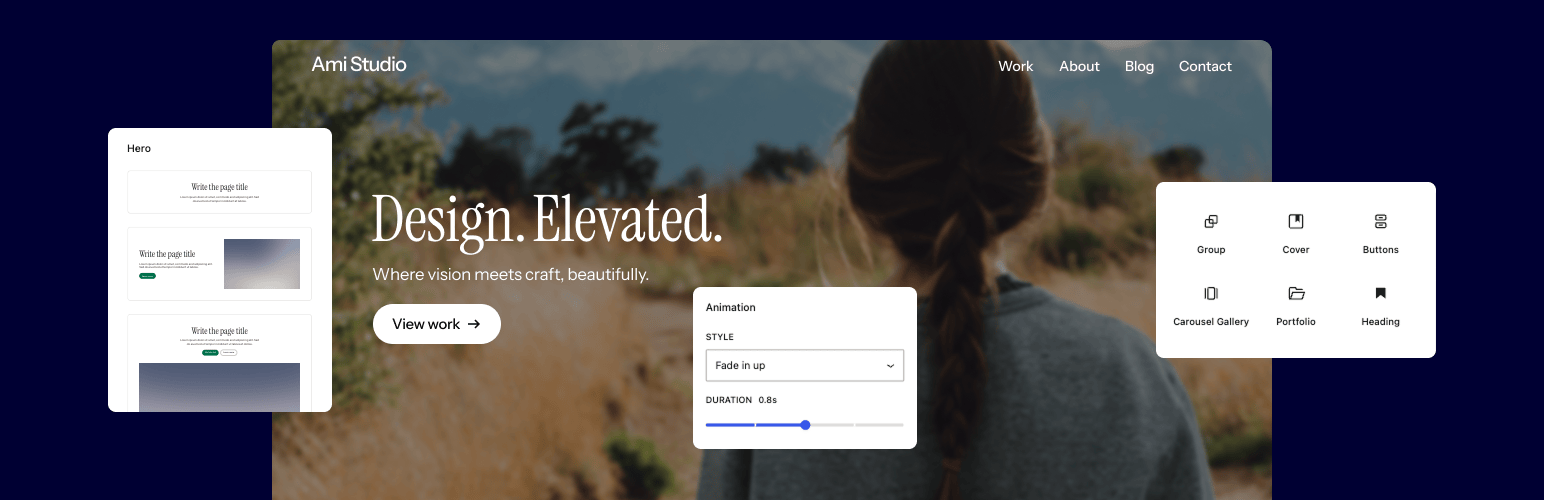

Twentig Supercharged Block Editor – Blocks, Patterns, Starter Sites, Portfolio
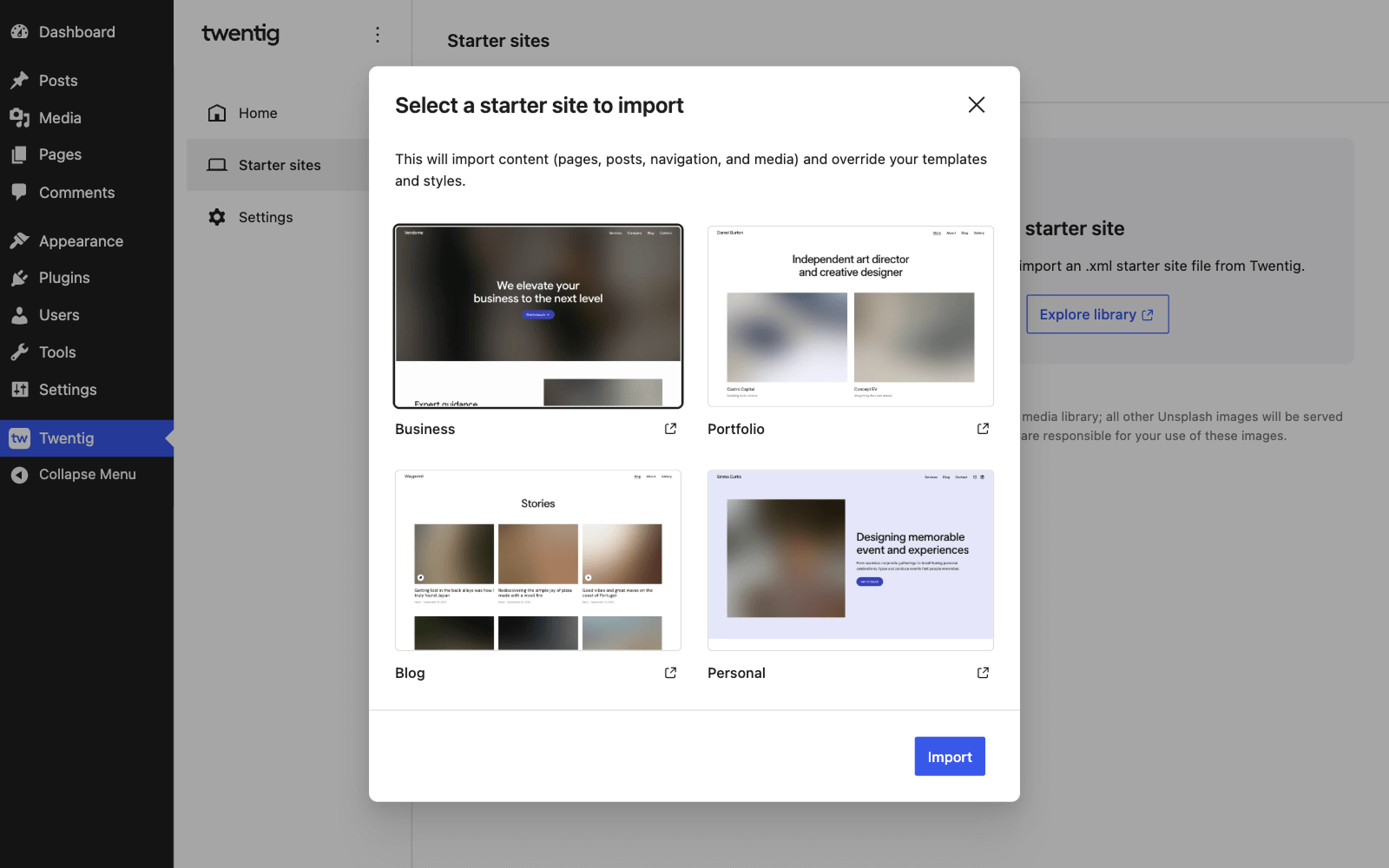
<strong>Import a starter site.</strong> Launch faster by importing a responsive starter site that gives your website a professional look.
The easy way to build a beautiful website with the WordPress block editor.
👉 Want to try Twentig? Launch the Playground
Twentig gives you simple, powerful tools to design a professional website with the WordPress block editor — no coding or design skills required. Customize your block theme, create polished pages, and build a site that fits your needs.
With starter sites, enhanced WordPress core blocks, block patterns, and portfolio tools, you’ve got everything you need to create a stunning website that looks great on every device.
For the best experience, pair the Twentig plugin with Twentig One — our free block theme built for WordPress Full Site Editing. Lightweight and beautifully designed, it gives you a professional foundation right out of the box.
Starter sites
Start with a professionally designed website, not a blank canvas. Import a ready-made starter site from our growing library and make it your own.
Twentig includes starter sites for the Twentig One theme directly in your WordPress dashboard. Import a starter site with one click, then customize the header, footer, homepage, blog, colors, and typography with our Onboarding Customizer.
From there, use the block editor to easily replace the content with your own text and images.
Built-in starter sites for Twentig One:
Twentig also includes starter sites for the Twenty Twenty-Five and Twenty Twenty-Four themes.
Enhanced WordPress blocks
Twentig enhances WordPress core blocks — giving you more design flexibility and creative control in the block editor.
Powerful block features. Twentig adds new settings, alternative styles, and CSS classes to the existing WordPress blocks. From scroll animations, hover effects, and image shapes to gallery sliders, button icons, video lightboxes, and fully clickable blocks — you’ve got everything you need to build modern, professional pages.
No extra blocks. Just better ones. Instead of cluttering the block editor with additional blocks, Twentig enhances WordPress core blocks with essential features for a more intuitive editing experience, greater creative freedom, and no lock-in.
Twentig extends the following WordPress blocks:
Design blocks
- Accordion: icon
- Button: icon, icon position, video lightbox (YouTube, Vimeo, self-hosted video)
- Columns: responsive stacking layout
- Column: stretched link (make the column fully clickable)
- Group: stretched link (make the group fully clickable), hover styles (text color, background color, border color, shadow), shape separator
- Separator: styles (asterisks, dotted, dashed), width, height
Media blocks
- Image: shape
- Gallery: justified and carousel/slider layouts (available as block variations), unstretch last row, responsive layout, vertical alignment
- Cover: stretched link (make the cover fully clickable), shape, hover effect
- Media & Text: styles (shadow, overlap, hard shadow), responsive layout, stretched link, full height
- Video: autoplay when in view, minimal controls
Text blocks
- Paragraph: typography options, responsive alignment
- Heading: typography options, responsive alignment
- List: styles (square, dash, checkmark, arrow, border, inner border, table, no bullet, inline)
- Quote and Pullquote: style (icon)
- Details: icon
- Table: styles (border, inner border), vertical alignment
Theme blocks
- Navigation: responsive breakpoint, menu icon size, hover style, active style
- Navigation Link: external link class
- Submenu: classes (rounded, shadow, no-border, align right)
- Site Logo: image width on mobile
- Query Loop: single-post filters (exclude current post, filter by category or tag)
- Post Template: responsive columns, class layouts (alt columns, alt spacer, alt grid)
- Pagination: spacing support (margin and padding), page number styles (square, rounded, circle, plain), previous and next page styles (square, rounded, pill)
- Title: typography options, responsive alignment
- Excerpt: option to display only the manual excerpt
- Featured Image: shape, hover effect
- Author: inline layout, avatar shape
- Categories and Tags: styles (outline, pill, hashtag, plain, list), unlink
- Previous Post and Next Post: style (stack)
Widget blocks
- Search: style (underline)
- Social Icons: styles (square, rounded), hover effect
- Tag Cloud: styles (rounded, pill, plain, list)
Twentig also lets you add animations to any WordPress core block. Choose from fade, slide, scale, or wipe effects, then customize the speed and delay to make your pages feel more dynamic.
Block patterns
Twentig includes hundreds of pre-designed block patterns — making it faster and easier than ever to create stunning pages in the WordPress block editor.
Flexible block patterns. Choose from a versatile collection of block patterns you can mix and match to fit your project. Our block pattern library is built to support a wide range of use cases, giving you the flexibility to create the pages and sections you need.
Professional design. All patterns are fully responsive and designed to give your pages a polished, professional look from the start.
Theme block patterns. Twentig also includes dozens of pre-built patterns for your header, footer, blog, and portfolio — helping you customize every part of your website with ease.
Twentig adds its pattern library to the Patterns tab of the block inserter in the following categories:
- Banners
- Call to Action
- Contact
- Events, Schedule
- FAQs
- Gallery
- Hero
- List
- Logos, Clients
- Media
- Numbers, Stats
- Pages
- Portfolio
- Posts
- Pricing
- Single Pages
- Team
- Columns
- Testimonials
- Text
- Text and Image
Portfolio
Twentig provides all the WordPress tools you need to create a portfolio website that shows your work at its best with starter sites, patterns, and WordPress blocks.
Portfolio post type & taxonomies. Manage all your projects in one place with Twentig’s portfolio post type. Build your portfolio pages in the WordPress block editor, add featured images, and organize your work with project categories and tags — just like blog posts.
Portfolio block. Display your projects with a powerful, easy-to-use portfolio block. Built on the Query Loop block, you can customize its query settings, layout, and style to fit your needs.
Portfolio block patterns. Browse a variety of patterns to showcase your projects, including grid, grid overlay, and split layouts. Choose the pattern that fits your style and apply it in one click.
Portfolio starter sites. Start with a professionally designed Portfolio starter site crafted for the Twentig One theme to get your portfolio up and running fast, then personalize it with our Onboarding Customizer.
Twenty Twenty-Five and other WordPress default themes
In addition to enhanced blocks, block patterns, and portfolio tools, Twentig extends the following WordPress default themes:
Twenty Twenty-Five and Twenty Twenty-Four
Starter sites for the Twenty Twenty-Five theme:
Starter sites for the Twenty Twenty-Four theme:
Twenty Twenty-One and Twenty Twenty
If you prefer classic themes over block themes, Twentig offers advanced customization options for the Twenty Twenty-One and Twenty Twenty themes, along with one-click starter sites.
Advanced theme customization. From post grids and sidebars to sticky menus and header & footer layouts, Twentig gives you powerful ways to enhance your WordPress theme. Inside the Customizer (Appearance > Customize), you can change fonts with Google Fonts, adjust the site layout, customize global styles, edit the 404 page, and more.
Custom page templates. Take control of your page layout with custom templates. Remove the page title, header, or footer, set a transparent header, and use WordPress blocks to create custom hero sections, landing pages, and more.
Starter sites. Instead of starting from scratch, import one of Twentig’s starter sites directly from the Customizer (Appearance > Customize > Starter sites).
Get more
- See our quickstart guide to learn the basics of using Twentig.
- Visit our blog for tutorials on building professional sites with the WordPress block editor.
- Browse curated color palettes to find beautiful color combinations for your site.
- Subscribe to our newsletter to receive exclusive starter sites, tips, and updates.
- Subscribe to our YouTube channel for video tutorials.
- Explore the best WordPress websites built with the block editor for inspiration.
Enjoying Twentig?
- Rate it on WordPress.
- Donate to support its development.