


TryAura: AI Virtual Try-On, Product Visualization & Product Videos for WooCommerce
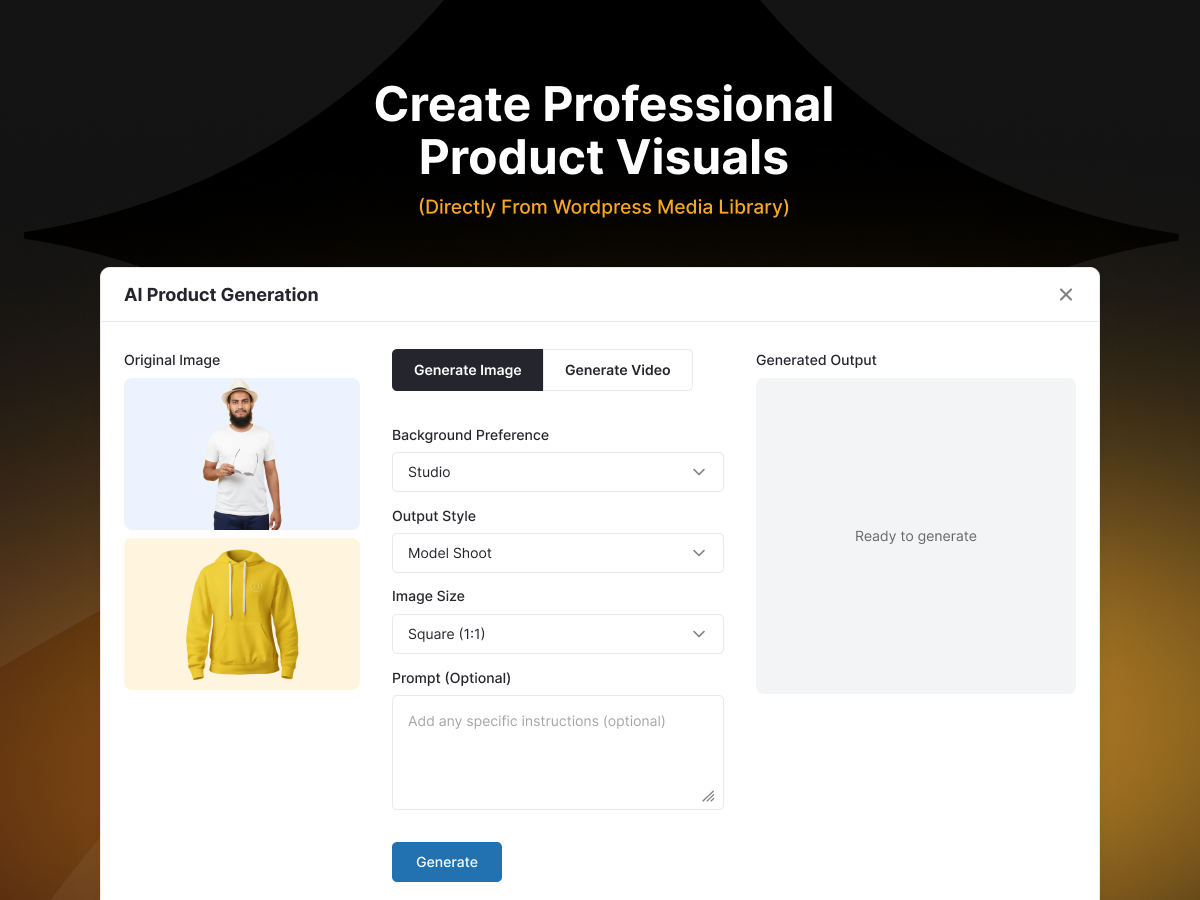
TryAura - Generate Product Photos
Get AI product photography, product video generation, and a customer-facing virtual try-on built right into WooCommerce.
TryAura turns basic product photos into studio-quality AI product photography, realistic AI product images, engaging product videos, and immersive WooCommerce virtual try-on experiences. Improve product visualization, help shoppers visualize products before purchasing, and create unlimited AI-generated product visuals using your own Google Gemini API key.
It is built for WooCommerce store owners who want to improve product presentation, create clearer visual experiences, and help customers make informed purchase decisions without jumping between multiple AI tools.
TryAura is built and maintained by weDevs, a WordPress-focused software company with 13 years in the ecosystem, trusted by over 1 million users across its product portfolio. It is part of the StorePulse family of eCommerce solutions.
🔥 What Is New in TryAura 2.0
TryAura 2.0 is the most substantial creative workflow update we have shipped. It gives WooCommerce merchants more control over product accuracy, scene, image quality, apparel presentation, image editing, and video motion without leaving WordPress.
The result is a faster path from a basic product photo to a polished product photo & video that is accurate, consistent, and ready for product pages, campaigns, social media, and ads.
🎊 New: Creative Controls in TryAura Lite
- More accurate AI product images. Add reference images from different angles, exclude unwanted elements with a negative prompt, and keep product shape, colour, details, text, and logos more consistent for clearer visuals.
- Faster scene creation. Pick studio white, lifestyle, marble, wood table, outdoor, and other ready-made settings. Generated images now follow your Background Preference and Output Style.
- Image resolution control. Choose a supported aspect ratio and generate at 1K, 2K, or 4K with automatic compatible model selection.
- Better apparel presentation and image SEO. Create On model apparel images and receive descriptive AI alt text with every generated image.
- A smoother admin workflow. Cancel a running generation and reach support, documentation, FAQ, changelog, and feature requests from the new Admin Top Bar.
🎊 New : Advanced Image and Video Workflows
- Start from a look. Use six curated eCommerce presets or save your own presets to your account for reuse across browsers and devices.
- Edit instead of regenerating. Remove text or objects, recolour, clean up imperfections, swap backgrounds, or enter a custom instruction. Ghost mannequin output presents apparel without a visible model.
- Direct every product video. Choose from 15 camera motions, set first and last frames, add reference images, select 4, 6, or 8 seconds, choose up to 4K on supported models, and refine the clip with a negative prompt.
Find step-by-step setup guides and tutorials in the product documentation to get the most out of every feature.
If you have additional questions or need assistance, please contact our team, or visit our official website at StorePulse.
🛍️ What You Can Do With TryAura
- Try on clothing, so shoppers see how items look on real models before buying
- Try on accessories like glasses, watches, and jewelry, without new photoshoots
- Show product in hand, with models holding cosmetics, gadgets, bottles, or accessories
- Change the model to match different styles, demographics, or brand aesthetics
- Stage the background with ready-made studio white, lifestyle, marble, wood table, outdoor, and other product scenes
- Keep product details accurate by adding reference images from more angles
- Create apparel visuals with On model output or Ghost mannequin
- Edit existing product images by removing text or objects, recolouring products, cleaning up blemishes, and swapping backgrounds
- Create product videos that turn static images into short, engaging clips
- Control product video motion with 15 camera motions, first and last frames, reference images, duration, resolution, and negative prompts
- Generate blog featured images for content that matches your store
- Build any visually driven WooCommerce store for fashion, apparel, beauty, jewelry, accessories, and lifestyle products
- Virtual mirrors that let customers try the product on themselves
The Problem TryAura Solves
Shoppers hesitate when they cannot picture a product clearly. That hesitation shows up as low conversion rates, weak product engagement, and returns from buyers who were not sure what they were getting.
Professional photoshoots help, but they are expensive, slow to repeat, and hard to scale as your catalog grows. Supplier images look identical to every competing store.
TryAura helps you close that gap. It improves your existing product images, generates new visuals and videos, and adds a virtual mirror to the product page, so shoppers see the product clearly and decide with confidence before they add to cart.
Everything happens inside WooCommerce, with no exports, no separate dashboards, and no third-party apps to manage. Save hundreds of hours when working with a large catalogue, and create on-brand visuals without expensive workarounds.
Create Stunning Product Visuals with Cutting Edge AI Infrastructure
With TryAura, you can upgrade your whole product catalogue with fresh photos, videos, and virtual try-on experiences without expensive photoshoots. Here are some of the features of TryAura.
Show Products Clearly. Sell With Confidence.
Just a few clicks turn simple product images into realistic visuals and try-on experiences. Clean, studio-quality images make your catalog look professional, product videos showcase the fit and fine details that static images miss, and virtual try-on helps customers picture the product before they buy.
When a shopper can see exactly what they are getting, they feel more secure about the purchase, and you spend less time creating and re-creating product images by hand.
WooCommerce Native Virtual Try-On
Let customers preview products visually before purchasing, directly on the shop and product page. Shoppers turn their camera into a virtual mirror or upload a photo to see how a product looks on them, then add the item to the cart straight from the try-on view.
You decide exactly where it appears: enable or disable virtual try-on on a single product from the WooCommerce product editor, or toggle it across your entire catalog from TryAura settings. Virtual try-on works on an unlimited number of products on the Free plan. Simply turn it on, and enable the virtual mirror experience for all your customers.
AI Product Photography Without Reshoots
Open any WooCommerce product, choose a background and style, and generate studio-quality product photos & videos in a few clicks. TryAura works with your existing product photos, so you can elevate dull or inconsistent images across your whole catalog without booking a photographer, renting a set, or editing in design software.
Upgrade one product at a time, or work through a full collection whenever you refresh your store. Every generated image saves straight to the WordPress Media Library, ready to publish.
Bring Products To Life With Product Video
Static images often miss the fit, fluidity, and fine details that help shoppers decide. With TryAura Pro, you turn product images into short videos that show movement and real-world context, then drop them straight into product galleries.
You can also embed YouTube or self-hosted videos on product pages for demos, tutorials, and reviews without slowing your store down. Product video helps shoppers understand what they are buying and keeps them engaged longer on the page.
Bring Your Own Gemini Key (BYOK)
TryAura connects to your own Google Gemini API key. Generation costs go straight to Google at standard API rates, never to a middleman.
There are no TryAura credits, no per-image fees, and no expiring packs, so you stay in full control of your AI usage and cost. Simply plug in your API key and start generating ultrarealistic product images and virtual mirror experiences without any hassle.
Backgrounds, Styles, and Creative Controls
Built-in presets are designed specifically for eCommerce product presentation, so you get consistent, realistic visuals without manual design work.
- Ready-made scenes. Choose studio white, lifestyle, flat lay, marble, wood table, outdoor, and more
- Background preferences. Choose Studio, Custom, Natural, or Plain
- Output styles. Choose Photo Realistic, Studio Mockup, or Model Shoot
- Reference images. Attach extra product shots to improve shape, colour, and detail accuracy
- Image negative prompt. Describe anything you want excluded from the generated image
- Image resolution. Generate 1K, 2K, or 4K output with automatic compatible model selection
- Aspect ratio control. Choose 1:1, 2:3, 3:2, 3:4, 4:3, 9:16, 16:9, or 21:9
- Custom prompt box. Describe the exact AI product image you want on the Starter plan and above
- Start from a look. TryAura Pro includes six curated looks and lets you save reusable custom looks to your account
Generated images now follow your selected Background Preference and Output Style, so the final result reflects the creative direction you chose.
Apply the same preset across products to keep a uniform, professional look throughout your store, or switch to lifestyle scenes for marketing and campaign visuals.
Edit Product Images Without Starting Over
TryAura Pro adds a dedicated Edit tab for fast product image retouching inside WooCommerce. Remove unwanted text, recolour a product, remove an object, clean up the image, swap the background, or write a custom instruction for another edit.
The Cleanup action removes wrinkles, dust, lint, and blemishes while protecting product shape, colour, text, and logos. This helps you correct a strong image without losing the details that make the product recognizable.
Create Apparel Images That Match the Selling Context
Use On model output to show clothing naturally worn by a person. TryAura Pro also includes Ghost mannequin output, which presents the garment in its natural worn shape without a visible body.
These apparel modes help fashion and clothing stores create clearer product gallery images without arranging a separate model shoot for every item.
Fits Natively In Your Workflow
TryAura works right inside your Product Editor and Media Library. Add visuals the same way you add any image to a product or post.
- Media Library integration: every generated image and video is stored on your own site, ready to reuse, download, or publish anywhere
- Per-product and catalog-wide controls: turn try-on on for one product or the entire store from a single setting
- Reuse visuals anywhere: native WordPress image, video, and gallery blocks let you place assets on any page or post, not just product pages
- Blog featured images: generate eye-catching featured images for posts directly from the WordPress editor
- Analytics dashboard: track total images, videos, virtual try-ons, and API token usage over time
- Add to cart from virtual try-on: shoppers buy the moment they feel confident, with fewer steps between decision and purchase
Consistent, Accurate Product Visuals
TryAura is tuned for eCommerce accuracy. Generated visuals are designed to preserve fabric texture, folds, and realistic human proportions, and to stay consistent across products, angles, and variations.
Customers choose how they want to try a product on, with a live camera view or an uploaded photo, and if camera access is unavailable, try-on continues through image upload, so no shopper is left out. The goal is realistic, trustworthy visuals, not over-polished images that look fake.
How TryAura Works
From AI product photography, product video generation, to virtual try-on in minutes, all inside WooCommerce.
- Choose a product. Pick an existing product from your WooCommerce store, or upload a basic image.
- Generate visuals. Create studio-quality product images and short videos in a few clicks.
- Enable virtual try-on. Turn on virtual try-on so shoppers can see how the product looks on them in front of a virtual mirror.
- Publish. Add images, videos, and virtual try-on directly to your product pages and start selling with confidence.
Who TryAura Is For
TryAura is built for WooCommerce store owners who want better product visuals and a clearer buying experience, without a steep learning curve or surprise costs.
- Small store owners who want studio-quality AI product images or videos without hiring a photographer or learning design tools
- Boutique and niche brands that need a consistent, professional look across the whole catalog
- Scaling merchants whose photoshoots no longer keep up with a growing product range
- WooCommerce agencies and builders who manage product visuals for many clients and stores
- DTC brands moving from Shopify who want a bring-your-own-key model with no platform fees
- Dropshippers and catalog-heavy sellers who need to differentiate generic supplier images
TryAura works best for stores where product appearance matters most for the sale: fashion, apparel, accessories, jewelry, beauty, cosmetics, and lifestyle products.
How Stores Use TryAura Every Day
- Refreshing an outdated catalog. A boutique owner brings hundreds of older product photos up to a consistent, studio-quality standard, product by product, instead of a weeks-long reshoot.
- Reducing guesswork in fashion and apparel. A clothing store turns on virtual try-on so shoppers visualize fit and style before buying, which supports more confident decisions and fewer surprises after the order arrives.
- Differentiating generic supplier images. A dropshipper changes backgrounds and swaps models to create unique product visuals that stand out, without commissioning new photography.
- Scaling visuals for an agency. An agency rolls out AI product photography, product video, and virtual try-on across many client stores, with multi-site licensing and no per-image fees eating into margins. Each store can add its own API key, so costs are not pooled towards the agency owner.
- Launching new products faster. A growing merchant generates images and short videos the same day a new SKU is added, then publishes them straight to the product page.
🎯 TryAura Pro Features
Upgrade to a Pro plan to unlock advanced image editing, reusable creative looks, Ghost mannequin apparel output, and deeper product video control.
- Reusable eCommerce looks. Start with one of six curated looks or save your own setup to your account for reuse across browsers and devices
- Product image editing and protected cleanup. Remove text or objects, recolour, swap backgrounds, or clear wrinkles, dust, lint, and blemishes while protecting shape, colour, text, and logos
- Ghost mannequin apparel output. Show garments in their natural worn shape without a visible model
- Product video generation. Turn existing product visuals into short product videos
- Motion and frame direction. Choose from 15 camera motions and set the first and last frames
- Video product accuracy. Add reference images and an editable negative prompt
- Video duration and resolution. Create 4, 6, or 8 second clips at 720p or 1080p, with 4K on supported models
- Custom prompt field. Describe the exact visual you want for full control over results
- Image and video aspect ratios. Prepare visuals for product pages, social media, and ads
- Video thumbnail generation. Create or customize thumbnails to improve first impressions
- Multi-site licensing. Use TryAura across multiple WooCommerce sites on Professional and Agency plans
Why Store Owners Choose TryAura
- No credit system. Bring your own Gemini key and pay Google directly at API rates, with no per-image fees and no expiring packs.
- Everything inside WooCommerce. No exports, no separate dashboards, and no third-party apps to manage.
- Accuracy you can trust. Reference images help preserve product shape, colour, details, text, and logos across generated visuals.
- Control from input to output. Choose scenes, negative prompts, aspect ratio, resolution, apparel presentation, and advanced video …