


TrueProof – Anonymous Sales Notifications
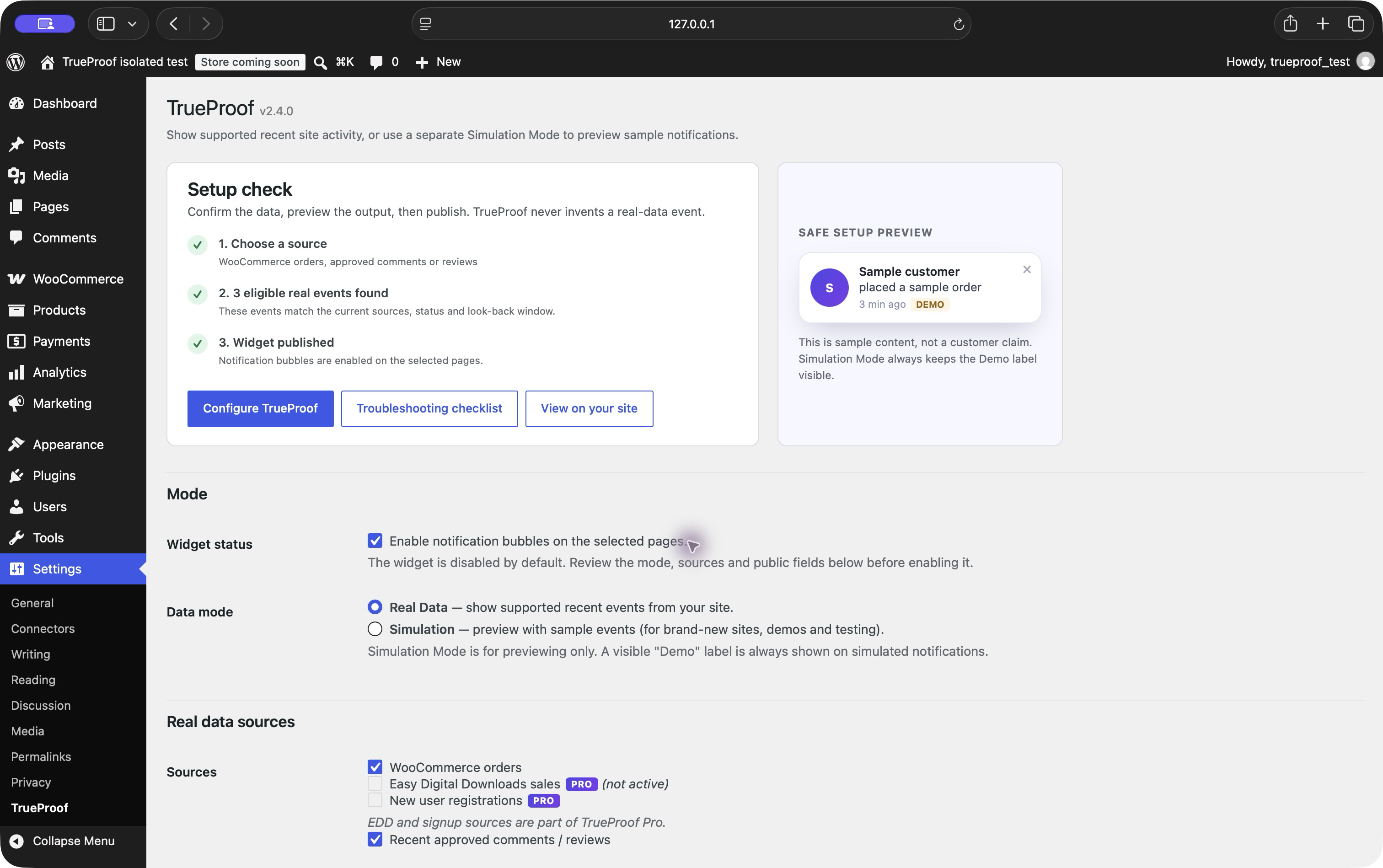
Actual TrueProof 2.4.0 setup on an isolated test site: Real Data and WooCommerce orders selected. Event counts come from synthetic fixtures, not customer results.
TrueProof shows real WooCommerce sales notifications and approved comment/review activity from your own WordPress site. New installs default to “Someone” without a location, and the widget stays off until you configure it. The WooCommerce workflow is free; Pro adds Easy Digital Downloads sales and new-user registrations.
Start with the free WooCommerce workflow: install the plugin, open Settings TrueProof, select Real Data and WooCommerce orders, review Fully anonymous output, then enable and save. A recent Processing or Completed order must be inside your look-back window. No hosted activity-feed account or payment card is needed for this Free path.
The illustrated WooCommerce checklist shows the actual 2.4.0 interface with synthetic fixtures, privacy checks and troubleshooting. It is not a sales-result claim.
The widget is disabled after a new installation until you review its sources and enable it. Use Simulation Mode only to design and preview notifications with sample data; its visible “Demo” badge is always shown. Use Real Data Mode to display supported records from enabled sources on your site.
Data modes
- Real Data Mode reads supported records from WooCommerce, Easy Digital Downloads, user registrations and approved comments/reviews.
- Simulation Mode is for previewing only. A visible “Demo” badge is always shown on simulated notifications.
- Site owners control the displayed sources and remain responsible for configuration, disclosures and legal compliance.
Features (free)
- WooCommerce order notifications
- Recent approved comment / review notifications
- Simulation Mode with a visible “Demo” badge that is always shown
- Fully anonymous display (“Someone”, with no location) is the default for new installs; shortened or full names remain available for sites that have an appropriate basis
- Vanilla-JavaScript frontend with no jQuery dependency; measure page impact with your own theme and plugins
- Position, accent colour and timing controls; free display scope is all eligible pages or the front/posts page
- Results cached server-side; events served over the REST API
- No built-in analytics or advertising integrations. The widget fetches event data from this site’s REST endpoint; licence requests use the data flow disclosed under Privacy
TrueProof Pro
The free plugin includes WooCommerce order notifications, approved comment/review notifications, Real Data and Simulation modes, core appearance and timing controls, and all-pages or front/posts-page display. TrueProof Pro unlocks:
- Easy Digital Downloads sales notifications
- New-user signup notifications
- Display rules — limit notifications by supported contexts (front/posts page, blog posts, pages, WooCommerce products and archive views)
- Activation on multiple sites, subject to the purchased plan’s site limit
- Priority email support during the paid licence period
Pro is activated with a license key from wptrueproof.com. Activating a key validates it with our store — see Privacy below.
Privacy
The order, user and comment records used to build notifications are read from your own WordPress site and are not sent to TrueProof. New installs default to “Someone” with no city/country; shortened and full-name modes are optional. See the FAQ for the exact data shown.
During normal use without licence activation, the plugin’s own code does not call a third-party service; the widget requests notification data from this WordPress site’s REST endpoint. Entering a licence key, periodic validation while it is active, or deactivation posts the licence key, home URL and requested action to wptrueproof.com. The built-in request body does not include notification-source records. Standard network metadata is also received by the licensing service.