

Track Orders for WooCommerce – Multi Carrier WooCommerce Shipping
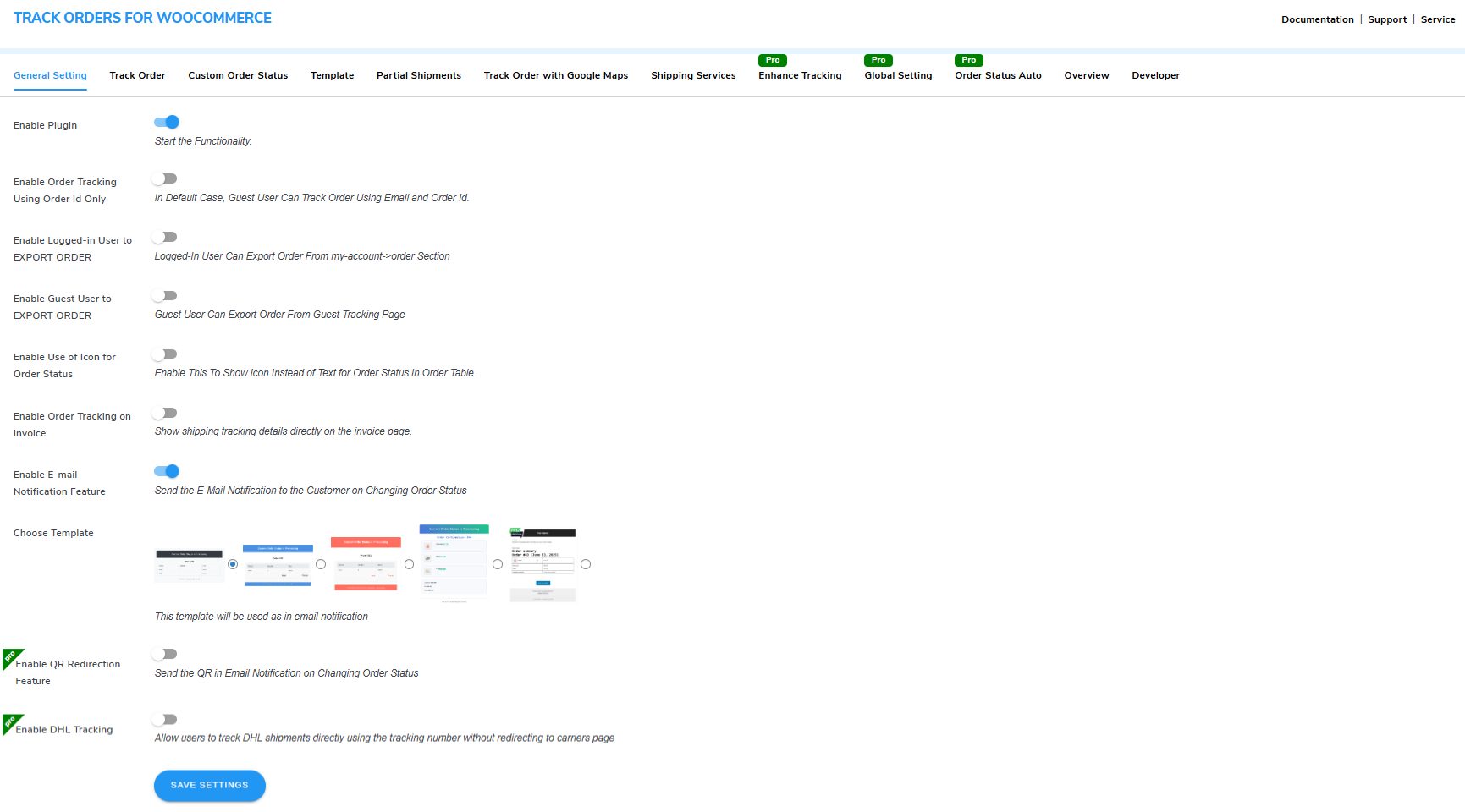
<strong>General Settings</strong>
📦 Automate your Multi Carrier WooCommerce Shipping. Using this extension, you can enable customers to monitor the delivery process. They can track the shipment from order placement to doorstep delivery.
It lets you optimize the custom WooCommerce shipping module to make waiting less boring for your customers. On top of that, you can tailor the tracking stages to your shipping process.
Keep your customers updated with real-time tracking and grab their attention while they wait. Incorporate stages into the shipping journey that align with your fulfillment process to provide customers with a comprehensive order tracking and woocommerce shipping experience.
Track Orders for WooCommerce Demo | Track Orders Documentation | Contact Us
Why Choose Our WooCommerce Shipping Plugin?
You can automate Multi Carrier WooCommerce Shipping with delivery notifications, tracking templates, and live updates.
WITH OUR WOOCOMMERCE SHIPPING PLUGIN YOU CAN:
- Simplify your order processing with partial shipment tracking
- Multi-Carrier Tracking On the Same Page with live updates
- Track Orders with multiple tracking templates.
- Quick order tracker button for customers
- Show the icon for order status in the order table
- Track your orders using the unique order ID only
- Third-party 3PL Shipment Tracking.
- Enable Live Map Package Tracking Using Google Map
- Let customers & guests export orders in a CSV file
- Email notifications for order status in WooCommerce
- Show additional order details with tracking
- Create and use unlimited custom order status.
- Share Tracking URL on WhatsApp.
- Create Custom Email Templates with Template Builder
⭐ KEY FEATURES OF WOOCOMMERCE SHIPPING PLUGIN:
1) Email Delay Notification:
Our Order Tracking plugin now lets you send delay notification emails to customers when their delivery is running late. You can turn this feature on or off anytime, edit the email template, and add details like order ID, customer name, and expected delivery date using dynamic placeholders. You can also send the delay email to the admin if needed.
2) Partial Shipment Tracking:
Our latest Track Orders plugin update brings partial shipment tracking. Customers placing multiple orders at once will see separate tracking buttons for each order and can track them one by one. As an admin, you can change the parent order status from the backend, mark it as partially shipped, and set child orders to be completed automatically when the parent order is completed.
3) Multi-Carrier Tracking On Same Page:
With the latest update to our WordPress order tracking plugin, we have added support for on-page live tracking for over 1000 carriers. Now, customers can track their orders directly on your website without being redirected anywhere else. All they need to do is enter their tracking ID, and the live order status will appear instantly on your site.
4) Pre-Built Tracking Templates:
WooCommerce Order Tracker provides a diverse range of three distinct order-tracking templates, which enables you to incorporate captivating visual representations for different order statuses, such as on-hold, processing, delivery, and more.
5) Create Custom Order Status in WooCommerce:
Order tracker for WooCommerce allows you to create and use custom order statuses tailored to your specific order fulfillment workflow. Define order statuses that cater to the distinct stages within your shipping process.
6) Track your orders With Google Maps:
With Google Maps feature allows customers to track their orders in real-time using Google Maps API integration. You have to provide the Google Maps API key, the order production house address, and the lessons of the order transit locations. Once enabled, customers can view the progress of their order on a Google Maps map.
7) Third-party Shipment Tracking (FedEx):
Through the integration with FedEx’s shipment tracking system, the WooCommerce shipping plugin allows customers to track their packages using the provided tracking code.
8) Replace Order Status Text With Icons:
You can replace the order status text with relevant icons in the order details table, allowing customers to grasp their orders’ status at a glance. By utilizing icons that are associated with each specific order status, such as a checkmark for “completed” or a clock for “processing,” the visual representation becomes more compelling and user-friendly.
9) Email Notifications for WooCommerce Order Status:
Use the order tracking plugin to implement automated email notifications that are triggered whenever the WooCommerce order status is updated. You also get access to four email notification templates, allowing you to choose the one that fits your brand.
10) Track Only Using Order ID:
Enable them to track their orders effortlessly by solely entering their unique order ID, without the need for additional information such as email addresses or account logins.
11) Order Export as CSV File:
With the WooCommerce order tracker, logged-in users and guest users can export their order details in a comma-separated values (CSV) file, which contains details like Order ID, Status, Total, Items, Payment Method, Billing Name, and Email address.
12) Order Information:
Show customers information crucial to the order fulfillment process, such as the delivery partner, estimated delivery date, and tracking code. Including the delivery partner’s name.
13) Create WooCommerce Order Tracking Shortcode on the tracking Page:
By utilizing the page short code, you can add an Order Tracking page anywhere on your WooCommerce store. Use the form shortcode to implement a Track Order Form anywhere on your site.
14) Order API:
With the latest update our track orders for WooCommerce plugin includes a powerful Order API that helps you easily connect your store with third-party applications. With this API, you can fetch paginated orders with status labels, view details of a specific order, create new orders, and access all available order statuses.
For example, if you have a mobile app, you can use the API to display a customer’s recent orders with real-time updates like Processing or Shipped, and even allow order creation directly from the app.
LIVE DEMO OF ORDER TRACKER PLUGIN
🤝 TRACK ORDERS FOR WOOCOMMERCE COMPATIBILITIES
Compatible with various themes and plugins that are suitable for any kind of WordPress project.
- Compatibility with Coefficient to display your API data in a clear, tabular format.
- Upsell Funnel Builder – Display upsell offers on the order tracking page.
- RMA – Return, Refund and Exchange – With this compatibility, you can now track the status of return, exchange, and refunded orders via the track orders plugin.
- Visual Composer – Free WordPress Website Builder
- Elementor – Create, Design, and Host your Website
- WC Vendors – A Modern WordPress Theme
- DIVI Theme – The Ultimate WordPress Theme
- Event Ticket Manager For WooCommerce & Event Ticket Manager For WooCommerce Pro – Events and Bookings Calendar, Registration, Event Check-in Using Emails, Edit Your Ticket Content by WP Swings
- PDF Generator For WordPress – Generate Invoice via PDF Plugin, embed the tracking button for users easily track their orders directly from the invoice.
🏆 WHAT PREMIUM VERSION OF WOOCOMMERCE SHIPMENT TRACKER OFFERS
1. Send Text Message Notifications: Our Pro plugin lets you send order-tracking updates to customers via text messages using Twilio’s API integration
2. Payment Reminders Orders: Automatically send payment reminders with the Pro plugin to boost conversions. These emails include payment links for pending transactions.
3. Custom JS and CSS: Use the global settings to define wrapper classes for your theme, and easily customize the design. With custom CSS and JavaScript, you can adjust the page’s look and feel.
4. Third-Party Shipment Tracking: Our Pro plugin integrates with trusted shipment tracking systems like FedEx, USPS, and Canada Post.
5. Redirect to Tracking Page With QR Code: WP Swings Shipment tracking plugin lets you include a QR code in order emails, redirecting customers to the tracking page.
6. Track Your Order Popup: Set up a “Track Your Order” popup to make order tracking simple and quick for your customers.
7. DHL Shipping Integration: With the tracking API, let your customers track their orders easily, no need to visit the carrier’s website.
8. Carriers Supported 1000+: WooCommerce Shipment Tracking plugin now supports over 1000+ carriers, like DHL, UPS, FedEx, and many more
9. Custom Email Template Builder: Create custom email templates with a simple drag-and-drop builder. Select and organize elements like headers, footers, and custom HTML to match your style.
Take Advantage of the Exclusive Features of the Track Orders For WooCommerce Pro Plugin
This Pro enables the addition of multiple shipping services, customization of the tracking process to match specific business needs, and the sending of email reminders with payment links for pending orders, it offers features like tracking templates for engaging customers, shortcodes for creating custom tracking pages and forms, and a Track Your Order popup box for convenient order monitoring within the My Account section.
Note: Get Track Orders For WooCommerce Pro
⭐⭐⭐⭐⭐ – Excellent plugin and support
The plugin is very useful, and the support is quite helpful. Recommend. Kudos to the team! (@stevecaloo)
❤️ SUPPORT
If you need support or have questions, kindly use our online chat window here
or connect with us then Generate a ticket
- If our documentation doesn’t contain the solution to your problem, you can visit the WP Swings Forums Community
- Create and Revamp your eCommerce store with WooCommerce Services
- Get Huge Discounts on Track Orders for WooCommerce Plugin – Get More Offers
External Services Documentation
1. WP Swings Support Service
Used to allow users to submit queries/support requests.
- Data sent: Name, Email and Message (user input)
- Trigger: When the user submits a support query from the plugin dashboard
- Service endpoint: https://wpswings.com/submit-query/
- Terms of Service: https://wpswings.com/terms-and-conditions/
- Privacy Policy: https://wpswings.com/privacy-policy/
2. YouTube Tutorial
- Purpose: Video walkthrough / setup guide
- Data Sent: none
- Trigger: User opens video link from plugin/readme
- Endpoint: https://youtu.be/tQ5tJTjDJTE
- Terms: https://www.youtube.com/t/terms
- Privacy: https://policies.google.com/privacy
3. TrackingMore
- Terms: https://www.trackingmore.com/legal/terms-of-use
- Privacy: https://www.trackingmore.com/legal/privacy-policy
Get Tracking Info
- Purpose: Fetch live multi-carrier tracking for a tracking number + courier
- Data Sent: tracking_numbers (query), courier_code (query), API key in header (Tracking-Api-Key)
- Trigger: AJAX call wps_mult_carrier_data_tracking (wp_remote_get) when multi-carrier tracking enabled
- Endpoint: https://api.trackingmore.com/v4/trackings/get?tracking_numbers=…&courier_code=…
Create Shipment Record
- Purpose: Create a shipment record on TrackingMore when a tracking number is new
- Data Sent: JSON body { tracking_number, courier_code }, API key in header
- Trigger: Plugin calls wps_create_new_shippement_order (wp_remote_post) when TrackingMore returns 4102 or manual create
- Endpoint: https://api.trackingmore.com/v4/trackings/create
List Couriers
- Purpose: Fetch all supported couriers (name, logo, code) to populate carrier logos DB
- Data Sent: API key in header
- Trigger: Admin init wps_fetch_and_store_carrier_logos (caching via transient)
- Endpoint: https://api.trackingmore.com/v4/couriers/all
4. Google Maps API
- Purpose: Map display / geocoding for “Track with Google Map” feature
- Data Sent: Google API key, addresses or lat/lng coordinates (as query params)
- Trigger: User views map tracking or plugin requests geocoding
- Endpoint: https://maps.googleapis.com
- Terms: https://www.google.com/help/terms_maps/
5. Google Cloud Console (Docs link)
- Purpose: Guide to obtain Google Maps API key
- Data Sent: none (documentation link)
- Trigger: Admin clicks link to get API key
- Endpoint: https://console.cloud.google.com/apis/library
- Privacy Policy:https://policies.google.com/privacy
- Terms of Service: https://policies.google.com/terms
6. WP Swings Telemetry / Tracking
- Purpose: Plugin usage / telemetry reporting (plugin tracking endpoint)
- Data Sent: plugin/version/site metadata (when telemetry enabled)
- Trigger: Plugin telemetry/usage reporting, Opt-in only (never pre-enabled)
- Endpoint: https://tracking.wpswings.com/
- Terms of Service: https://wpswings.com/terms-and-conditions/
- Privacy Policy: https://wpswings.com/privacy-policy/
7. HubSpot Forms API
- Data sent: Name, email, site URL, and feedback when forms are submitted.
- Purpose: Onboarding / deactivation form submissions (marketing/telemetry onboarding)
- Trigger: Plugin onboarding or deactivation steps submit form to HubSpot
- Endpoint: https://api.hsforms.com/ (submission endpoint built from this base)
- Terms: https://legal.hubspot.com/terms-of-service
- Privacy: https://legal.hubspot.com/privacy-policy
My Question is not listed?
Check out Knowledge Base