


TNC Toolbox: Web Performance
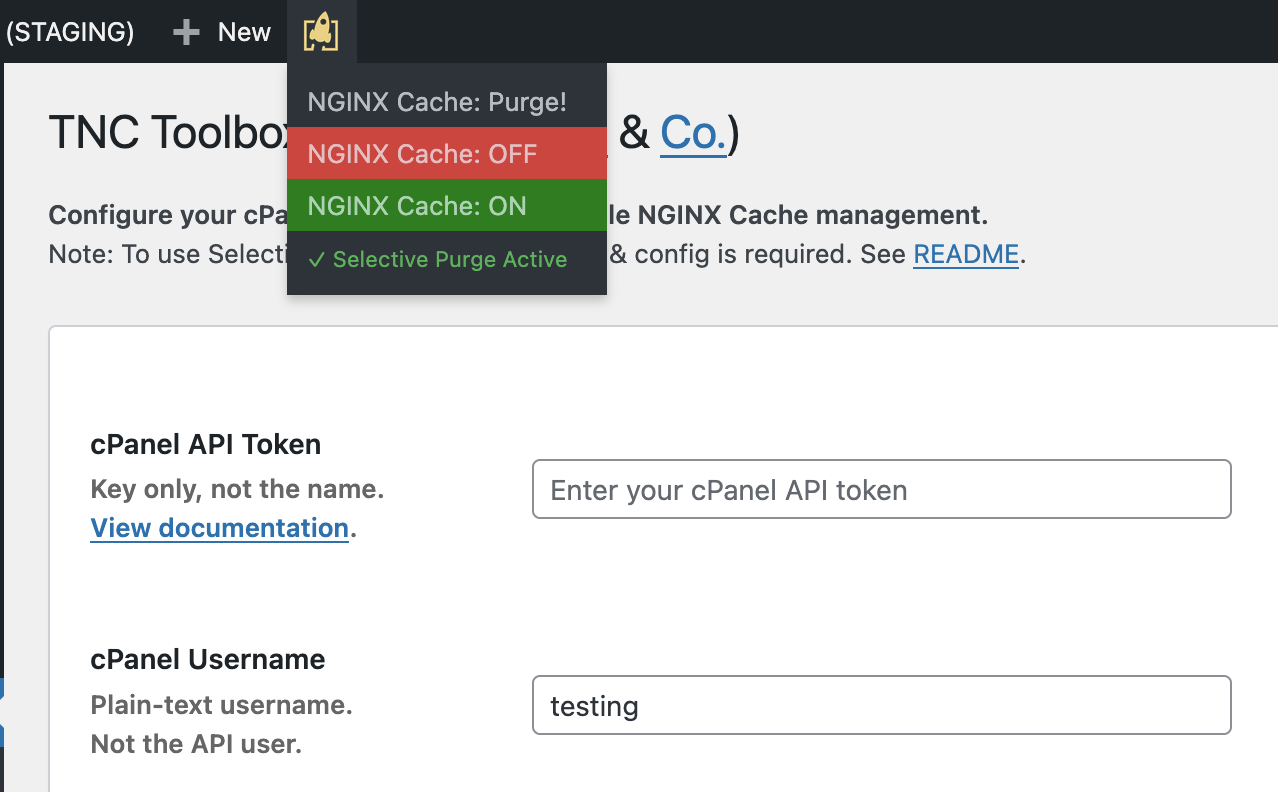
Top Menu Bar options for NGINX Caching.
TNC Toolbox enhances your WordPress experience with multi-stack caching support.
Built for our Managed Server clients, we’ve open-sourced it so others can enjoy it too!
Now supporting both ea-NGINX (cPanel/WHM) and LiteSpeed (OpenLiteSpeed/Enterprise) web stacks, with automatic server detection!
❤️ FOSS by The Network Crew Pty Ltd (TNC) for Merlot Digital & the world. ❤️
Functionality
At the moment, TNC Toolbox:
- Multi-Stack Support: ea-NGINX (cPanel) and LiteSpeed (OpenLS/Enterprise)
- Auto-Detection: Automatically detects your web server and configures appropriately
- Allows you to enable, disable and purge the NGINX User Cache
- Purges the NGINX Cache magically on post/page publish/update!
- Also purges the Cache when the WP Core is successfully updated
- Lets you know if the plugin is activated but not yet configured
- Only allows Admins to enable/disable caching & edit configs
- Shows you the status of cP UAPI via disk usage info
- Purge when any ACF config options are saved
- Supports scheduled post publishing!
- LiteSpeed: Recommends LiteSpeed Cache plugin for optimal performance
Eager for even more capabilities?
We plan to add further features as clients & the community request it.
Please let us know your ideas on GitHub – we’d love to hear from you!
Caching Deployments
For NGINX Stack (cPanel/WHM):
– ea-NGINX (reverse proxy caching) is meant to be 2nd-level
– Make sure your WP site also has on-site caching, like WP Super Cache
– You can go further with caching: browser-caching assets!
For LiteSpeed Stack:
– Use the LiteSpeed Cache plugin
– See LiteSpeed Cache documentation for configuration
3-layer Cache (NGINX):
1. NGINX Caching Proxy (ahead of Apache)
2. WP Super Cache, WP Rocket, etc on-site
3. htaccess/etc rules for Browser Caching
This way, you can ensure maximum efficiency!
The key is to purge when stale, so properly configuring your WP Plugin Cache is critical to ensuring that you don’t end up with cache misses due to stale data that could’ve/should’ve been purged by garbage collection, preloading, etc, rule-sets.
Updating from v1 to v2.x.x
On every website running the plugin, check that:
- Website is reporting v2.x.x plugin version.
- Plugin has been activated post-update. *
- Config exists in the plugin settings.
- API status checker reports OK.
- /wp-content/tnc-toolbox-config/ folder is gone.
(* Change to main plugin file name may result in deactivation)
Verifying cP+WHM Logs
If you’d like to ensure actions are firing properly at a deeper level:
- WHM > Tweak Settings > Logging > Enable cPanel API Log > On
- WHM > Terminal >
tail -f /usr/local/cpanel/logs/api_log - WordPress > Update a Post/Page, or explicitly Purge
- WHM > Terminal > You should see the action fire!
- WHM > Terminal > Ctrl+C to close the tail
Note: To do this, you require root access to the Server.