

TibaCheck — Site Audit
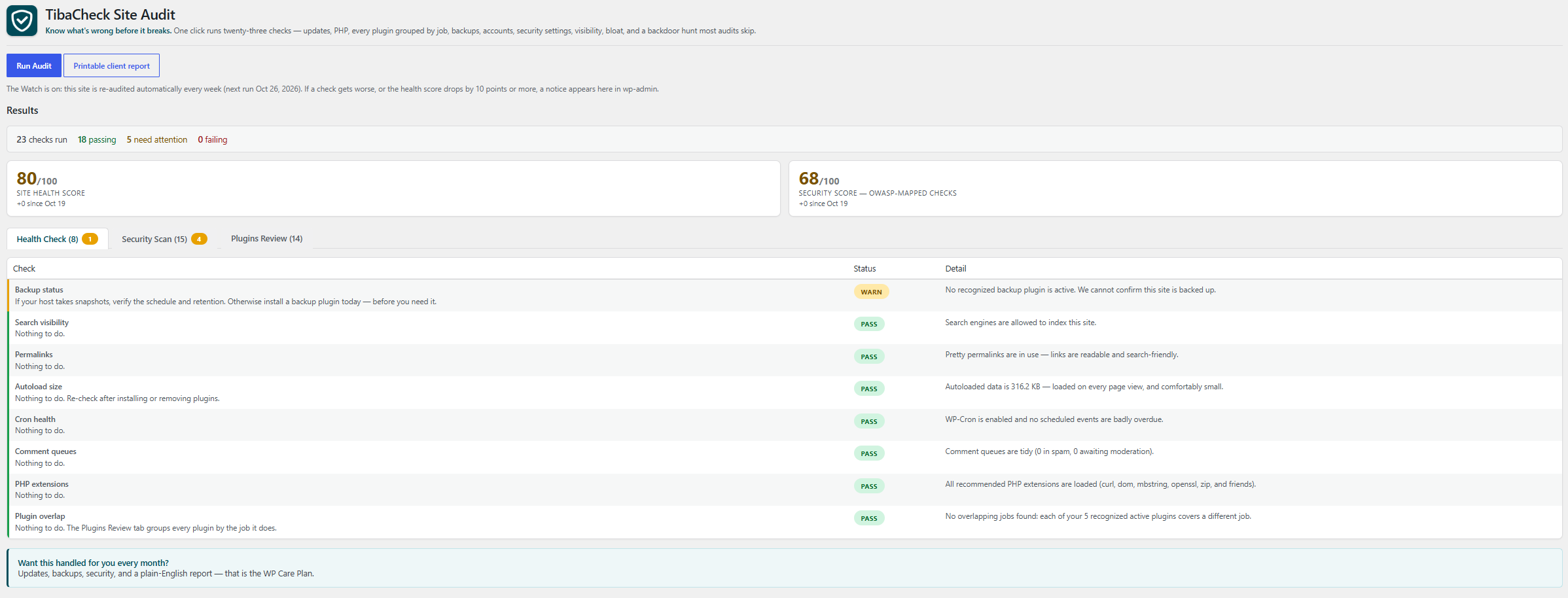
One-click audit results with color-coded status pills and a summary bar — passing, needs attention, and failing at a glance.
TibaCheck runs a read-only audit of your site’s configuration and shows you, in plain language, what needs attention. Every report leads with two scores — a Site Health Score and a Security Score built from checks mapped to the OWASP Top 10 (2025) — with a full OWASP coverage table showing what was assessed and what needs an external deep scan:
- Software updates — pending WordPress core, plugin, and theme updates (outdated software is the #1 way sites get hacked)
- PHP version — whether your PHP is supported, outdated, or end-of-life
- PHP critical security update — whether the PHP version actually running the site is affected by the October 2026 PHP security advisory (CVE-2026-109618 and CVE-2026-109619, critical unauthenticated remote code execution vulnerabilities with active exploitation reported), naming the patched release for your PHP branch (8.2.35, 8.3.36, 8.4.27 or 8.5.12)
- Inactive plugins & themes — unused code sitting on your site is a favorite hiding spot for malware
- Backup status — whether we can confirm this site is backed up at all
- Site email delivery — whether we can confirm this site’s email is set up to be delivered at all: a dedicated mail plugin (one of the mail plugins the plugin catalog already lists as sending site email through SMTP or a mail service — WP Mail SMTP, WP Mail SMTP Pro, Easy WP SMTP, Post SMTP, FluentSMTP — matched by its exact folder name, or by its exact file name for a single-file plugin) is active and named, or the report warns that no recognized dedicated mail plugin is active and says plainly that this does not prove mail is broken — mail may be handled by the host, by a must-use plugin, or by a mail plugin the check does not recognize — only that WordPress’s built-in mail, which hands password resets, account and comment notices, form alerts, and store order emails to the web server’s own mail setup, is the only setup we can see. The check never sends a test message: sending mail would break the plugin’s read-only, no-external-requests rule, so the report tells the owner to prove delivery with a test message themselves
- User accounts — every administrator listed by name after each scan, plus a hidden-account test that catches backdoor users invisible to WordPress
- Registration safety — open registration paired with a powerful default role is an open door; we flag it
- File editor — whether the wp-admin theme/plugin editor (one stolen password away from code execution) is disabled
- Debug display — whether PHP errors are being shown to visitors, leaking server internals
- Exposed debug log — whether a debug log file sits in a web-accessible folder (WordPress’s own debug log defaults to a file named debug.log inside wp-content, a folder reachable by web address), or WordPress debug logging is switched on and directed into the wp-content or site root folder, where the first error logged will create it there; a log found there warns and is named — it can hold error messages with server paths and request details — while logging directed to a path outside both folders passes. No log file is ever opened or read, and the report says plainly that whether the server blocks the file cannot be tested from inside WordPress
- Exposed PHP error log — whether a PHP error log file sits in a web-accessible folder, or PHP’s own error log setting directs one into one. PHP keeps a separate error log from WordPress’s debug log, configured in php.ini, a .user.ini file, or a host control panel — switching WordPress debug off does not change it — and its classic file name is error_log, which turns up in the site root, wp-admin, and wp-content folders, all reachable by web address; a log found there warns and is named — it can hold error messages with server paths and request details — while logging directed to a path outside those folders, or to the system log, passes. No log file is ever opened or read, and the report says plainly that whether the server blocks the file cannot be tested from inside WordPress
- Exposed PHP configuration files — whether a PHP configuration file (php.ini, .user.ini, or the per-folder file name this site’s PHP is set to look for) sits in the site root, wp-admin, or wp-content folder, all reachable by web address; a file found there warns and is named — it can hold PHP settings in plain text, and on hosts that read per-folder configuration a .user.ini file can also set PHP directives for the scripts in its folder — while a host may have placed it deliberately, which the report says plainly. No configuration file is ever opened or read, and the report says that whether the server blocks the file, and whether this server’s PHP loads configuration from a web folder at all, cannot be tested from inside WordPress
- Search visibility — whether the site is accidentally telling Google to stay away
- SSL / HTTPS — whether both site URLs are actually configured for encrypted traffic
- Permalinks — whether links are readable and search-friendly, or the plain
?p=123default - Autoload size — how much data loads on every page view, with the biggest offenders named; bloat here is the #1 silent slowdown
- Cron health — whether scheduled tasks (updates, backups, posts) are actually firing, or silently stalled
- Comment queues — spam and unmoderated comments piling up in the database
- PHP extensions — whether the extensions WordPress relies on for updates, images, and encryption are present
Plus the Persistence Pack — the backdoor hunt most audits skip entirely:
- Privilege audit — accounts whose real power exceeds their role label (a “Subscriber” who can actually run the site)
- Must-use plugins & drop-ins — code that runs on every request but never appears in your plugin list, listed by name; files matching names commonly installed by WordPress, hosts, or caching tools are called out separately from names we cannot recognize
- Database triggers — triggers on account tables can silently recreate a deleted backdoor; we inspect the schema
- Cron job origins — scheduled tasks that trace to neither core nor any installed plugin or theme are how cleaned infections return
- Code in uploads — executable files inside the media folder, where only images and documents belong
- Server config in uploads — .htaccess, web.config, and .user.ini files inside the media folder that can redefine how uploaded files are treated: a config file whose rules enable code execution fails (it turns the media folder into a code folder, and can survive a cleanup that only removes the payload), config files whose active rules are all recognized and none enables execution pass and are named, and a config file with rules the check does not recognize — or that cannot be read in full — warns instead of being assumed safe
- Stray code in wp-content — code files sitting loose in the top level of the wp-content folder, outside any plugin, theme, or WordPress drop-in: directly reachable by web address, invisible in your plugin list (the drop-in list WordPress exposes only ever returns the filenames WordPress itself defines, so a file with any other name never shows up there), and able to survive a cleanup that only removes plugins and themes; any such file warns and is named for a human eyeball
- Stray code in site root — code files sitting loose in the top level of the folder WordPress is installed in, beyond the files WordPress itself ships there and your wp-config.php: directly reachable by web address, invisible in your plugin list and in every update list, and able to survive a cleanup that only removes plugins and themes; the files WordPress expects are matched by their exact file name (a file whose name differs only in letter case is a different file on most servers and is named, not excused), any other file with a code extension warns and is named for a human eyeball, and matching by name is stated plainly as not proof that an expected file’s contents are genuine
- Exposed backup files in site root — the non-code leftovers sitting loose in the top level of the folder WordPress is installed in, where a web server hands a file to anyone who asks for its address: copies of your configuration or environment file (wp-config.php.bak, .env, .envrc and the like) fail, because they can hand out secrets such as your database password or API keys as plain text; database dumps (db.sql, backup.sql.gz, and the same dumps renamed with a backup, text, or editor suffix — db.sql.bak, db.sql.txt, db.sql~) fail for the same reason — your users and password hashes in readable form; environment templates (.env.example, .env.sample, .env.template, .env.dist, and the direnv forms .envrc.example, .envrc.sample, .envrc.template, .envrc.dist) warn instead of failing — those names claim placeholder values, not real secrets — and site archives, backup copies of other files (index.php.bak), and version-control folders (.git) warn and are named for a human eyeball. Files are matched by name only and none is ever opened — the report says so plainly — and only the top level is listed, because backup tools that keep archives inside subfolders are a different row’s scope
- Exposed backup files in wp-content — the same non-code leftovers, one folder the site-root row never lists: the top level of the wp-content folder, which that row skips as a folder and the stray-code row only grades for code files. Copies of your configuration or environment file (wp-config.php.bak, .env, .envrc and the like) and database dumps (db.sql, backup.sql.gz, and the same dumps renamed with a backup, text, or editor suffix) fail and are named, because wp-content is reachable by web address and a file there is handed to anyone who asks for it; environment templates (.env.example and the direnv forms), site archives, backup copies of other files (index.php.bak), and version-control folders (.git) warn and are named for a human eyeball. Files are matched by name only and none is ever opened — the report says so plainly — and only the top level is listed, because the subfolders hold the site’s plugins, themes, and uploads rather than loose leftovers
- Server prepend directives — auto_prepend_file / auto_append_file run code before WordPress even loads; we show you if they’re set
- File permissions — wp-config.php and the code folders (site root, wp-includes, wp-content, plugins, themes) fail the check if any account on the server can rewrite them; a world-writable uploads folder warns, and a code folder that cannot be found at all is reported as “could not confirm” rather than silently skipped. Only the world-writable setting is graded — owner and group permissions differ legitimately between hosts, so they are not judged
- Application passwords — an inventory of the standing credentials that bypass your login screen, with the oldest one’s age
- Login keys and salts — the eight secret values WordPress signs login cookies with, read from the constants the site runs with (values themselves are never displayed — only the names of the settings): a setting that is not set, still holds the sample placeholder text that ships in wp-config-sample.php, or holds the same value as another setting warns and is named, because WordPress itself refuses to use such a value and covers it — with one it generates and stores in the database, or, on a site still carrying the older SECRET_KEY setting, with that setting’s value — so logins are not left unprotected, but the keys actually in force are then not the ones in the configuration file where a care team expects to find and rotate them, and a database-stored covering value lives in the same database as the user password hashes
Plus the WooCommerce store pack — four more checks that appear only when WooCommerce is active, so they never clutter a non-store report. A store that cannot take payment is down in the only way that matters, and these are what a care plan watches on a store every month:
- Store pages — the Checkout page must be assigned and published or customers cannot buy at all (the check fails when it is not); the Cart, Shop, and My Account pages are checked too and warn when broken
- Payment gateways — at least one gateway must be switched on, read from WooCommerce’s own gateway registry so extension gateways count exactly like built-in ones; up to four enabled ones are named
- Store details — store currency, base country, and street address, the details taxes, shipping, and invoices are calculated from (a currency or country that was never set is flagged with the default WooCommerce silently uses instead)
- Checkout posture — the silent sales leak: guest checkout off, no account creation during checkout, and registration closed on the My Account page too, so only existing account holders can buy. Checkout encryption itself is graded once, by the SSL / HTTPS check, and cross-referenced here — never double-counted
Every report also carries a Plugins Review section: every installed plugin grouped by the job it does — backups, security, SEO, speed, forms, builders, store, analytics, spam, media, email, languages, utilities — each with a one-line purpose and its active/inactive state. When two or more active plugins share a job, the group is flagged repetitive and a Plugin Overlap check warns: duplicates conflict, slow the site, and double what you must keep updated. Plugins we don’t recognize are listed honestly as “not yet categorized” — we never guess what a plugin does.
Every report can also be opened as a printable client report: a branded document with the score cards, every check and its detail, and the plugin and OWASP coverage summaries — ready to print or save as a PDF for a client. It is generated fresh when opened; the plugin stores no full report (only scores, statuses, and time).
The Watch keeps an eye on the site between visits: once a week, TibaCheck quietly re-runs the same read-only audit on its own (using WordPress’s built-in scheduler — no external calls, nothing phones home). If a check gets worse than the last audit, or the health score drops by 10 points or more, a notice appears in wp-admin naming what changed. A manual audit run answers the notice; improving checks never raise one, and each weekly run reconciles an unanswered notice — problems that recovered drop off it, problems still active stay on it. Deactivating the plugin stops the Watch and discards any pending notice (on a multisite network, deactivate on the site itself to clear that site’s Watch).
A note on honesty: TibaCheck does not claim to “scan for malware” the way signature scanners do — signatures miss modern, per-site malware, and a scanner runs inside the very environment an infection can hide from. What it does is audit the places …