


Tabsmith – Custom Product Tabs for WooCommerce
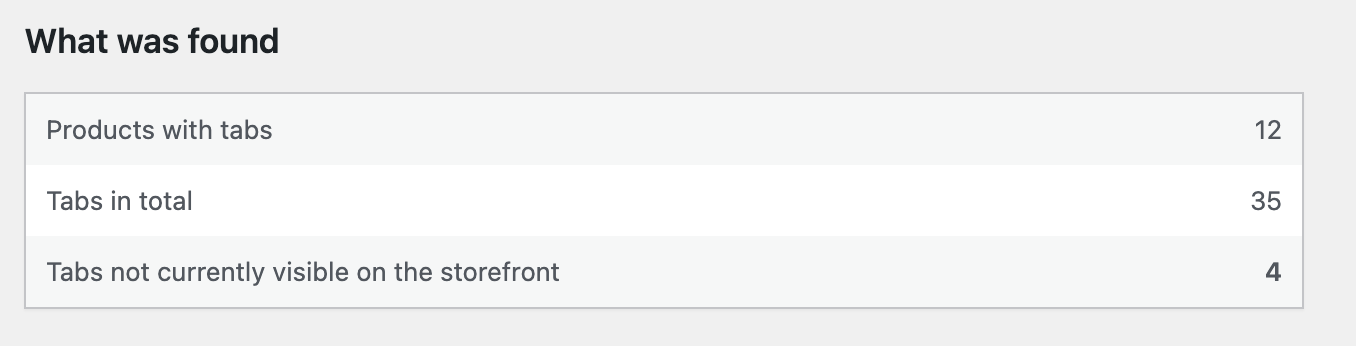
The scan runs before anything changes, and reports how many tabs are not currently reaching your product pages.
Tabsmith adds your own tabs to WooCommerce product pages: shipping information, care instructions, sizing, warranty, anything your customers ask about twice a week.
If you are moving from Custom Product Tabs (YIKES), Tabsmith reads your existing tabs and brings them across in one click – including any that were never reaching your customers.
Some of your tabs may not be on your product pages
WooCommerce identifies every product tab by a key. That key is built from the tab’s title. Two tabs with the same title produce the same key, and when that happens the second tab replaces the first. The first one is still saved in your database. It simply never renders.
This is easy to do by accident. A shop with “Shipping” on a product and a second “Shipping” tab added later has one tab quietly missing, with no warning anywhere in the admin.
Tabsmith scans for this before it changes anything, and tells you exactly what it found:
3 tabs across 1 product. 1 of them is not currently shown on your product pages.
Importing gives every tab its own key, so all of them appear.
What you get
- Add as many tabs as you like, per product
- The full WordPress editor in each tab, with media and shortcodes
- Reorder tabs with up and down buttons – keyboard friendly, and usable on a touch screen
- Tabs appear after Description and Additional information, where shoppers expect them
- Works with classic and block themes
Moving from Custom Product Tabs (YIKES)
- A scan that runs first and writes nothing. The numbers it shows are the numbers the import will act on.
- Nothing belonging to the other plugin is deleted or changed. Its data stays exactly where it is, so you can go back at any time.
- Every import can be undone from the same screen. Anything Tabsmith overwrites is backed up first.
- Large catalogues are handled in batches, so an import cannot time out halfway through.
- Tabs that were being hidden are recovered, each with its own key.
- Existing theme CSS written for the old plugin keeps working, because the same heading classes are still output.
How tab content is rendered
Tabsmith formats tab content the way WordPress formats post content by default: paragraphs, smart quotes and shortcodes.
It does this without running the the_content filter, so page builders such as Divi, Elementor and WPBakery do not add their own layout inside your tabs.
Support
Bug reports and compatibility problems get answered in the support forum. It helps if you include your WordPress and WooCommerce versions, your theme, and what you expected to happen instead.
Tabsmith is built and maintained by one developer, so I cannot take on theme customisation or bespoke development. Anything that looks like a fault in the plugin is worth reporting though – I would rather hear about it than not.