


SurfacedBy AI Visibility – AI Traffic, Crawler Analytics & llms.txt
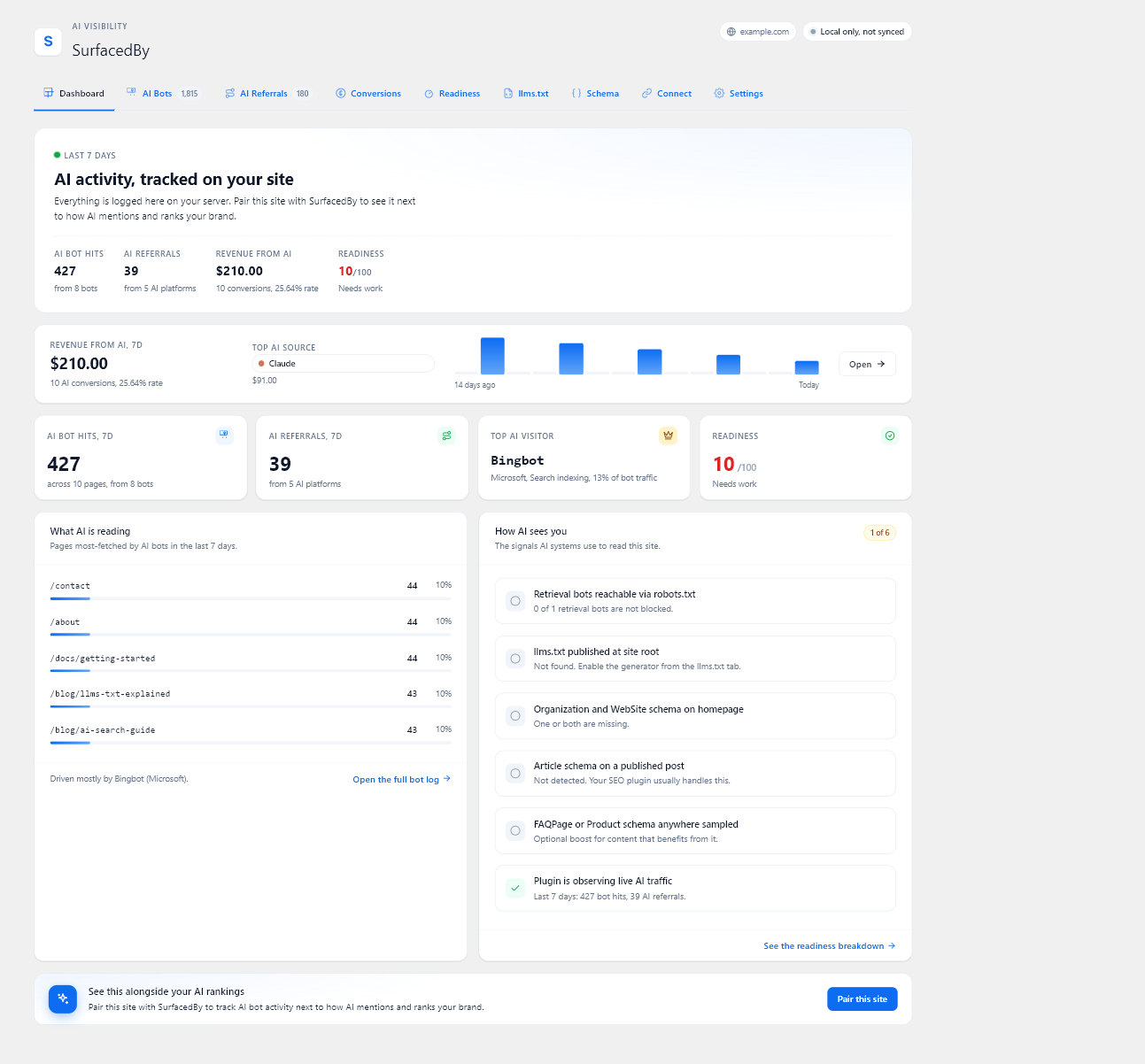
AI crawler analytics dashboard
People can find your store through AI assistants as well as search engines. SurfacedBy shows which AI crawlers request your pages, which assistants send visitors, and whether those visits lead to orders or signups. A visit from an AI assistant does not, on its own, mean your store was cited in an answer.
The plugin gives you these tools in your WordPress dashboard:
- AI crawler analytics. See requests from 19 known AI crawlers and content retrieval tools. After you connect to SurfacedBy, supported crawlers can be checked against reliable address information. Requests that cannot be verified are shown separately.
- AI referral tracking. See visits from chatgpt.com, claude.ai, perplexity.ai, gemini.google.com, copilot.microsoft.com, grok.com, deepseek.com, and meta.ai. The source tells you where a visitor came from, but does not show whether an AI answer cited your site.
- AI readiness checks. Check whether your robots.txt, llms.txt, and page information help AI tools find and understand your content. The checks cover common page types such as articles, products, and FAQs. To see how AI assistants actually describe your business, run SurfacedBy’s free AI visibility check.
- llms.txt generator. Publish a
/llms.txtlist of your posts and pages. It follows the content exclusion settings in Yoast, Rank Math, AIOSEO, and SEOPress. - Sales and signup tracking. Record purchases, renewals, signups, and refunds from WooCommerce, Easy Digital Downloads, and MemberPress against the AI visit that brought the customer in. Custom checkouts can send events with
window.sbAi.track().
These features work without a SurfacedBy account. The plugin stores crawler requests, AI visits, and sales or signup records in your WordPress database. It does not contact SurfacedBy until you connect it.
Connecting the plugin to SurfacedBy is optional. It sends the records this plugin collects, including records saved before you connected, to your SurfacedBy dashboard. There you can see them alongside your site’s AI visibility, competitors, tracked prompts, and cited pages. Dashboard traffic views are included with SurfacedBy’s paid plans and trial.
External Services
The plugin makes no outbound calls until you save a SurfacedBy connection code or an older Site ID under SurfacedBy > Connect. Without a connection, the plugin keeps its records on your site.
After you connect, your server makes the three types of requests below. The browser tracker in item 4 sends AI attribution to your own site and anonymous page observations directly to SurfacedBy. The plugin does not load code from SurfacedBy or another external source.
1. Event forwarding (when a page finishes rendering, plus an hourly wp-cron safety net)
- Endpoint:
https://api.surfacedby.com/api/v1/tracker/collector/batchfor connection codes, orhttps://api.surfacedby.com/api/v1/tracker/batchfor older Site ID-only installs. The connection-code path signs the request with a per-install secret and retries a saved batch ID after uncertain delivery. - Data sent: rows from the local log tables, in three kinds:
- Crawler rows: the crawler token, the request path, the time of the request, the response code, and the crawler’s IP address, used only to verify the crawler’s identity. With a connection code, requests carrying Signature-Agent also forward their original method, URL (including the signed query), and Signature-Agent, Signature-Input, and Signature headers for server-side identity verification. This evidence is cached for ten minutes before batch selection; a selected batch keeps its exact contents until delivery succeeds or is rejected. The normal crawl history keeps only the query-free path, and delivery clears the temporary evidence.
- Referral rows: the AI referrer host, the request path, the time of the visit, and a pseudonymous visitor ID.
- Conversion rows (when WooCommerce, Easy Digital Downloads, or MemberPress is detected, or when custom front-end code calls
window.sbAi.track): the event type (purchase, renewal, signup, refund, lead, or custom), an event ID and an order or subscription identifier, the value, the currency code, the time, the page path when the conversion happened on a page, the AI referrer host that first brought the customer in and how long before the conversion that visit was, and a small metadata object (for example the order number, the items bought with their product ID, name, quantity, and price, tax, shipping, the country code, or a refund reason, capped at 4 KB), plus the pseudonymous visitor ID when one is available. Conversion rows never carry names, emails, billing addresses, or payment details. - Each batch also carries your Site ID and your site’s domain name.
- The plugin never sends raw User-Agent strings outside the bundled crawler registry, never sends human visitor IPs, and never sends cookies. SurfacedBy uses a crawler’s IP only to decide whether it is verified, failed, unchecked, or has no documented verification method, and stores that verdict, not the IP. Behind Cloudflare, the plugin trusts the reported client IP only when the origin connection comes from a fresh published Cloudflare range. The local queue clears the crawler IP once the row is forwarded.
- Purpose: fills your SurfacedBy dashboard for this site.
2. Plugin heartbeat (hourly wp-cron with a 24-hour staleness check, plus a best-effort nudge when the last heartbeat is older than 20 hours)
- Endpoint:
https://api.surfacedby.com/api/v1/tracker/collector/heartbeatfor connection codes, orhttps://api.surfacedby.com/api/v1/integrations/wordpress/heartbeatfor older Site ID-only installs. - Data sent: your Site ID, a random install ID the plugin creates for this site, the plugin version, the WordPress version, the PHP version, the number of AI crawler and AI referral rows recorded in the last 24 hours, each store or membership plugin the plugin supports (WooCommerce, Easy Digital Downloads, and MemberPress) with whether it is active, its version, and the conversion types the plugin records for it, and the time of the most recent conversion recorded. No personal data.
- Purpose: shows the health of the install in SurfacedBy.
3. Crawler registry refresh (daily wp-cron)
- Endpoint:
https://api.surfacedby.com/api/v1/tracker/registry(HTTP GET) - Data sent: nothing beyond standard HTTP request headers.
- Purpose: pulls the latest list of AI crawlers and fresh Cloudflare origin ranges so new crawlers are tracked without waiting for a plugin update, and forwarded client IPs are accepted only from Cloudflare peers.
4. Browser tracker (on by default; switch it off under “Browser tracker snippet” in Settings. It needs no account and runs whether or not the plugin is paired)
- The script is bundled with the plugin (
assets/js/sb-tracker.js) and served from your own site; no external script is loaded and no third-party code runs. AI attribution posts to your own site’s admin-ajax handler, with a WordPress security nonce. When a cached page’s nonce has expired, the script asks your own site for a current nonce and sends the event once more. - On a verified connected install, it also sends one anonymous page observation to
https://api.surfacedby.com/api/v1/tracker/landing/wordpress_plugin: your public Site ID, page path, time, count, referring hostname, andutm_sourcelimited to 64 characters. It sends no visitor IP, visitor or session identifier, cookie, full referrer URL or other query parameters. A random event nonce is used only to avoid counting a transport retry twice. It uses no persistent visitor storage for this observation, waits until a prerendered page is opened, and excludes automated browsers. Delivery is best effort; blocked scripts or networks leave gaps. - Data sent (to your own server): the AI referrer host, the URL path, the pseudonymous visitor ID, and, when custom front-end code calls
window.sbAi.track, the conversion event ID, value, currency, and the small metadata object the site passes in. The plugin sets only thesb_tandsb_attrcookies described in the Cookies section. - Those rows are stored in the local log tables and later forwarded to SurfacedBy by your server, through the endpoint in item 1.
- Purpose: catches AI visits on pages served from a full-page cache, where the PHP tracker never runs.
Cookies
The plugin sets cookies only after a visitor arrives from a confirmed AI referrer. There are two, both first-party and both opaque:
sb_t(30 minutes): an anonymous session nonce that stops one browsing session from being counted more than once. No personal identifiers.sb_attr(13 months): a pseudonymous visitor ID, the AI host (for example chatgpt.com), and the time of the first qualifying visit, so a later purchase or signup can be credited to the original source. When an AI-attributed landing URL carries them, it can also keep the advertising click IDs gclid, fbclid, msclkid, and ttclid. The browser tracker mirrors this value in first-party local storage so attribution survives browser cookie clean-up. The identifier is scoped to this site and is never used for cross-site tracking.
The commerce integrations and a site-initiated window.sbAi.track call can also create the pseudonymous sb_attr identifier when a conversion needs a stable local attribution key.
When paired with SurfacedBy, aggregate crawler, referral, and conversion history is kept with the connected domain. The raw AI visit rows used to rebuild visitor journeys follow the plan’s retention window: 90 days on Starter, 395 days on Professional, and 760 days on Agency. The dashboard’s journey view shows only the 30 days before a conversion.
Terms of Service: https://surfacedby.com/terms
Privacy Policy: https://surfacedby.com/privacy