


Super Speedy Imports Lite
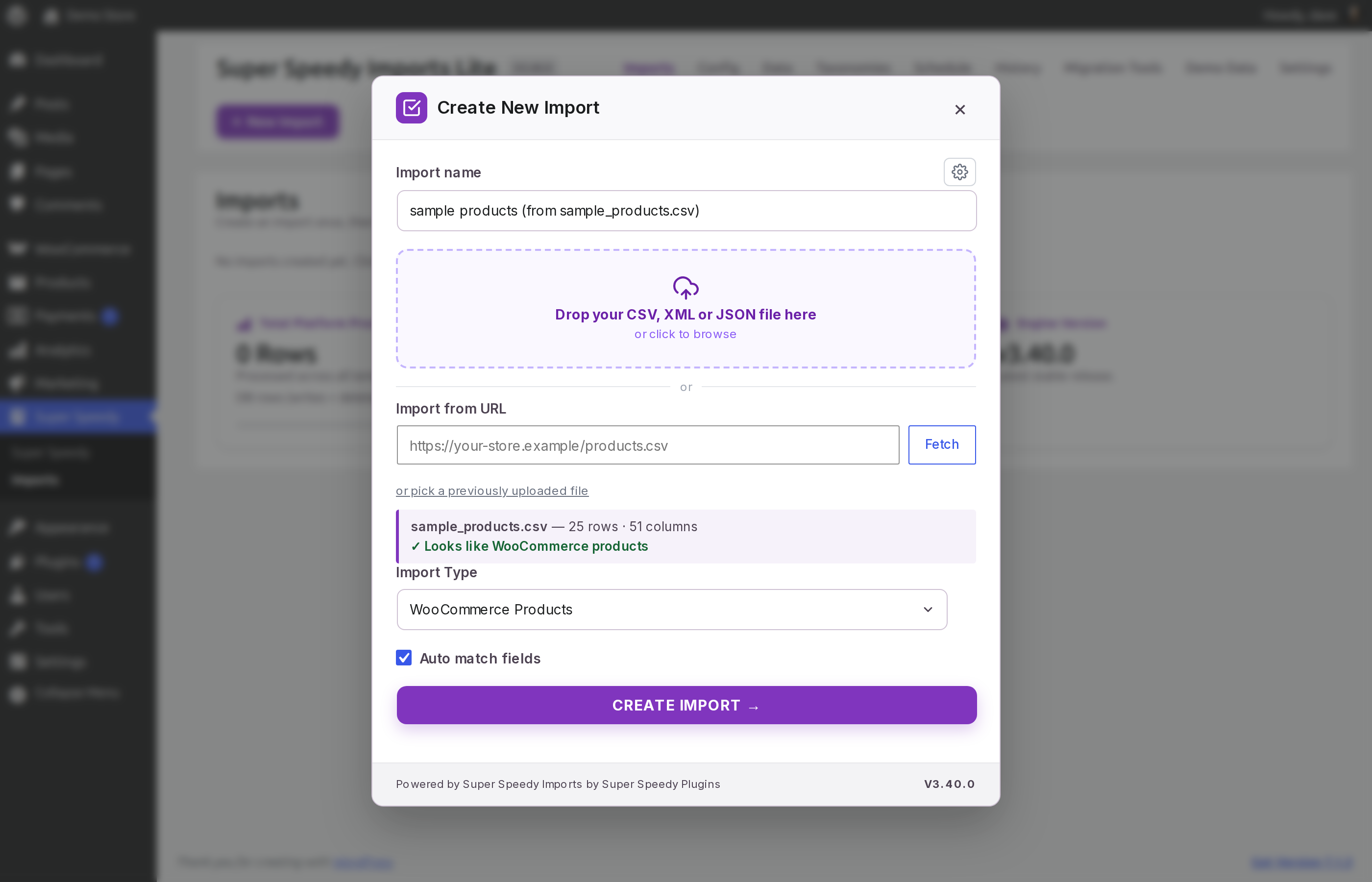
Give it your file: drop in a CSV and it recognises what the file holds.
Super Speedy Imports Lite imports CSV, XML and JSON files into WooCommerce products, WordPress posts and pages, in bulk. It is unlimited: import as many products and posts as you want. This edition imports simple products; variable products, product galleries, custom post types and ACF fields are in Pro.
Give it the file you want to import, uploaded from your computer or fetched from a URL that returns CSV, XML or JSON, and it works out where every column goes, including files separated by semicolons with decimal commas. Check the mapping, change anything you like, then run the import from the dashboard or with WP-CLI. Import an updated file and it updates the items already on your site and adds the new ones, or set the import to only update existing items or to remove items that are no longer in your file.
Measured with the WordPress.org build of version 3.40.0 on a 4-vCPU server, through the dashboard: 100,000 simple WooCommerce products imported in 81 seconds, 1,000 products with their images downloaded from a remote image host and resized in 105 seconds, and a price and stock update of 10,000 products in 11 seconds. Full results and how to reproduce them.
What it imports
- WordPress posts and pages, and simple WooCommerce products
- Post fields: title, content, excerpt, status, dates, slug and more
- WooCommerce fields: SKU, GTIN, regular and sale prices and sale dates, stock, weight and dimensions, tax, shipping class and more
- Categories, tags and brands, including hierarchies such as
Men > T-Shirts, and WooCommerce global attributes such aspa_color - Custom fields (postmeta)
- Featured images from any public URL, each URL downloaded once however many rows use it
- XML and JSON files, including JSON Lines, chosen in New Import like a CSV
- Imports saved in WP All Import on the same site, converted into Super Speedy imports under Migration Tools
Your shop is ready when the import finishes
When the products are in, it rebuilds WooCommerce’s product lookup tables, the price, stock and SKU data your shop sorts and filters on, recounts your category, tag and attribute counts, and clears WooCommerce’s caches, so the new prices, stock and counts show straight away. It also hands the rebuild of WooCommerce’s attribute lookup table, the data that filter widgets and other plugins read, to WooCommerce, which runs it in the background. Each import’s choices are under After Import, including a rebuild of the attribute lookup table with bulk SQL straight after the import.
Keeping a catalogue in sync
Run the same import each time your supplier sends a new file. Fields you have not mapped stay as they are, and a mapped column is applied as it is in the file, so an empty cell empties that field. Featured images downloaded on an earlier run are reused.
To update only the items already on your site, set What should this import do? (the ⚙ options on New Import, or Additional Options on the Config tab) to Only update existing items: it updates every mapped field of those items and creates none.
To remove the items this import loaded that are no longer in your file, set If an item is missing from your file… to Remove it, or tick Delete missing items under Additional Options. After each run they are moved to the Trash, or deleted permanently if you tick Force delete (skip trash). Items created by hand or by other imports are left as they are.
Large files and how imports run
A dashboard import runs as a series of short requests to your server. The plugin sizes each batch of rows from how long the previous batch took, so every request stays short, and when one big step takes longer than a request, the dashboard waits for the server to finish it and then carries on. It needs no exec or proc_open.
A dashboard import runs while its tab is open. For unattended runs, use WP-CLI: wp ssi <import id> runs the whole import on the server with no browser.
For a file larger than your server accepts as an upload, copy it into wp-content/uploads/super-speedy-imports by FTP or SFTP, then choose it under or pick a previously uploaded file on New Import.
Running your own import
- Give it your file. Click New Import and drop in a CSV, XML or JSON file, or paste a URL that returns one and press Fetch. It reads the file and recognises what it holds (screenshots 1 and 2). For XML and JSON it finds the repeating record and shows the record path it chose, which you can change (screenshot 3).
- Check the mapping. The import is already configured: every column it recognises is mapped to its field, and the panel on the right shows the real values from your file, row by row (screenshot 4).
- Make any corrections you want. Map a column somewhere else, add a column, combine columns in a transform, or set the hierarchy and multiple-value separators for a taxonomy (screenshot 5).
- Run it. Preview & Run shows the file, the row count and what happens to items already on your site, then Start Import runs it with every stage and its timing on screen (screenshots 6 to 8).
- Or run it from WP-CLI with
wp ssi <import id>, and add that command to cron to run it on a schedule (screenshot 9).
Every import matches rows to items already on your site with a unique identifier column. By default this is SKU for products and post title for posts, and you can choose another: GTIN / UPC / EAN / ISBN for products, post title + category for posts, or the post ID for either. Pro matches on any field or combination of fields.
Three ways to run it
- The dashboard – Preview & Run, then Start Import, with every stage and its timing on screen
- WP-CLI –
wp ssi <import id>runs any import; put it in cron to run it on a schedule - AI agents – an AI coding agent runs imports with WP-CLI, and 32 WordPress Abilities API tools let it upload files, create and change imports, preview the first item and read the results over the REST API (
/wp-abilities/v1), with no MCP setup needed
Try it in one click
- Install and activate the plugin.
- Open Super Speedy > Imports and go to the Demo Data tab.
- Click Load this sample on one of the samples: 1,000 posts with featured images, 20,000 posts, or 1,000 simple WooCommerce products with categories, brands, colours and images.
- On the Imports tab, press Preview & Run, then Start Import, and watch it import.
Super Speedy Imports Pro
Everything above is included here, unlimited. Pro, a separate download from superspeedyplugins.com, adds:
- Variable products – parents and their variations, with per-variation prices, stock and attributes
- Product galleries – several images per product, with alt text and captions
- ACF and SCF fields – scalar, choice, group and repeater fields
- Custom PHP transforms – split, format, look up or calculate a value before it is written
- Custom post types – any registered post type
- Term descriptions and term metadata – for the categories, tags and attributes an import creates
- Image size selection – generate only the image sizes you choose
- Parallel workers from WP-CLI – and per-stage performance tuning
- Built-in scheduled imports
- Match on any field – or any combination of fields
- CSV export – export your catalogue and use the file as the start of the next import
- Direct help from the developer in the Super Speedy Plugins Discord
External services
Your own data sources
The plugin makes outbound HTTP requests only to addresses you give it, and only when you ask it to fetch a file or while an import you started is running:
- The address of a CSV, XML or JSON file you enter under Import from URL, when you press Fetch, or the address of a CSV or XML file you give the plugin’s Abilities API tools. The file is downloaded once, when you fetch it.
- The source of an import converted from WP All Import that loads its file from a URL or FTP server. It is fetched at the start of each run of that import.
- The image URLs inside your file, to download featured images (and, in the paid edition, gallery images). Each distinct URL is downloaded once and reused on later runs.
These requests are made with WordPress’s own HTTP functions and carry nothing but the request for the file. Beyond the requests described in this section, the plugin contacts no other server: it sends no data about your site, your users or your imports to Super Speedy Plugins or to anyone else.
Local process checks (not a service)
On Linux servers, an import started with WP-CLI records its own process identity from the server’s local /proc files and /etc/machine-id (stored only as a hash), so that a later run can tell whether an interrupted import has really stopped. These are files on your own server, read locally; nothing is sent anywhere.