

SubtleForms

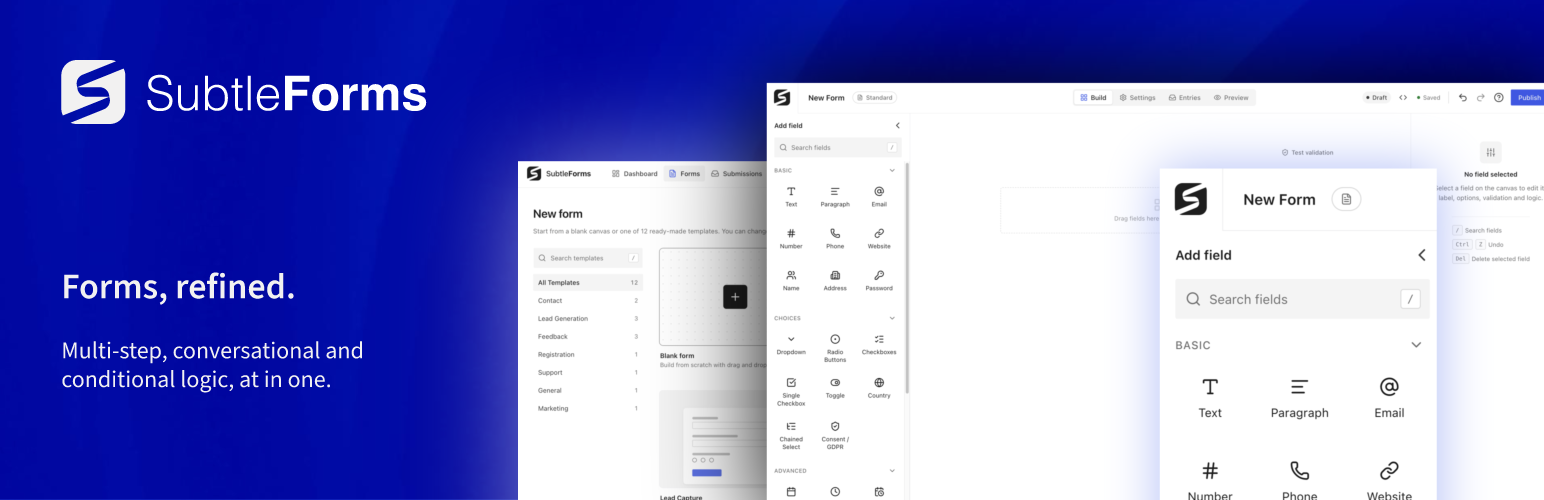
The form builder with the field library, canvas and field settings.
SubtleForms is a form builder for WordPress. You build on a canvas that looks like the live form, publish with a shortcode or the SubtleForms block, and read every entry in an inbox inside wp-admin. One builder makes regular, multi-step and conversational forms, and everything described here is in this plugin and works without an account or a licence.
Everything in the free plugin
- Visual drag and drop builder with a live canvas and undo
- Regular, multi-step and conversational (one question at a time) forms
- 38 field types, including file and image uploads
- 12 ready-made templates, plus a blank form
- Field widths to place fields side by side
- Conditional logic: show or hide a field based on other answers
- Per-field settings for validation, logic and style
- Appearance presets, or custom colours and fonts that start from your theme
- Desktop, tablet and mobile preview
- The SubtleForms block and a shortcode
- Entries inbox with search, filters, stars, flags, notes and a Trash
- Unread entries counted in the admin menu
- Reports with a chart of recent submissions
- Email notifications with merge tags, plain text or HTML
- Webhooks after each entry, with a test button
- Confirmation message or redirect after submit
- Open and close dates, entry limits and logged-in-only forms
- CSV export of entries, JSON export and import of forms and entries
- Honeypot, minimum time and rate limiting on every form
- Optional Google reCAPTCHA, hCaptcha or Cloudflare Turnstile
- Data retention settings and WordPress personal data export and erase support
- Import forms from Contact Form 7, Gravity Forms and Fluent Forms
- Translation ready, with an RTL stylesheet
Three form types, one builder
Start with a regular form that shows every field on one page. Add a Page Break and the same form becomes multi-step, with progress shown to the visitor. Switch to conversational and visitors answer one question at a time, full screen, then review their answers before they send. You change the type in the form settings and keep your fields.
Drag and drop builder
The field library is on the left, the canvas in the middle and the settings for the selected field on the right. The canvas shows the form as visitors see it, so there is no separate preview step to trust. Each field has tabs for Settings, Validation, Logic and Style. Drag a field from the library, click it to add it after the current one, or press the slash key to search the library. Undo is in the header, and the Preview tab shows the form at desktop, tablet and mobile widths.
Fields included
- Basic: Text, Paragraph, Email, Number, Phone, Website, Name, Address and Password
- Choices: Dropdown, Radio buttons, Checkboxes, Single checkbox, Toggle, Country, Chained select (dependent dropdowns, typed in or loaded from CSV) and Consent
- Date and time, and more: Date, Time, Date and time, Rating, Opinion scale, NPS, Slider, Matrix, Colour picker, Rich text and Hidden (with merge values such as {user_email} and {get:param})
- Uploads: File and image uploads, one file per field, with allowed types and size limits, kept in a private folder and downloaded by admins only
- Layout: Section heading, Custom HTML, Notice, Page Break and Repeater
- Spam protection: reCAPTCHA, hCaptcha and Turnstile fields
Ready-made templates
Start from a template and change what you need: Contact Form, Simple Contact, Contact + Attachment, Lead Capture, Newsletter, Newsletter Sign-Up, Free Resource Download, Product Feedback, Website Feedback, Customer Satisfaction (CSAT), RSVP and Bug Report. Or start with a blank form.
Conditional logic
Show or hide a field when other answers match. Rules can use equals, does not equal, contains, does not contain, is empty, is not empty, greater than and less than, and a field is shown only when all of its rules match. Hidden fields are not validated or saved, in the browser and on the server, so a hidden required field never blocks a submission.
Entries inbox and reports
Entries arrive in an inbox with tabs, search, filters and a reading pane. Mark entries read or unread, star or flag them, add notes, resend notifications, and move them to the Trash, one at a time or in bulk. The SubtleForms menu shows how many entries are unread. Reports show submissions, unread entries and a chart of the last days. Activity, webhook and API logs show what happened and when. Export entries as CSV whenever you need them.
Email notifications and webhooks
Send an email after each entry to the people you choose, with merge tags such as {all_fields}, {field:email} and {entry_id}, in plain text or HTML. Set the reply-to address from a field. Add a webhook to send each entry as JSON to a URL you enter, and test it from the settings. After submit, show a confirmation message with the visitor’s answers merged in and clickable links, or send them to another page. When the MailPoet plugin is active on the same site, a form can also pass each entry’s email address to a MailPoet list, with no outside service involved.
Looks like your site
Pick an appearance preset, or switch to custom mode and set colours, fonts, fields and buttons with grouped controls that start from your theme colours and fonts. Choose a compact or comfortable density, and get a warning when text and background colours do not have enough contrast. Or let the form inherit the look of your active theme. There is no freeform custom CSS box: styling is done with structured settings.
Fast and light
SubtleForms adds its scripts and styles only to pages that contain a form. Code for date pickers, phone and country fields, uploads, repeaters, rich text and conversational forms is loaded only when the form uses that field or type. For a simple contact form, the plugin’s own JavaScript is about 35 KB and its stylesheet about 11 KB, both gzip-compressed. It uses the copy of React that WordPress already ships.
Spam protection and privacy
Every form has a honeypot, a minimum time check and rate limiting, with no setup. You can add Google reCAPTCHA (v2 or v3), hCaptcha or Cloudflare Turnstile under Settings, Security and privacy; these are the only outside services the plugin can contact besides webhook URLs you enter (see External services). Choose how long entries are kept, and use the WordPress personal data export and erase tools for a person’s entries. Uploaded files are stored under random names and served to admins only. SubtleForms sends no usage data or telemetry.
Move from another form plugin
Under Settings, Tools, Migrate, copy forms you made with Contact Form 7, Gravity Forms or Fluent Forms. The other plugin does not need to be active. Forms arrive as drafts with their fields, required rules, choices, email notifications and thank-you message, and a report names anything that was not copied. Entries and payment settings are not imported, no emails are sent, and your original forms are not changed. On a site with no forms yet, SubtleForms offers to import any it finds. You can also import a Gravity Forms or Fluent Forms export file.
Accessible and translation ready
Fields have labels, errors are announced and tied to their fields, choice groups use a fieldset with a legend, and dropdown, country, phone and date fields work with the keyboard. The plugin loads an RTL stylesheet for right-to-left sites and all text uses the subtleforms text domain with a translation template included.
SubtleForms Pro
SubtleForms Pro is a separate plugin sold at subtleforms.com/pro. It adds Signature, Calculation and Picture choice fields, several files per upload field, advanced conditional logic, form analytics, Stripe payments with coupons, WooCommerce checkout, extra email marketing options, HubSpot, Salesforce, Pipedrive and Close connections, Zapier, Make and n8n, entry PDFs and more templates.
Documentation and support
- Documentation: subtleforms.com/docs
- Support forum: wordpress.org/support/plugin/subtleforms
- Bug reports and source code: github.com/smhz101/subtleforms
External services
SubtleForms works without any external service and sends no usage data or telemetry. The services below are used only when a site administrator turns them on, and only for forms on that site.
Google reCAPTCHA
Used to check that a form is sent by a person. When reCAPTCHA is enabled under Settings, Security and privacy, the form page loads the reCAPTCHA script from google.com, which collects data about the visitor’s browser and interaction. On submit, the site sends your secret key, the visitor’s response token and IP address to https://www.google.com/recaptcha/api/siteverify. Terms of Service, Privacy Policy.
hCaptcha
Used for the same purpose when hCaptcha is enabled. The form page loads the script from js.hcaptcha.com, and on submit the site sends your secret key, the response token and the visitor’s IP address to https://hcaptcha.com/siteverify. Terms of Service, Privacy Policy.
Cloudflare Turnstile
Used for the same purpose when Turnstile is enabled. The form page loads the script from challenges.cloudflare.com, and on submit the site sends your secret key, the response token and the visitor’s IP address to https://challenges.cloudflare.com/turnstile/v0/siteverify. Terms of Use, Privacy Policy.
Mailchimp, Brevo and Kit (email marketing)
Used only when a site administrator connects an account under Settings, Integrations, Email marketing, and only for forms where the administrator turns that service on. After an entry is saved, the site sends the person’s email address to the service, with the form answers the administrator mapped (such as first name, last name or other contact fields), the tags the administrator typed, and the subscription status (subscribed, or pending when double opt-in is on). Entries marked as spam, and entries where the consent box the administrator chose was not ticked, are not sent. The visitor’s IP address and browser are not sent. When the administrator connects, tests the connection or loads their lists in wp-admin, the site sends the API key to the service to sign in and receives the account name and email, the lists and their fields. The API key is stored in the WordPress options table and is never shown again after saving.
Mailchimp: requests go to https://.api.mailchimp.com/3.0, where the data center (for example us21) is the end of your API key. Terms of Use, Privacy Statement.
Brevo
Used for the same purpose when the administrator connects Brevo. Requests go to https://api.brevo.com, with the contact’s email address, the mapped answers and the list. With double opt-in on, Brevo sends the confirmation email from the template the administrator chose. Terms of Use, Privacy Policy.
Kit
Used for the same purpose when the administrator connects Kit (formerly ConvertKit). Requests go to https://api.kit.com, with the subscriber’s email address, the mapped answers, the Kit form the administrator chose and the tags the administrator typed. Terms of Service, Privacy Policy.
HubSpot (CRM)
Used only when a site administrator connects a HubSpot account under Settings, Integrations, CRM, and only for forms where the administrator turns HubSpot on. After an entry is saved, the site sends the person’s email address to HubSpot, with the form answers the administrator mapped (such as first name, last name, phone number, company name or other contact properties). The contact is created, or updated when the email address is already a contact and the administrator allows updates. Entries marked as spam, and entries where the consent box the administrator chose was not ticked, are not sent. The visitor’s IP address and browser are not sent. When the administrator connects, tests the connection or loads their contact properties in wp-admin, the site sends the HubSpot service key (or a legacy private app access token, which HubSpot accepts in the same way) to HubSpot to sign in and receives the account name and number and the list of contact properties. The account number is kept so the entry log can link to the contact in HubSpot. Requests go to https://api.hubapi.com. The key is stored in the WordPress options table and is never shown again after saving. Terms of Service, Privacy Policy.
Webhooks
When you add a webhook action to a form, each new entry is sent as JSON to the URL you, the site owner, enter, after the entry is saved (and when you press Test). The data goes only to that URL: nothing is sent to SubtleForms or to any address you did not enter. What that service does with it is set by its own terms.
Source code and build
The JavaScript and CSS in the build folder are compiled. The human-readable source, with the build tools, is public at https://github.com/smhz101/subtleforms (folder resources). To build: run npm ci, then npm run build:all. PHP dependencies: composer install --no-dev.