

Strakture
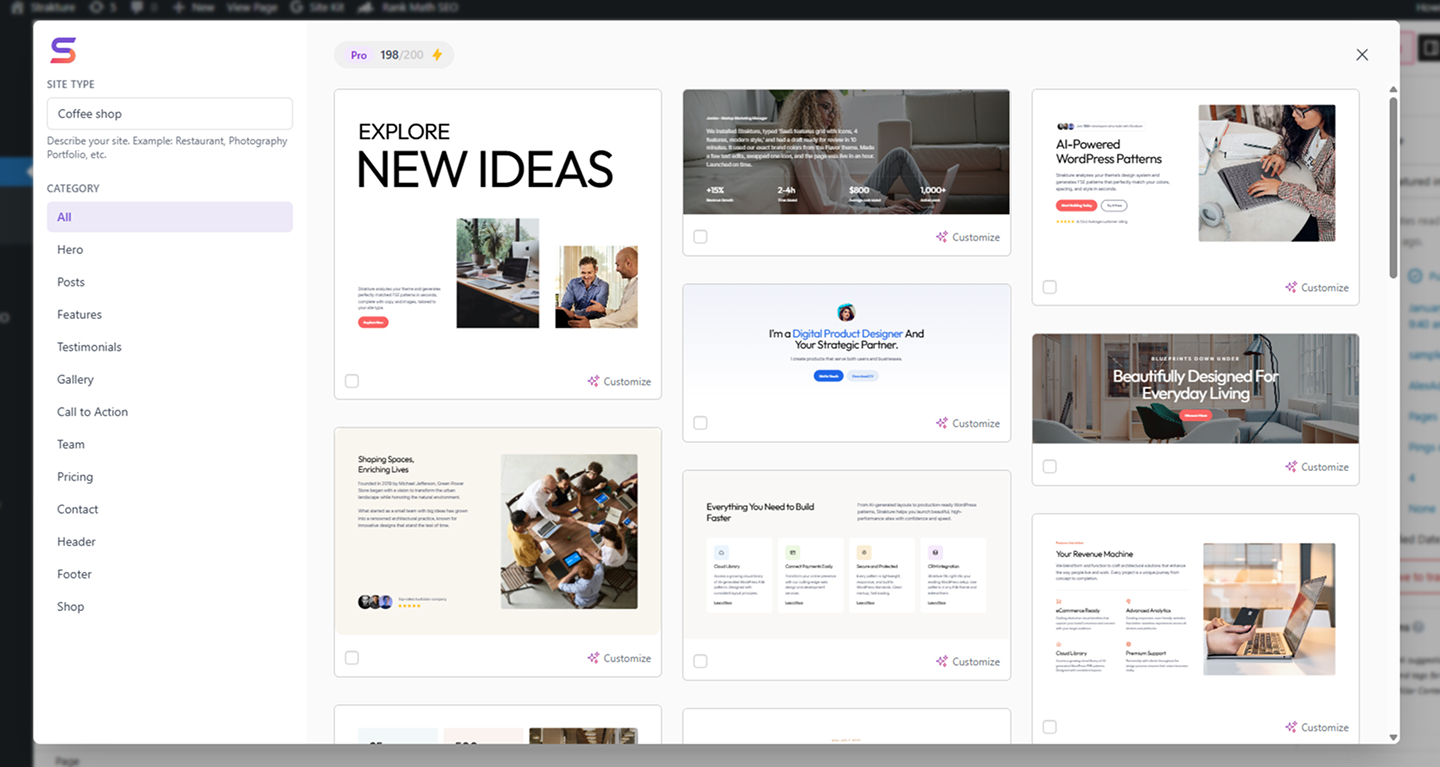
Browse hundreds of WordPress block patterns organized by category in the Strakture library.
Strakture is an AI-powered WordPress block pattern library that generates layouts matched to your theme’s actual design system — and to your site’s content. Unlike generic pattern libraries that give you patterns you have to restyle and rewrite from scratch, Strakture reads your theme’s CSS variables and understands what your site is about, then creates patterns that look native and feel relevant from the first click.
Running a restaurant? Generated patterns use food and dining imagery with copy that fits your industry. Launching a SaaS? Patterns arrive with tech-forward headlines and product-appropriate visuals. Your theme, your niche, one click.
Stop spending hours on generic patterns. Generate professional, on-brand layouts in seconds with Strakture, then refine any selected block in place with Customize with AI.
The Problem with Generic Patterns
Every WordPress developer knows the pain: you find a great pattern, insert it, and then spend two hours manually matching colors, adjusting fonts, fixing spacing, and making it look like it belongs on your site. Multiply that by every section on every page, and you’ve lost a full day to style matching.
Strakture solves this by reading your theme’s actual design tokens — the CSS variables that define your site’s look — and generating patterns that use those exact values. Patterns arrive ready to publish, not ready to customize.
Theme-Matched, Site-Aware AI Patterns
Strakture analyzes two things before generating a pattern: your theme’s design system and your site’s context. It reads your theme’s CSS variables to apply your exact colors, typography, and spacing — then it uses your site’s niche to generate copy and select images that actually fit.
A portfolio site gets clean, minimal layouts with professional imagery. A fitness studio gets bold, energetic sections with workout visuals. A law firm gets formal, trust-building structures with appropriate language. Same AI, tuned to your site — not a one-size-fits-all template.
Works with 15+ popular WordPress block themes including:
- Kadence
- Astra
- Neve
- Blocksy
- GeneratePress
- OceanWP
- Twenty Twenty-Four
- Twenty Twenty-Three
- Any theme using standard WordPress design tokens (theme.json)
Browse the Full Pattern Library (Free)
Every Strakture user gets access to the complete pattern library — no account required. Browse hundreds of professionally designed block patterns across every common page section:
- Hero sections and full-width banners
- Features grids and service listings
- Pricing tables and comparison layouts
- Testimonial sections and social proof blocks
- Team member grids and about sections
- Contact and call-to-action sections
Browse with infinite scroll, preview patterns in your site’s context, and insert original patterns into any page or post with a single click.
AI Generation (Premium)
Upgrade to unlock AI-powered pattern generation. Instead of inserting a generic pattern and manually styling it to match your brand, Strakture generates a version matched to your theme’s design system and your site’s content — the right colors, relevant copy, and contextually appropriate images, all in one click.
A restaurant gets a hero section with dining imagery and a reservation CTA. A digital agency gets a features grid showcasing services. The AI understands what your site is about and generates accordingly.
Describe further customizations in plain English before generating: “Dark background, 3-column layout, add a subtitle.” Claude AI applies your changes while keeping everything aligned with your theme. No prompt engineering required.
Need to refine something you’ve already inserted? Select an existing block in the editor and use Customize with AI to rewrite copy, regenerate imagery, or refine colors in place without rebuilding the section from scratch.
Free vs. Premium Features
Free — Browse and Insert
- Full access to the Strakture pattern library
- Infinite scroll pattern browsing
- Pattern categories (Hero, Features, Pricing, Testimonials, and more)
- One-click insertion of original patterns into the block editor
- Preview patterns in your site’s context before inserting
- Works with any WordPress block theme
Premium — AI Generation + Site Building Tools
- AI-generated theme-matched patterns (your exact colors, fonts, spacing)
- Natural language customization — describe changes before generating
- Customize any selected block with AI — rewrite copy, regenerate images, or refine colors from the block toolbar
- Unsplash image integration — relevant images auto-downloaded to your media library with attribution
- Select and generate multiple patterns at once
- Starter sites — one-click demo import with theme activation and full content setup
- Responsive block controls — hide any block on mobile, tablet, or desktop
- WooCommerce-ready starter demos with automatic store configuration
- Credits rollover protection — upgrade or downgrade any time
How to Use
Inserting a Pattern (Free):
- Edit or create a new page or post in the WordPress block editor
- Click the “Strakture Patterns” button in the editor toolbar
- Browse by category or scroll through the pattern library
- Click any pattern to insert it directly into your content
Generating a Theme-Matched Pattern (Premium):
- Open the Strakture library from the editor toolbar
- Browse to a pattern you like
- Optionally describe customizations in the prompt field
- Click Generate — Strakture sends your theme data to the AI and returns a theme-matched version
Customizing an Existing Block (Premium):
- Select any block in the WordPress block editor
- Click Customize with AI in the block toolbar
- Enter a plain-English request such as “rewrite this copy for a law firm”, “replace the image with a modern office”, or “adjust the colors so they feel more cohesive”
- Press Enter or click the button to replace the selected block with the AI-edited version
No Lock-In
Strakture generates standard WordPress blocks — core/group, core/columns, core/image, and every other native block type. If you ever cancel or deactivate the plugin, every pattern you’ve inserted stays on your site as regular, fully editable content. No proprietary format. No data held hostage.
Starter Sites (Premium)
Get a fully designed website up and running in minutes. Strakture ships with curated starter site demos — complete with pages, templates, navigation, and WooCommerce setup where applicable. Pick a demo, activate the companion theme, import the content, and customize from there.
- One-click theme activation and content import
- Multiple demos available (Main, Coffee Shop, and more)
- WooCommerce-ready demos with shop pages, product attributes, and store configuration
- Automatic template and navigation reassignment to your active theme
Companion FSE Theme
Strakture includes its own Full Site Editing block theme — Strakture Theme — designed from the ground up to work with the plugin’s AI pattern generation. The theme provides a clean, modern design system with well-structured CSS variables that the AI reads to produce pixel-perfect results. Available in free and Pro versions, with Pro adding WooCommerce templates, additional patterns, and premium assets.
Responsive Block Controls (Premium)
Fine-tune how blocks display across devices without writing CSS. Strakture adds a responsive visibility panel to the block editor, letting you hide any block on mobile, tablet, or desktop.
- Three breakpoints: desktop, tablet (782px), and mobile (480px)
- Hide any block on any device — full per-block visibility control
- Controls sync with the WordPress editor’s device preview
- Saved per-post — no global overrides, no theme conflicts
- Lightweight CSS output — only renders rules for blocks with overrides
WooCommerce Integration
Strakture’s starter site demos include full WooCommerce setup when the plugin is active. Shop pages, cart, checkout, my account, and product templates are configured automatically during import. Product attribute types (like color swatches) are set up out of the box. No manual WooCommerce page assignment needed.
Lightweight by Design
Strakture adds no frontend scripts or styles to your site (except minimal responsive CSS when block overrides are used). The pattern library UI loads only when opened in the editor. Generated patterns are standard WordPress blocks — no performance overhead, no extra HTTP requests for visitors.
Requirements
- WordPress 6.5 or higher
- A WordPress block theme (FSE-compatible)
External services
This plugin connects to the Strakture API (https://api.strakture.com), a service operated by Aleksandr Samokhin, to serve the block pattern library and AI generation features.
Strakture API (api.strakture.com)
What it is: The Strakture backend that provides the pattern library content and AI-powered pattern generation displayed inside the block editor.
What data is sent and when:
- Loading pattern categories — When the pattern library is opened, the plugin fetches the list of available categories. The request includes the WordPress version and the site’s language (locale).
- Loading patterns — When browsing patterns, the plugin fetches paginated pattern data for the selected category. The request includes the WordPress version, the site’s language (locale), the selected category, and the current page number.
- Generating patterns or customizing existing blocks (Premium only) — When a user generates a theme-matched pattern or uses Customize with AI, the plugin sends theme design token data (CSS variables for colors, typography, spacing), the Freemius license key, the site’s home URL, and the optional prompt they enter to the API. For block customization, the plugin also sends the selected block’s serialized block markup so the AI can return an edited replacement. No personal data or user information is transmitted.
No personal data or user information is transmitted for free features. The WordPress version and locale are sent solely to serve compatible, correctly localized patterns.
Terms of service: https://strakture.com/terms
Privacy policy: https://strakture.com/privacy