

Stowaway – Offload Media to Amazon S3 & CloudFront
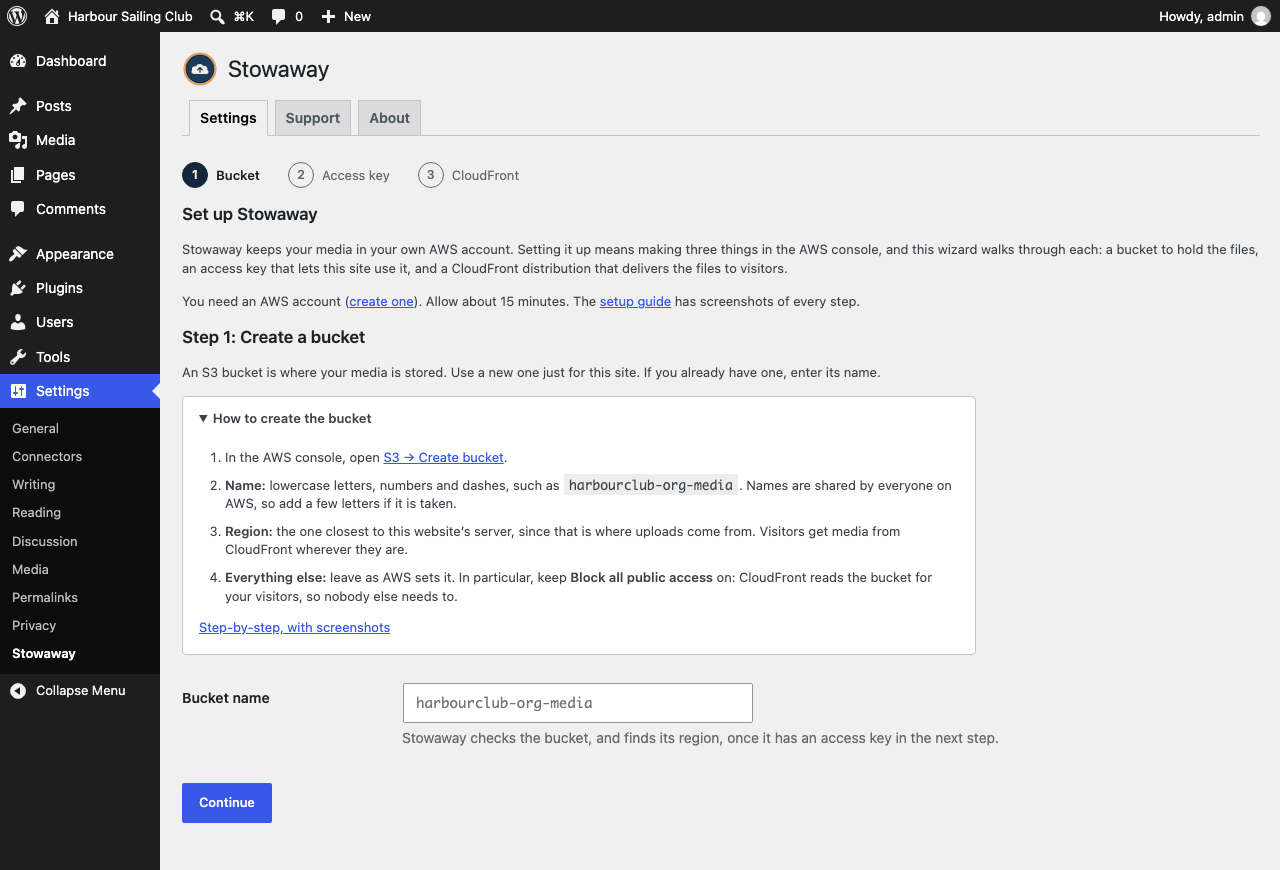
Setup starts from an empty AWS account: create a bucket, with the settings that matter.
Stowaway copies your uploads to your own Amazon S3 bucket and serves them to
visitors through Amazon CloudFront (or straight from S3). Your server stops
serving images, your pages load media from a CDN close to each visitor, and
nothing about how you use the Media Library changes.
It does one thing, AWS, and does not try to support every storage provider.
Every feature is free: there is no “Pro” version.
What it does
- Offloads every upload, and every size WordPress makes of it, as soon as it is uploaded. Edited and regenerated images go up too.
- Serves media from CloudFront or S3: attachment URLs, responsive
srcsetimages, images in post content and page-builder shortcodes, and Yoast SEO’s share images and schema. - Catches images anywhere on the page for themes and page builders that print them outside the post content, such as Divi’s background images (WordPress 6.9 or later).
- Offloads your existing library in the background of one admin page, with a progress bar, or with
wp stowaway offload --all. - Shows each file’s status in the Media Library, with “Offload now” and an “Offload to S3” bulk action.
- Deletes files from the bucket when you delete them from the Media Library.
- Keeps your database clean: posts keep their local media URLs, so turning delivery off, or removing the plugin, never breaks a page.
- Keeps local copies on your server as a safety net, or removes them to save disk space: your choice.
- Survives AWS outages: checks every hour that your images load from CloudFront. If AWS stops serving them (a suspended account, a deleted distribution, broken DNS), your site switches to its own copies, clears page caches and emails you, then switches back when AWS returns.
- Never locks you in: “Bring it all home” downloads every file back from the bucket, whenever you want.
Set up in three steps
A setup wizard walks you through it, starting from an empty AWS account. Each step explains what to make in the AWS console and links to a full guide with screenshots:
- Bucket: create one with the settings that matter, and give Stowaway its name.
- Access key: an AWS user just for your site, with a policy that lets it use that one bucket and nothing else. Stowaway checks the key with AWS, finds the bucket’s region, and makes sure the key can use it. Keys can live in
wp-config.phpinstead of the database. - CloudFront: put a distribution in front of the bucket and paste its domain. Or skip it for now: media keeps being served from your server, and new uploads are copied to the bucket for when you’re ready.
Finishing runs a connection test that walks the whole path a real upload takes: it reaches the bucket, uploads a small file, loads it the way a visitor’s browser would, and deletes it.
Coming from WP Offload Media?
Stowaway reads the settings and offload records WP Offload Media (Lite or Pro) left in your database, so media you offloaded with it keeps its exact URLs, with nothing uploaded again. It even uses the access keys already in your wp-config.php until you replace them.
Deactivate WP Offload Media, then choose Import from WP Offload Media on Settings Stowaway.
Some WP Offload Media setups make every file public and let CloudFront read them as an anonymous visitor. Stowaway’s uploads are private, so on those setups CloudFront also needs Origin Access Control, or new uploads won’t load. The connection test tells you if that’s the case, and what to change in CloudFront. Media you already offloaded keeps working either way.
WP-CLI
wp stowaway status: what is configured, and how much is offloaded.wp stowaway offload --all: offload everything not yet in the bucket (orwp stowaway offload 12 34for specific attachments).wp stowaway import-wpom: import from WP Offload Media.wp stowaway download --all: bring every missing file back from the bucket.wp stowaway remove-local --all: remove local copies that are safely in the bucket (with Remove local copies on).wp stowaway health: check now that images load from CloudFront.
External services
Stowaway connects your site to Amazon Web Services (AWS), which you choose and pay for with your own AWS account. Nothing is sent anywhere until you enter your AWS access keys.
Amazon S3 (the S3 API at s3.<region>.amazonaws.com) stores your media. Your site sends it:
- each file you upload to the Media Library, every size WordPress makes of it, and the file’s name and folder, when the file is offloaded;
- requests to delete those files when you delete them in WordPress;
- requests to list your buckets and look up a bucket’s region, when you set up or change the bucket;
- a small test file, uploaded and deleted again, when you run the connection test.
Requests are signed with your access keys; the secret key itself is never sent.
Amazon CloudFront (your distribution’s domain, if you set one up) delivers the media to visitors. Their browsers load images and files from it, so CloudFront receives what any web server does: their IP address, browser details, and the address of the file. Your site itself also requests files from it:
- one test file, when you run the connection test;
- a few of your images once an hour, while outage monitoring is on (it is by default, and can be turned off on the Safety tab);
- files your server is missing, when you use “Bring it all home” or edit an image whose local copy was removed.
Outage and upload alerts are sent by your own site’s email, to the address you choose; they don’t go through any other service.
AWS’s terms and privacy policy: AWS Service Terms, AWS Privacy Notice.
Stowaway sends nothing to its author, and has no tracking or analytics.