

StoreRuler – Order Management & Back Office for WooCommerce

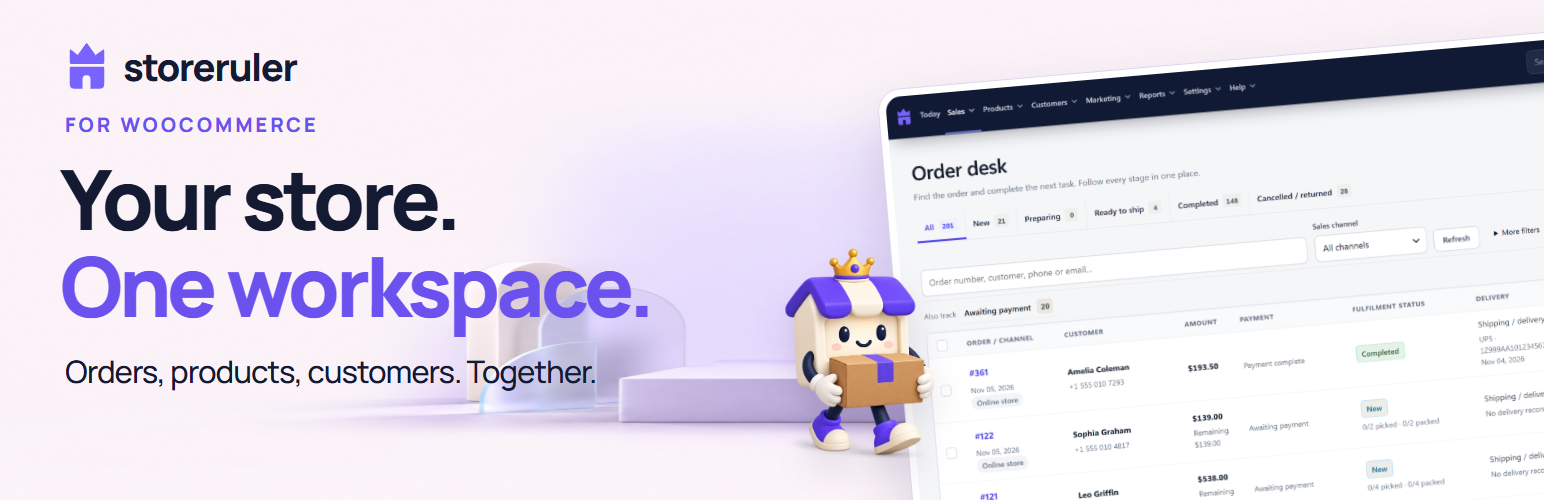
The WooCommerce order desk: every order by stage, with filters and saved views.
StoreRuler is a free WooCommerce order management plugin and back office for small shops. Prepare and ship orders from one order desk, print pick lists and packing slips, give customers an order tracking page, fix products with missing details, see live carts and follow your sales, all inside the WordPress admin.
StoreRuler works on top of WooCommerce. It reads the orders, products and customers you already have, so there is nothing to import, and they stay WooCommerce records. WooCommerce’s own screens keep working.
What you can do with it
- Get through the day’s orders. See what is new, what is being prepared and what is ready to ship.
- Pack with fewer mistakes. Confirm each line by scanning or typing its SKU or barcode.
- Answer “where is my order?” Send the tracking details, or let customers look them up themselves.
- Keep the catalogue clean. Find products with no price, SKU, photo, barcode or category, and fix them from the list.
- See demand you would otherwise miss. Live carts, back-in-stock requests and shop searches that found nothing.
WooCommerce order management
- Order desk. Every order in one list, grouped by stage: New, Preparing, Ready to ship and Completed. Filter by payment status, date and sales channel, and search by order number, customer name, email or phone.
- Saved views. Save a set of filters under a name, for yourself or for the whole team.
- Order page. The next step at the top, then the products with photos, the payment summary, shipping details and the order’s activity.
- Preparing and shipping. Confirm each line by scanning or typing its SKU or barcode. Record the shipment with carrier, tracking number and expected delivery date, or record that the customer collected the order in person.
- Several orders at once. Start preparing the selected orders, or mark them ready, in one step. An order that cannot take the step is listed with the reason.
- CSV export. Download the selected orders as a CSV file for a spreadsheet.
Pick lists and packing slips
- Printouts. For up to 100 selected orders: a pick list with each product once and the units to pick per order, packing slips without prices, and order summaries with WooCommerce’s totals.
Shipment and order tracking
- Tracking messages. Send the customer their tracking details with WooCommerce’s customer note email after a preview, copy the message, or open it as a WhatsApp draft.
- Carrier list. Keep the names of up to eight carriers you use, so recording a shipment is one choice.
- “Where is my order?” page. Customers see their order’s status and tracking numbers by order number and email.
Product management and stock
- Product list. One row per product, with its variations underneath. Search by name, SKU or barcode, and show published products or those that are drafts, pending review, private or scheduled.
- Quick edit. Change regular and sale prices right in the list, and the name, SKU and barcode in the product window. A change made elsewhere in the meantime is never overwritten.
- Product window. A wide window with the product’s details, prices and stock, and a table of every variation for changing SKUs and prices together.
- Product health. Counts and filters for products that are out of stock, or that have no price, SKU, photo, barcode or category other than “Uncategorized”.
- New simple product. One form for name, prices, SKU or barcode, photo and stock. Products with options are created in WooCommerce’s product editor.
- AI text for one product. Draft a description or photo alt text with your own OpenAI key; review it before applying.
Customer management
- Customer directory. Every customer account, including people who have not ordered yet. Search matches words across name, company, email and phone numbers written in different ways.
- Customer card. Orders and spending per currency, what is still to be paid, recent orders and a timeline, plus your team’s notes, tags and contact preferences (email, SMS, WhatsApp).
Live carts, back-in-stock notifications and lost searches
- Live carts (on unless you turn them off). Web carts changed in the last hour and those left longer, with products, estimated totals and where the shopper came from (Instagram, Google, Yandex and others, as WooCommerce order attribution recorded it). Guests stay anonymous; a signed-in customer’s cart links to their card, and your team’s carts are marked as tests. Cart data is deleted after 72 hours, or at once when you turn live carts off.
- Back-in-stock requests (off until you turn them on). Shoppers can ask, with a consent box, for one email when an out-of-stock product or variation is back. StoreRuler then sends each of them one WooCommerce email (editable under WooCommerce Settings Emails, or sent by hand) and shows how many shoppers wait for each product.
- Searches with no results. Shop searches of the last 30 days that found no product, most searched first. Only the words are kept; email addresses, links, phone numbers and your team’s searches are left out.
URL redirects, 404 report and SEO health
- URL redirects and 404 report. 301, 302 or 410 redirects for an address or everything under it, with CSV import and export. A renamed category, tag or brand redirects from its old address by itself. The 404 report lists the missing addresses, each with a Redirect button that opens the redirect form already filled in; it keeps the path, the visit count and the referring site, never IP addresses.
- SEO health. A score and the top SEO issues, read only.
Sales reports and dashboard
- Home. Net sales, orders and average order for 7, 30 or 90 days against the period before, with daily sales, orders by stage, best sellers and stock that needs attention.
- Today. A start to the day: the orders waiting to be prepared or paid. A new store also gets a setup checklist (store details, first product, payment methods) on the Help page.
- Sales report. Net sales, orders, average order and refunds for 7, 30 or 90 days against the period before, with daily sales, best sellers and cash on delivery still to collect, and a detailed view for any dates by channel and currency with refunds, amounts still due, current stock and saved report views.
Built for everyday work
- Four languages. English, Turkish, German and Spanish are included. StoreRuler follows your WordPress language settings.
- On your phone. Add StoreRuler to your phone’s home screen and open it like an app, with a shortcut to the order desk. It is the same signed-in admin; nothing is stored for offline use.
- Store health and support report. Checks the store details and time zone, the checkout (and, for stores shipping in Turkey, that it asks for a phone number), payment methods, policy pages, product details, a first test order, the WordPress scheduler and StoreRuler’s storage. It changes nothing. The support file lists versions, plugins and a few settings, without customer data.
- Email history. Every email your site handed to its mail server in the last 30 days, with the result, and the reason when it could not be sent.
- Store email connection. An administrator can connect an existing email account in Settings Email, verify it with a test code and send WordPress and WooCommerce emails through it. Existing email plugins keep control of their own connection.
- Activity log. Who did what in StoreRuler and when, such as order steps, product edits and setting changes, with links to the records.
- Search. One search box for orders (also by tracking number), customers, products and StoreRuler’s screens.
- Privacy tools. StoreRuler’s data (back-in-stock requests, email history, signed-in customers’ carts, customer notes, tags and contact preferences) joins WordPress’s personal data export and erasure. When WooCommerce removes an order’s personal data, StoreRuler removes its own copies too.
StoreRuler Pro
StoreRuler Pro is a separate, paid plugin from Eren Labs, sold in three plans. It runs instead of the free plugin and uses the same StoreRuler data and settings.
- Pro, for stores that sell online: manual and phone orders, returns and order editing, payments and collections, campaigns, cart reminders, gift cards and store credit, Google and Meta product feeds, bulk editing, smart categories, bundles, reviews and product questions, an SEO centre, AI Studio with your own OpenAI account, reports, team roles, automations and phone notifications.
- Plus, for shops with a till, stock and suppliers: everything in Pro, plus a quick-sale screen and cash register, purchase orders, suppliers and goods in, stock counts with barcodes, landed cost and profit, files for your accountant, and sales on account with customer statements.
- Business, for stores that also sell to dealers: everything in Plus, plus dealer groups and wholesale price lists, quotes and prices on request, payment terms and credit limits per customer, and receivables.
Everything described above works without Pro and has no time limit. More about StoreRuler Pro: storeruler.com
External services
StoreRuler uses Freemius and, only when you choose to connect them, your email provider and OpenAI, in the cases listed below.
Apart from Freemius and the optional email and OpenAI connections described below, the free version contacts no external service: it calls no third-party API, and it loads no fonts, scripts or images from other servers.
Freemius (Freemius, Inc.) runs StoreRuler’s optional data-sharing opt-in and the plans, checkout and licenses of StoreRuler Pro.
- Opt-in. The first time you open StoreRuler, it asks whether you want to share data with Freemius. If you click “Allow & Continue”, Freemius receives the first name, last name and email address of the WordPress user who clicked; your site’s address and title, WordPress and PHP versions and site language; the StoreRuler and Freemius SDK versions and whether StoreRuler is active, deactivated or uninstalled; and the names, versions and status of your installed plugins and themes, unless you switch that list off on the same screen. Freemius keeps this information up to date while you stay opted in. If you click “Skip”, nothing is sent. You can opt in or out later from the Plugins screen.
- StoreRuler Pro page. The StoreRuler Pro page (“Upgrade to Pro” in the StoreRuler admin menu,
admin.php?page=storesuit-pro) is part of StoreRuler and loads nothing from Freemius or any other server. Its buttons are plain links, and nothing reaches Freemius until you click one. For a site administrator they open Freemius’s checkout for the chosen plan, which loads the plan and its price from Freemius (the request includes the StoreRuler version and your site’s address). Buying a plan sends the opt-in details above, and the checkout asks for what it needs for the payment. While Freemius is not set up for StoreRuler, and for shop managers, the buttons open StoreRuler’s page on storeruler.com instead. - Contact Us. This link in the StoreRuler admin menu opens a contact form on the Freemius website and passes it your site’s address, its login address and the StoreRuler version.
- Deactivation feedback. When you deactivate StoreRuler, Freemius may ask why. Answering is optional. If you send an answer, Freemius receives it when the plugin is deleted: with an anonymous site ID if you tick “Anonymous feedback”, otherwise with the opt-in details above.
Freemius’s terms of service and privacy policy apply to these cases.
Links that a team member clicks, such as “Send on WhatsApp” or a carrier’s tracking page, open that website in their browser; StoreRuler itself sends nothing to it. Emails such as back-in-stock and tracking emails go out through your site’s own email setup.
Your email provider (optional). Settings Email can connect an existing Hostinger Email, Gmail/Google Workspace or other provider account using authenticated SMTP over verified TLS on port 465 or 587. Saving an account stores its credentials encrypted in your WordPress database; it sends nothing and leaves the connection disabled. Clicking “Send one test email” resolves the chosen server and sends its sign-in details and one verification email to that server, addressed only to the current administrator’s WordPress account. Enabling requires the code from the received test email. Once enabled, WordPress and WooCommerce messages use this account: the provider receives the sign-in credentials, sender, recipients, subject, content and any attachments of each message. Each feature’s own sending and consent settings still apply. Eren Labs receives none of these details. Turning the connection off returns to the previous WordPress email settings; disconnecting removes the saved credentials. If an email plugin already handles delivery, StoreRuler preserves it and can test that existing connection.
The account owner’s chosen provider’s terms and privacy policy apply. Presets: Hostinger’s terms and privacy policy; Google’s terms and privacy policy. For another provider, consult the terms and privacy policy for that account. Provider instructions are ordinary links that open only when clicked.
OpenAI (optional). Only when a team member asks for an AI draft for a product, StoreRuler sends that product’s texts, categories and attributes, or its main photo, to api.openai.com with the store’s own key (details in the FAQ). OpenAI’s terms of use and privacy policy apply.
Privacy
StoreRuler stores its data in your WordPress database and sends nothing to Eren Labs, except what you choose to share through Freemius (see External services). You stay responsible for your customers’ data, so mention the features you turn on, such as back-in-stock emails and live carts, in your privacy notice.
Optional email credentials use authenticated encryption bound to this site’s WordPress salts. They are never returned to the browser, included in StoreRuler settings backups or support reports, or added to personal-data exports. Reconnect the account after changing the site’s salts or moving the encrypted settings to another site. A test code is stored only as a hash, expires after 10 minutes and is limited to five attempts. Email servers accepting a message does not guarantee delivery to the inbox.
Deleting StoreRuler removes its saved email credentials and setup-test records; store business records are retained.
The optional OpenAI key is encrypted the same way and removed on deletion.
While it is active, StoreRuler deletes time-limited data by itself: live carts after 72 hours; email history after 30 days (at most 5,000 entries); shop searches after 30 days; 404 report entries 30 days after they were last seen; sent or cancelled back-in-stock requests 90 days after the request, and requests still waiting after one year. The activity log has no automatic time limit. The back-in-stock form uses the visitor’s IP address only in hashed form, for an hourly limit; the address itself is not stored. The order tracking page counts failed lookups for an hour under hashed keys only.
See the StoreRuler privacy policy.