


Storebird AI Chat for WooCommerce
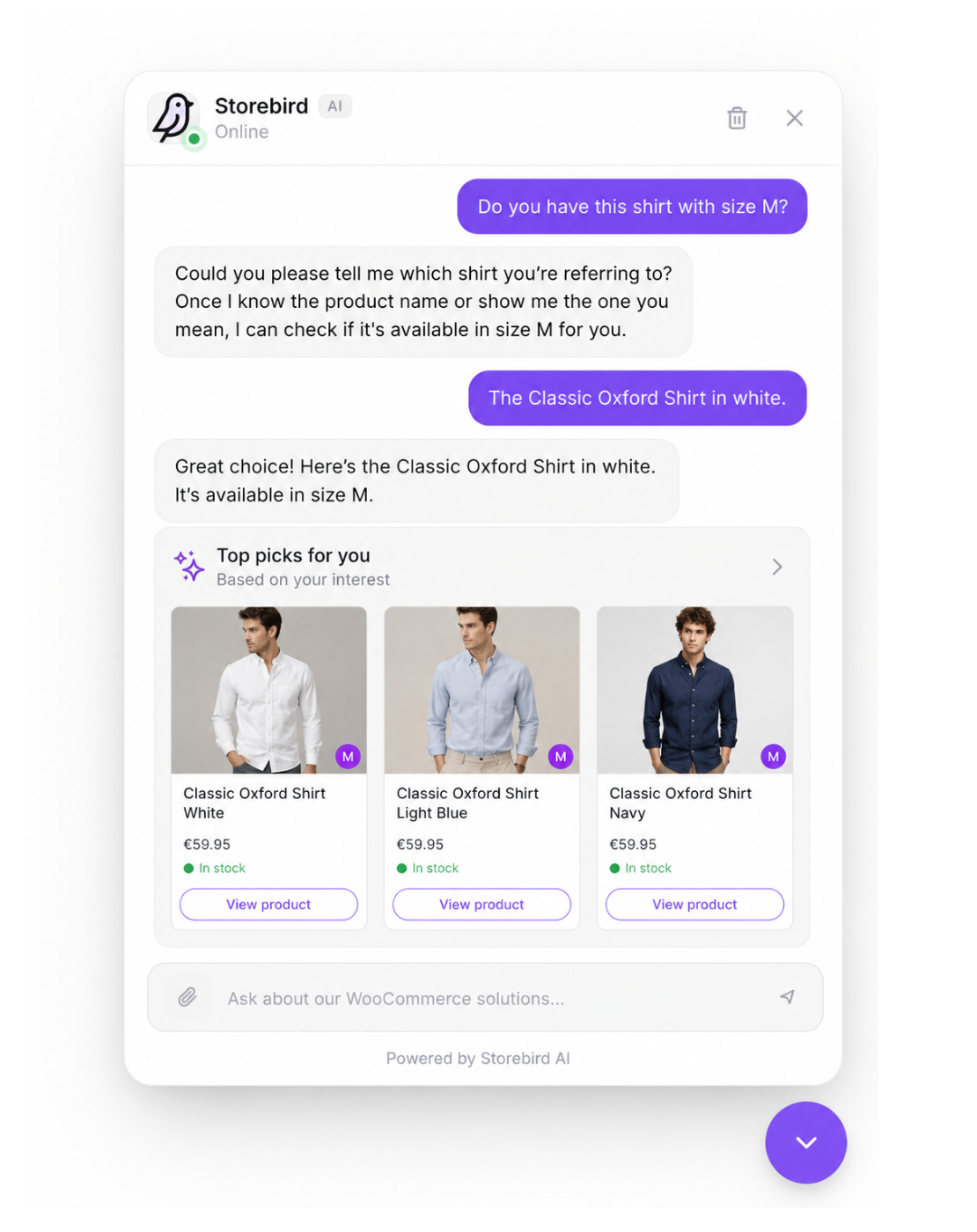
Instant AI product recommendations -- Storebird answers product questions straight from your live WooCommerce catalog, with prices and direct links.
Questions cost sales before checkout—and time after it. Storebird answers both.
A shopper is ready to buy, but has one last question. Is it the right size? Is it in stock? Will it arrive in time?
Another customer just wants to know where their order is.
If nobody answers, the first shopper may leave. The second question lands in your inbox.
Storebird is the AI chatbot that knows your WooCommerce store. It turns live products, stock, variations, orders and store information into useful answers. Before the sale, it helps shoppers find the right product and move forward. After the sale, it answers order, delivery and policy questions—without making you type the same reply again.
Less chasing. Less hesitation. More customers who know what to do next.
Real Questions. Real Store. Real Results.
On one real WooCommerce store, Storebird handled 534 customer chats and captured 72 leads. 82% of those conversations were freely typed product questions—not preset buttons.
That is the job Storebird is built for: being there at the exact moment a customer needs an answer.
Not Another Chatbot That Guesses
Generic chatbots read a few pages and hope for the best. Storebird connects directly to WooCommerce, so it can work with the data your store already runs on:
- Products and variations — help shoppers compare options, sizes, colours and specifications
- Live prices and stock — show what is available now
- Product recommendations — turn natural-language questions into matching products with direct links
- Orders and tracking — let customers securely check order status and delivery information
- Coupons and policies — explain discounts, shipping, returns and the store information you add
When you update a product in WooCommerce, Storebird syncs the change automatically. No scripts to maintain. No chatbot flowcharts to rebuild. No OpenAI API key required.
Train Storebird on What Makes Your Store Different
Your store is more than product titles and prices. The best answers often live in your shipping rules, return policy, sizing advice, buying guides and the details your team knows by heart.
Storebird gives your AI its own knowledge base. You can:
- Import pages from your website and turn existing store content into answers
- Add and edit knowledge manually for FAQs, policies, product advice or anything unique to your business
- Teach product-specific details with notes and corrections attached to individual products
- Control what the AI uses by activating, updating or removing knowledge whenever you want
- See which knowledge gets used in customer answers
Storebird automatically enriches and reprocesses the knowledge you add. Update a page, correct a product or change your WooCommerce data, and future answers can use the latest version.
The more useful knowledge you give Storebird, the more useful Storebird becomes—without rebuilding scripts or chatbot flows.
Your own knowledge base is included on every plan: up to 100 pages on Essential and unlimited pages on Pro and Scale.
One WooCommerce Brain, Before and After the Sale
Storebird does more than answer FAQs. It understands where the customer is in the buying journey.
Before checkout, Storebird can answer questions such as:
- “Which of these products fits what I need?”
- “Do you have this in my size?”
- “What is the difference between these two?”
- “Can this arrive before Saturday?”
After checkout, the same assistant can help with:
- “Where is my order?”
- “Has my package shipped?”
- “Can I return this?”
- “How do I use the product I bought?”
Your customer gets a clear next step. You get fewer repetitive questions competing for your attention.
AI When It Can. You When It Should.
Some conversations need a person. Storebird can hand over the full conversation history and notify you, so the customer does not have to start again.
When you are ready to bring more customer communication together, Storebird also supports AI email drafts using live WooCommerce data, two-way WhatsApp conversations, lead capture and one inbox across connected stores and channels.
You stay in control of the assistant’s tone, instructions, welcome message and knowledge. Match the widget to your brand, review conversations in the dashboard and let Storebird respond in your customer’s language, with WPML support for multilingual catalogs.
Your Store in Your Pocket. Free iOS and Android App.
A handoff only helps if you notice it. The Storebird app for iOS and Android sends you a push notification the moment a shopper asks for a human, so you can read the whole conversation, take over from the AI and answer from wherever you are — then resolve the chat or hand it back to the assistant.
The app is included with your Storebird account: same login, no extra subscription, no per-seat fee.
Get it for iPhone and iPad or Android.
See It Answer Before Your Customers Do
Do not take our word for it. Install Storebird, connect your store and ask it the hardest product question you received this week.
Private test mode keeps the widget visible only to logged-in store administrators until you decide it is ready for shoppers:
- Install and connect Storebird
- Let your WooCommerce products sync
- Ask real customer questions
- Check the answers yourself
- Go live when you are ready
The plugin is free to install. A Storebird account and paid plan are required to make the assistant available to shoppers. The Pro plan includes a 14-day trial.
Your customers already have questions. Give them a reason to keep shopping.
Install Storebird and see what it knows
External Services
This plugin connects to the Storebird API service to provide AI-powered chat functionality.
Storebird API
This plugin sends data to and receives data from the Storebird API (https://storebird.ai/api) for the following purposes:
Data sent:
* Product information (names, prices, descriptions, images) – when syncing products
* Chat messages from customers – when customers use the chat widget
* Visitor information (page URL, session ID) – for chat context
* WordPress and WooCommerce version info – during connection setup
When data is sent:
* On initial plugin connection (automatic or manual)
* On product sync (manual trigger in admin)
* When products are created/updated in WooCommerce
* When customers send messages through the chat widget
Service links:
* Service website: https://storebird.ai
* Terms of Service: https://storebird.ai/terms
* Privacy Policy: https://storebird.ai/privacy