

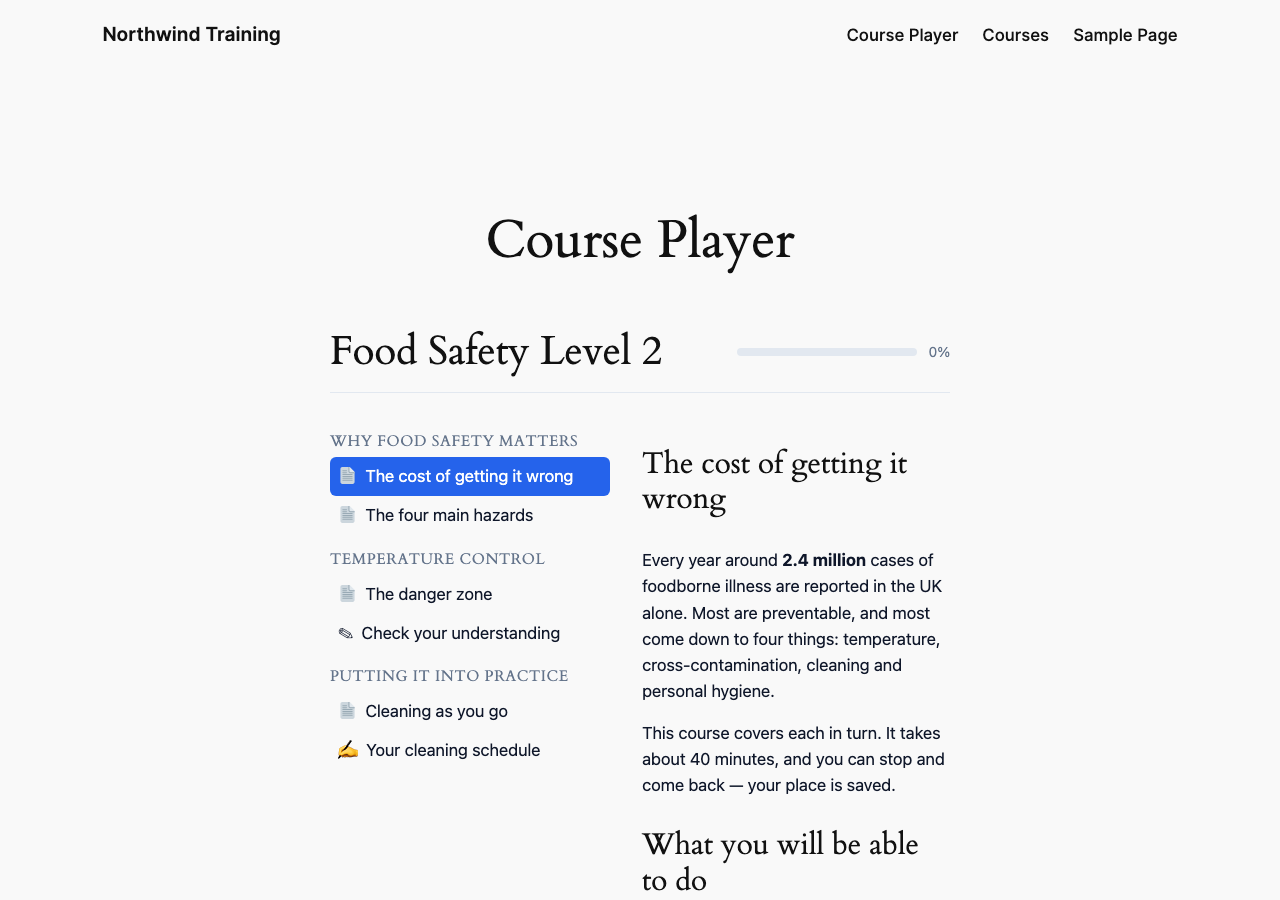
The course player a learner sees: lesson and topic structure on the left, the topic itself on the right, and progress saved as they go.
Stedica LMS turns a WordPress site into a full training platform, with no external
service required.
Getting started
The dashboard creates the catalog and course-player pages for you, and can install a
complete sample course on request: three lessons, a graded quiz and a certificate. Moving
from LearnDash? Its courses can be imported straight from the same site, with no export
file; nothing is written to LearnDash, and anything left out is reported.
For learners
Course catalog and self-enrolment, a course player with resume, progress tracking and
drip-released lessons, eight quiz types, a discussion area per course, certificates with
a verifiable number, leaderboards and achievements.
For instructors
A drag-and-drop course builder (lessons and topics: text, video, audio, document, SCORM,
H5P, quiz, assignment) with a featured image per course, a reusable question bank, a
grading queue with a visual rubric grid, a weighted gradebook, and per-learner and
per-course progress with CSV export. The builder warns about problems a learner would hit
later, such as a question with no answer key, without ever blocking a save.
For administrators
Roles and capabilities, white-label branding, editable categories and levels, and an
audit log covering 27 action types. Groups grant course access to their members and take
it back when someone leaves. Access can be limited to a number of days per course, and
four automatic emails can each be switched on or off: grade posted, learner inactive,
access expiring, and work waiting to be graded. Every admin screen has a Manual button
explaining how it works.
Languages
English and Spanish (es_ES and es_MX) ship with the plugin, including the admin screens.
Selling courses
Link a WooCommerce product to a course: the buyer is enrolled on payment and access is
revoked on refund. No external service and no subscription required.
Standards
SCORM 1.2 and 2004 import and runtime, with resume and HTTP Range media streaming. Scores
from SCORM content count in the gradebook, weighted like quizzes and assignments.
License
Stedica LMS is distributed under the GNU General Public License. The plugin’s own code is
GPL-3.0-or-later.
It bundles third-party components under their own compatible licences, and two of them are
worth naming because they are stricter than the plugin’s own: the Freemius SDK in
vendor/freemius/ is GPL-3.0-only, and dompdf’s rendering library in vendor/dompdf/ is
LGPL-2.1. Taken as a whole, therefore, this distribution is effectively GPL-3.0 without the
“or later” option, because one of its components does not offer it.
Both LICENSE (GPLv3, the licence this plugin is under) and LICENSE-GPL-2.0.txt (included
because WordPress itself is GPLv2-or-later and the directory asks for a compatible licence)
ship in the package. GPLv3 is compatible with that requirement.
External services
This plugin connects to one external service, and only for licensing.
Freemius
Freemius handles licensing, the free trial and update delivery for the optional paid
add-on, Stedica LMS Premium. The licensing SDK is bundled in this plugin.
Nothing is sent until you choose to send it. On a fresh install the plugin runs in
anonymous mode: no request is made to Freemius and no data leaves your site. Requests
begin only when you opt in to Freemius’ service, start the free trial, or activate a
licence key — each of which is an explicit action you take.
Once you have opted in, the following is sent to Freemius:
- when you opt in, start a trial or activate a licence: your site URL, the email address
and name of the WordPress user performing the action, and the WordPress, PHP and plugin
versions - when checking for updates to the paid add-on, and when validating a licence: your site
URL and the installed plugin version
No learner data, course content, grades or quiz results are ever sent.
If you never opt in, the plugin remains fully functional and contacts nothing. The paid
add-on is the only thing that requires it.
Service provided by Freemius, Inc.
Terms of Service: https://freemius.com/terms/
Privacy Policy: https://freemius.com/privacy/
Security
Authorization is enforced server-side on every REST route and every admin screen —
hiding a menu item is never treated as access control. Learner-owned resources are
ownership-checked to prevent enumeration by id. Quiz answer keys never leave the
server. Protected files (SCORM assets, submissions, certificates) are served through a
PHP proxy that derives authorization from the request path, because a SCORM package’s
relative sub-resource requests cannot carry a token. Grades are clamped server-side.
Secrets are masked in every API response, and are encrypted at rest when the PHP
OpenSSL extension is available (it is on virtually all hosts; without it they are stored
unencrypted and only the masking applies).
Shortcodes
For learners: [stedica_my_courses], [stedica_catalog], [stedica_course_player],
[stedica_leaderboard], [stedica_certificates], [stedica_discussions],
[stedica_achievements]
Stedica LMS Premium, a separate add-on, adds [stedica_live_sessions],
[stedica_my_skills], [stedica_learning_paths] and [stedica_membership]. They are
listed here so you know what exists, not offered by this plugin — this package does not
contain them and does not register them.
For staff: [stedica_my_group] shows a group leader their members’ progress, and
[stedica_instructor] gives an instructor their grading queue. Both are safe to put on an
ordinary page — each shows only what the person viewing it is entitled to see, and a
visitor with no such role sees a plain explanation rather than an error.
Every surface is also a block — search “Stedica” in the inserter — and an Elementor
widget, found under a Stedica LMS category with a dropdown for which surface to show.
All three render through the same code, so they behave identically.