

Staylodgic – Booking & Activity Manager for Boutique Hotels

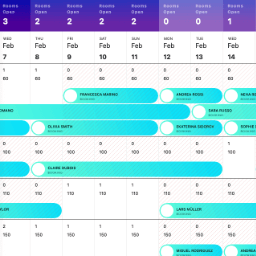
Room Availability Calendar – View confirmed, pending, and cancelled bookings in a visual calendar format.
Staylodgic is a user-friendly hotel management plugin designed to simplify and enhance operations for small to medium-sized hotels, guesthouses, and boutique properties. With a comprehensive suite of features, Staylodgic allows you to manage room bookings, activity reservations, guest registration, invoicing, and more.
Developed by a boutique hotel owner, with real-world needs in mind.
Introduction video:
Shortcodes
-
[staylodgic_activity_booking_search]
Displays a search form for guests to browse and book available activities. -
[staylodgic_hotel_booking_search]
Provides a search form for guests to find and book available rooms. Helps streamline the booking process by showing room availability based on their preferences. -
[staylodgic_hotel_booking_details]
Displays status about a specific hotel booking. -
[staylodgic_guest_registration]
Adds a customizable guest registration form to your website. Ideal for collecting guest details online or facilitating pre-arrival registration via shared links or QR codes.
Features
-
Hotel Management
- Setup new hotel settings.
-
Online Payments
- Accept online payments via WooCommerce (e.g., WooCommerce Payments and other compatible gateways).
- Enable from StayLodgic Settings.
- After a booking is made, guests can complete payment online.
- Payments are logged as WooCommerce orders; booking details show payment status and link to the order in wp-admin.
-
Room Management
- Create rooms for reservations.
- Add room rates.
- Set room quantity.
- Create and manage reservations.
-
Activity Management
- Create activities for guests.
- Add scheduled times to the weekly calendar.
- Create and manage activity reservations.
-
Dashboard Tools
- View bookings overview.
- View activities overview.
- Check availability calendar.
- Monitor annual availability.
-
Customer Management
- Create and manage customer profiles.
-
Guest Registration
- Customize guest registration forms.
- Create guest registrations.
- Enable online registration.
- Share registration links or QR codes.
-
Invoicing
- Generate booking invoices.
- Generate activity invoices.
-
Import/Export Data
- Export bookings as CSV files.
- Export guest registration data for a specific month.
-
Tax Management
- Apply fixed taxes.
- Set percentage-based taxes.
- Add per-day taxes.
- Configure per-person taxes.
-
Meal Plans
- Create free meal plans.
- Create paid meal plans.
-
Per Person Pricing
- Add fixed price increments per occupant.
- Apply percentage-based increments per occupant.
-
Discounts
- Offer last-minute booking discounts.
- Provide early booking discounts.
- Enable long-stay discounts.
Benefits
-
Streamlined Hotel Operations
- Simplify and centralize hotel and room management.
- Manage reservations, activities, and guest registration in one platform.
-
Time-Saving Automation
- Automate guest registration with customizable forms and online submissions.
- Generate invoices for bookings and activities instantly.
-
Comprehensive Dashboard
- Gain insights with an overview of bookings and activities.
- View availability calendars and annual availability at a glance.
-
Enhanced Guest Experience
- Offer flexible meal plans and activity reservations.
- Provide seamless guest registration with links or QR codes.
-
Flexible Pricing and Discounts
- Configure per-person pricing with fixed or percentage-based increments.
- Apply discounts for early bookings, last-minute reservations, or long stays.
-
Efficient Tax Management
- Set up taxes per booking, per person, per day, or as a percentage.
-
Data Management Made Easy
- Export bookings and guest registration data for analysis or reporting.
-
Customizable for Small to Medium Hotels
- Adaptable to guesthouses, boutique hotels, and properties with specific needs.
-
Affordable and Scalable
- Ideal for small businesses.
- Scales easily for larger hotels and businesses.
-
User-Friendly Interface
- Designed for ease of use with intuitive navigation and clear workflows.
-
Improved Decision-Making
- Leverage data insights to optimize operations and improve guest satisfaction.
Helpful How-To
Get started quickly with these helpful guides from the Staylodgic Help PDF:
Configure Hotel Settings
Set up your hotel’s pages, discounts, taxes, meal plans, and general settings.
(See pages 6–13 of the PDF)
Create Rooms and Bed Layouts
Add rooms, set base rates, configure occupants, and define bed types.
(See pages 14–20)
Manage Availability and Rates
Use the Availability Calendar to control room quantity and pricing by date.
(See pages 21–35)
Add a Booking Manually
Step-by-step on how to create a reservation manually.
(See pages 36–40)
Generate Booking Invoices
Quickly print or save invoices for room bookings.
(See page 41)
Set Up Guest Registration
Customize forms, generate QR codes, and track registration status.
(See pages 42–46)
Create Activities & Reservations
Define activities, schedule time slots, and manage guest signups.
(See pages 47–53)
Generate Activity Invoices
Produce printable invoices for activity bookings.
(See page 54)
Use the Booking Dashboard
Track arrivals, departures, and revenue trends using the graphs.
(See pages 55–58)
Annual Availability View
Get a yearly bird’s-eye view of all your bookings.
(See pages 59–60)
Export Bookings and Registrations
Download CSV files of all bookings and guest data.
(See pages 61–63)
Development
This plugin uses minified JS and CSS files for better performance.
Source files are available in the following repository:
driver.js
https://github.com/kamranahmedse/driver.js
DataTables
https://github.com/DataTables/DataTablesSrc
Lightbox for Bootstrap 5
https://github.com/trvswgnr/bs5-lightbox
HTML2Canvas
https://github.com/niklasvh/html2canvas
Signature Pad
https://github.com/szimek/signature_pad
VelocityJS
https://github.com/julianshapiro/velocity
Fontawesome
https://github.com/FortAwesome/Font-Awesome
QRcode JS
https://github.com/davidshimjs/qrcodejs
PDFMake
https://github.com/bpampuch/pdfmake
Flatpickr
https://github.com/flatpickr/flatpickr
jsPDF
https://github.com/parallax/jsPDF
Chart.js
https://github.com/chartjs/Chart.js
Select2
https://github.com/select2/select2