


SpeeSeek – Find What Slows Your WordPress Site
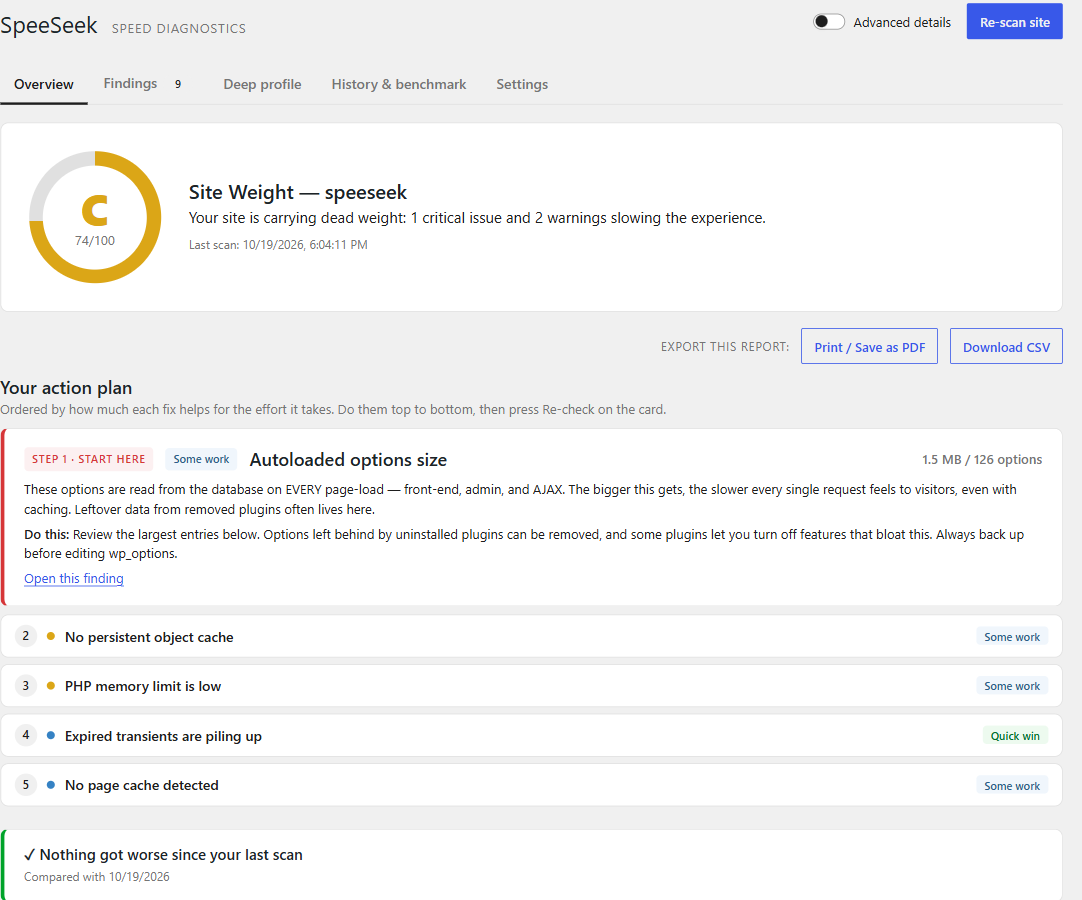
Overview: the Site Weight grade and a ranked action plan — step 1 expanded with exactly what to do, the next fixes tagged by effort (quick win, some work, needs a host or developer).
Your site is slow and PageSpeed only tells you to “reduce server response time”.
That number is decided inside WordPress — by autoloaded options loaded on every request,
a database full of leftovers, a page cache that is installed but not actually serving
pages, a plugin quietly running hundreds of queries. Speed tests can’t see any of it.
SpeeSeek looks at your site from the inside and tells you, in plain language, what
is slowing it down, why it matters, and exactly how to fix it — then puts the fixes in
order, so you know what to do first.
- A ranked action plan. Up to five steps, ordered by how much each fix helps for the
effort it takes. A two-minute cleanup comes before a hosting migration. - “I fixed it — re-check.” Re-run just the check behind a finding and see it turn
green, without a full scan. - It measures, not guesses. Page caching is tested with a real request to your home
page, so you learn whether your cache actually works — not just whether one is
installed. The deep profiler times a real page load, front end or wp-admin. - Every finding is What Why it hurts How to fix, with a copy-paste-ready
snippet, and “Copy as task” to hand it to your developer.
SpeeSeek is advise-only. It is not an optimizer and it never changes your data
or your settings. It diagnoses; you decide. There is zero front-end footprint —
nothing is added to your site’s public pages, nothing is added to autoload, and scans
run on demand from the admin only.
Why it’s different
- Reads what external tools can’t: autoloaded options bloat, cron backlog, database
overhead, object cache / OPcache / page-cache behaviour, page-builder weight. - Its own transparent Site Weight grade across four categories — Server Response,
Database Weight, Request Load, and Maintenance Health — instead of a single opaque
Google score. - Built for site owners, not just developers. Query Monitor is a superb tool for
developers debugging one request; SpeeSeek is the plain-language report for the person
who owns the site — and it works well alongside Query Monitor. - Safe on big sites: heavy database checks are time-limited and skip themselves on huge
tables instead of locking anything up, and a check that fails is shown as “not
measured” rather than taking the whole scan down. - Lightweight by design: read-only, on-demand, and it refuses to be the bloat it detects.
It remembers, so it’s a keeper — not a one-time scan
- History & regression alerts — every completed scan is snapshotted, so SpeeSeek
can tell you what changed since last time and which plugin or update caused it. - Per-plugin cost attribution — the “who’s the culprit” finder attributes autoloaded
weight back to the plugins that created it. - Consequence translator — not “1.2 MB of autoload” but “~16 ms added to every page
load,” with the math shown under an Advanced toggle. Never fake precision. - A “✓ what we verified is healthy” panel, so you can trust the verdict.
Scanners included
- Environment (PHP version / EOL, memory limit)
- Autoloaded Options — size + top offenders loaded on every request (signature finding)
- Cost by Plugin, Plugin Footprint
- Database Weight (expired transients, orphaned metadata, table overhead)
- Post Revisions (page-builder aware), Media Library, Comment Hygiene
- Scheduled Tasks (overdue / duplicate cron, cron-on-page-load)
- Caching (persistent object cache, OPcache, page cache)
- WooCommerce (Action Scheduler backlog, stale sessions — when active)
- Page builders: generic builder weight plus a dedicated Elementor scanner
- Jet / Crocoblock (custom-table weight, SmartFilters indexer, widget packs)
Optional deep profiler
On demand, SpeeSeek measures (rather than estimates) real server render time, database
time per plugin, query count, peak memory, front-end asset weight, and outbound HTTP
during a single request to any page on your site — or to a logged-in wp-admin screen such
as the Dashboard or the Posts list (“why is my admin slow?”). Nothing is installed and no
file is written: SpeeSeek measures from inside itself during that one request, then
forgets it. After a few pages it points out the templates that do the most work.
Works with AI assistants
On WordPress 6.9+, SpeeSeek registers read-only abilities through WordPress’ built-in
Abilities API. Connect an AI assistant to your site (via the MCP Adapter plugin or the
WordPress AI Client) and it can ask SpeeSeek for your latest Site Weight report, list the
findings, see what changed since the last scan, and trigger a fresh scan — so you can ask
“why is my site slow?” in plain language and get an answer grounded in real diagnostics.
It’s administrator-gated and read-only, and your assistant connects to your site, so
nothing new leaves it and there is no API key to set up.
Translations
Ships ready in English, German (de_DE), and Persian (fa_IR), with full RTL support for
Persian. The German and Persian translations are AI-drafted and welcome a native-speaker
review pass.
External services
SpeeSeek connects to external services in two clearly-scoped cases. No personal data and
no content from your site is ever transmitted.
-
WordPress.org API (api.wordpress.org) — The “External HTTP” scanner performs a
single test request tohttps://api.wordpress.org/core/stable-check/1.0/to measure
your server’s real outbound latency to a known-good endpoint. Only a standard HTTP GET
is made; no data about your site is sent. This request only happens while you run a
scan in the admin, and it respects theWP_HTTP_BLOCK_EXTERNALconstant.
WordPress.org terms: https://wordpress.org/about/privacy/ . -
SpeeSeek Benchmark service (opt-in, OFF by default) — If — and only if — you
explicitly enable “Compare against other sites” in SpeeSeek’s settings, the plugin
sends a small set of anonymous numeric “weight” metrics (for example: total
autoloaded bytes, query count, database overhead size) to the SpeeSeek Benchmark API
so it can show you where your site sits relative to aggregate percentile bands of
other sites. No URLs, no site identity, no personal data, and no content are sent —
only whitelisted numbers. This happens at most once per day, and never while the
setting is disabled.
Endpoint:https://benchmark-backend-cf.leoworking96.workers.dev(hosted on
Cloudflare Workers). Service privacy & terms:
https://benchmark-backend-cf.leoworking96.workers.dev/privacy .
Cloudflare’s terms: https://www.cloudflare.com/website-terms/ .
Source code and build
SpeeSeek ships its full, human-readable source. The admin dashboard is written in
React/JSX and lives in the src/ directory, bundled inside the plugin alongside
the compiled assets in build/. The PHP in includes/ has no build step.
The compiled build/ assets are generated with the official WordPress build
tooling (@wordpress/scripts, which wraps webpack/Babel). To regenerate them
from source:
npm install
npm run build:assets
That compiles src/ into build/. No other build step is required.