
Somethumb Login Identity
0/5 (0 ratings) — active installs Updated Sep 15, 2026

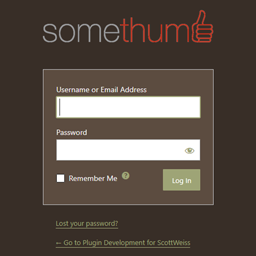
Somethumb Login Identity displaying a custom logo, shown with the separate Remember Admin Login Colors plugin using the Ocean color scheme.
Somethumb Login Identity displays the custom logo selected under Appearance > Customize > Site Identity on the WordPress login screen.
Features:
- Uses the site’s existing custom logo.
- Adds custom-logo support when the active theme does not provide it.
- Restores Appearance > Customize when WordPress does not display the link.
- Supports standard image formats and SVG logos.
- Preserves the logo’s proportions when WordPress has image dimensions.
- Limits the displayed logo width to 320 pixels.
- Links the login logo to the website homepage.
- Uses the website name as the logo link text for accessibility.
- Adds no settings page and requires no configuration beyond selecting a custom logo.
If no custom logo is selected, the standard WordPress login logo remains unchanged.