

SoftVoltAI Voice Agent
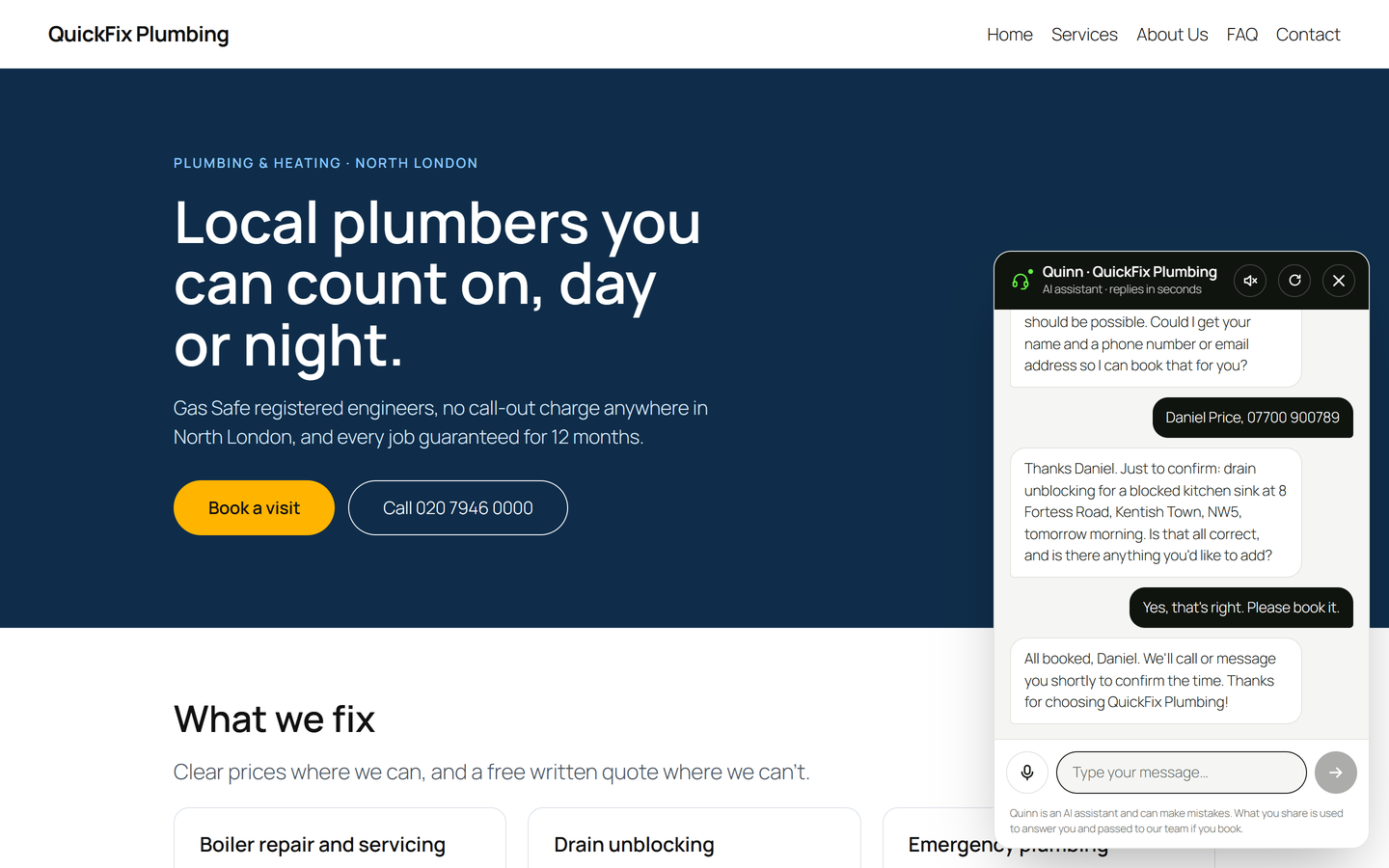
The AI chatbot on a plumber's website: it answers from the price list, checks the area and the time, and books the visit.
SoftVoltAI Voice Agent is an AI chatbot with a built-in voice assistant for WordPress. It works like an AI receptionist and sales agent on every page of your site: visitors talk or type, it answers from your own business facts, recommends the right service or product, books the appointment, and sends you every lead by email, Telegram or n8n.
It does more than answer questions: it asks one question at a time, recommends what fits, collects the details you choose and books the job. When a visitor would rather speak to a person, it hands them over as a hot lead, with a note of what they wanted and what it already explained. Every booking and hand-off is saved in WordPress before any alert is sent, so a lead is kept even if an email or message fails.
An AI chatbot you can talk to
The voice agent listens and speaks through the speech features already built into the visitor’s browser. There is no speech service to pay for. It understands and answers in 31 languages, from English to Bengali, Arabic, Spanish, Hindi and Japanese. Browsers without voice support simply get the text chat, so every visitor can use it.
An AI receptionist for bookings and appointments
For a plumber, a clinic, a salon or a consultant, it works like a virtual assistant at the front desk: it asks what the visitor needs, where and when, collects a phone number or email, confirms the details and saves the appointment request. You get it straight away, with the whole conversation.
A WooCommerce chatbot that shows real products
In a WooCommerce store the agent searches your live products and shows them as cards with the price, stock and an Add to cart button. New products and price changes are used the moment you save them. Customers pay at your normal checkout.
Lead generation around the clock
- Qualifies every enquiry and captures the lead, even at night.
- Hands hot leads to a person when a visitor asks, stays unsure, or asks something it cannot answer.
- Keeps every lead in a Leads inbox with its status, your notes and the conversation, ready to export as CSV.
- Alerts you by email (replies go straight to the visitor), by Telegram through your own bot, or as JSON to n8n, Make or Zapier.
Free AI models, or your own key
Start on a free AI model: OpenRouter’s free models, Groq’s free plan or Google Gemini’s free tier. When the leads justify it, move to DeepSeek, OpenAI (GPT) or Anthropic Claude for sharper answers, or any OpenAI-compatible service, including a model you run yourself. Each provider comes with step-by-step instructions for getting a key and a Test connection button.
On WordPress 7.0 or later you can instead choose WordPress AI connection: the agent uses the AI provider you connected under Settings > Connectors, with no second key to paste.
Answers from your facts
- It is told to use only the services, prices, questions and pages you add, and not to make up prices or promises.
- Replies are checked before the visitor sees them: a price that is not in your facts, your shop or the conversation is caught, and the agent answers again from your data.
- Learn from my site reads your About, Services, FAQ and Contact pages, your shop and your booking plugin, and fills in the agent’s knowledge for you to check.
- During a chat it can search your published pages, so answers about opening hours or delivery match what your site says.
Fits any kind of site
- Services or agency: qualifies the enquiry and books a call or a project.
- Local service or appointments: asks what the problem is, where and when, and books an appointment. A phone number is enough.
- Online shop: recommends products from your WooCommerce store, with cards and an Add to cart button.
- Information, blog or community: answers questions from your pages and takes enquiries.
Place it anywhere, with drag and drop
- A floating chat button in any corner: drag it into place in the live preview.
- A button in your header menu, chosen from your theme’s menu locations.
- The “Voice Agent Button” block, for any page or a block theme’s header and footer.
- The “Voice Agent Button” widget for classic sidebars and footers.
- A “Voice Agent” menu item, or any link to #svava-open.
- One shortcode for everything else, including Elementor and other page builders:
[softvoltai_voice_agent]
A dashboard that shows what matters
One screen shows whether the agent is live, new leads, messages per day, the latest leads, and a health check that points to anything that needs fixing: the AI connection, HTTPS for voice, alerts, placement and your shop. Press Talk to your agent to try it the way a visitor would.
Private and careful
- API keys are stored encrypted and never reach the visitor’s browser.
- Leads are private: only administrators can see, edit or export them.
- A limit per visitor and a daily cap protect your AI credit.
- Works with WordPress’s personal-data export and erase tools, and adds suggested text to your privacy policy.
External services
The plugin connects to outside services only as described here.
The AI provider you choose
Needed to write the agent’s replies. Each time a visitor sends a message (and when you press “Test connection”), the plugin sends the provider: the instructions built from your settings (your business details, services, questions and pages), the visitor’s message, the recent conversation, and the results of any search the agent makes of your published pages or products. Nothing is sent until you choose a provider and add its key.
- OpenRouter: terms, privacy. When you press “Show every free model”, the plugin also downloads the public model list from openrouter.ai; nothing is sent with that request.
- Groq: terms, privacy
- Google Gemini API: terms, privacy
- DeepSeek: terms, privacy
- OpenAI: terms, privacy
- Anthropic (Claude): terms, privacy
- Any other OpenAI-compatible address you enter yourself.
- WordPress AI connection: if you choose it, the same information goes through the WordPress AI Client to the provider you connected under Settings > Connectors, under that provider’s terms and privacy policy. The plugin never handles that key.
Telegram
Only if you turn on Telegram alerts. When a lead is saved (or you send a test), the alert text with the lead’s details is sent to api.telegram.org through your own bot. Terms, privacy.
Your webhook (n8n, Make, Zapier or other)
Only if you turn on the webhook. When a lead is saved (or you send a test), the lead’s details are sent as JSON to the address you enter, with your secret header.
SoftVoltAI model suggestions
Only if you tick the weekly check or press “Check now” on the Advanced tab. The plugin downloads https://www.softvoltai.com/voice-agent/catalog.json, a list of suggested models and setup guides. No information about your site or its visitors is sent. Terms, privacy.
Speech in the visitor’s browser
Voice uses the Web Speech API built into the visitor’s browser. The plugin sends no audio anywhere, but some browsers (for example Chrome) use their maker’s online speech service to turn speech into text.